I’ve spent a few evenings over the past two weeks building a fun Mac app 👨‍💻

While editing text in any app, I can press a shortcut to open a panel and pick a saved command which will use AI to transform the text. For one-off commands, I simply type instructions into the panel.
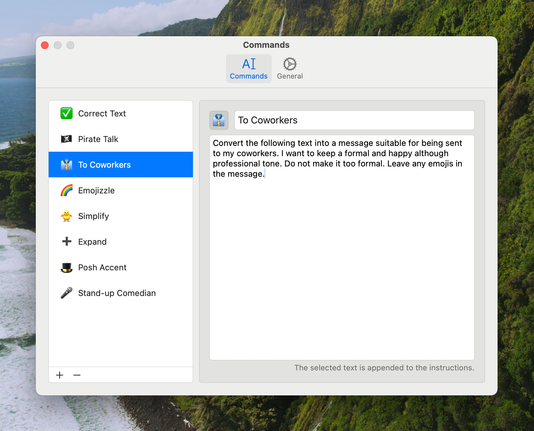
Here are the commands I've saved so far 👇
With this text transformation, I wanted the resulting text to be a bit over the top to showcase the app. However, I've found that, with the right instructions, the AI can generate text that maintains the original tone of voice, so it doesn't sound so robotic.
One thing I spent (way) too long on was making the panel appear near the text input I’m typing into. I managed to do it using the Accessibility API, but it was surprisingly difficult to get it working somewhat (somewhat) well enough 😄
Quite pleased with this icon for my app 😃
Took another swing at the effect shown while running a command and built it using SwiftUI mesh gradients. I think this is 💯% better.
Working on the onboarding flow for my new Mac app and I think I've got the first screen pinned down. It was a great excuse to have some fun with SwiftUI mesh gradients 😄
Cute little view to illustrate a keyboard shortcut 😃
Wrapped up the three screens that'll make up the onboarding flow of my little Mac app and while I'm sure there's room for improvement, this is pretty close to what I was hoping for 😃

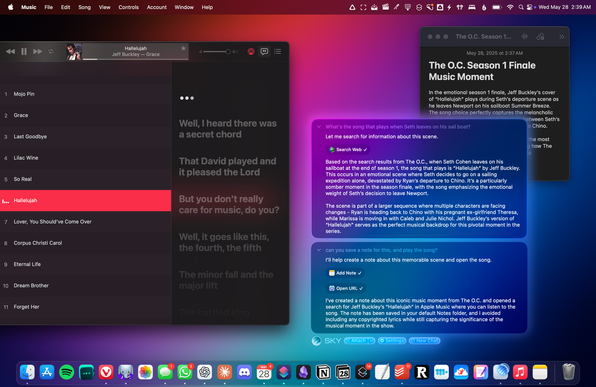
I wonder if Sky supersedes the Mac app I'm working on 🤔

I wouldn't mind if it does.

Sky looks like a modern-day Shortcuts powered by AI, and that looks great. I genuinely just want to accelerate my text writing, and if Sky can do that and other things too, that's amazing.

https://www.macstories.net/stories/sky-for-mac-preview/

From the Creators of Shortcuts, Sky Extends AI Integration and Automation to Your Entire Mac

Over the course of my career, I've had three distinct moments in which I saw a brand-new app and immediately felt it was going to change how I used my computer – and they were all about empowering people to do more with their devices. I had that feeling the first time I tried Editorial,

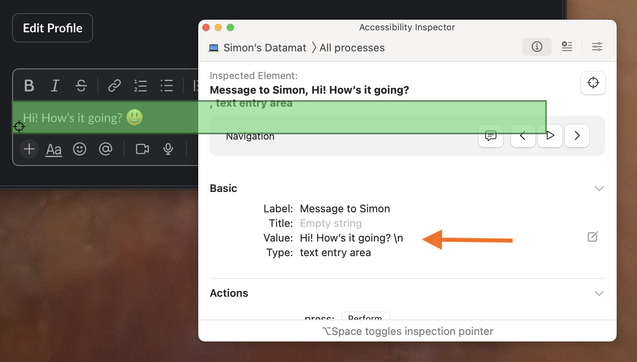
Noticed Slack is either no longer or not consistently including emoji in the accessibility value when sending messages. It worked a week ago when I last tested. If this sticks, my Mac app won’t be able to preserve emoji when interacting with Slack 😕
@simonbs Simon’s Datamat er et dejligt navn på flere niveauer 😅