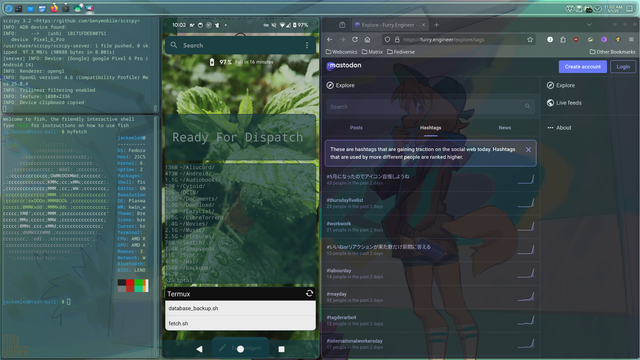
I just spent three hours ricing my top panel in Plasma only to realize it's past bed time & I'm still on the first section of Panel Colorizer. I finished the rest pretty quickly though. I generated a nice color palette from my wallpaper but I can't figure out how to apply it to my terminal properly. I need to change my fish prompt to be able to accept it so the text isn't the default colors, which is hard to see against the background color that does apply properly, but I don't know how to edit it & I only barely managed to make it look like bash. Hyfetch also thinks my shell is bash despite it being set to fish with chsh & in my Konsole profile, & echo $0 prints nothing. I have no idea what's going on with that, but chsh & changing it in Konsole worked fine on KDE Neon, I guess Fedora just has it stuck as bash forever. I still need to figure out what desktop effects I want & figure out how to apply my color palette to the rest of the system too.

Has anyone else had this issue with the shell still being recognized as bash no matter what you do on Fedora?
I don't know what I did, but it's recognized as fish correctly now.
Here's what it looks like right now. It still needs work.
Now I can't log in when turning it on 
SDDM says yes & then lets me in, then it goes back to SDDM. I can't keep doing this shit.
I can log in fine on a different TTY with just a terminal though.
What the fuck even causes this? I didn't even do any updates. Plasma just doesn't start & it sends me back to SDDM to log in again.
I have a class that I'm supposed to be doing RIGHT NOW. This computer is doing this on purpose!!! The only thing I can think of is maybe something in my dotfiles is making it crash since I customized alot.
I'm going to cry

Systemd can't start plasmashell. "This application failed to start because no Qt platform plug-in could be initialized. Reinstalling the application may fix this problem." & "qt.qpa.plugin: Could not load the Qt platform plugin 'xcb' in '' even though it was found."

Maybe I can export this log to a text file & copy it to my phone. Somehow this laptop is still connecting to Wi-Fi so I can use magic-wormhole. If that doesn't work I have ADB installed & I can use that to copy the file to my phone.

This is because I posted about xargs last night. The for-loop-ers are fucking sabotaging me!!!!!!!!!
"qt.qpa.plugin: From 6.5.0, xcb-cursor0 or libxcb-cursor0 is needed to load the Qt xcb platform plugin."
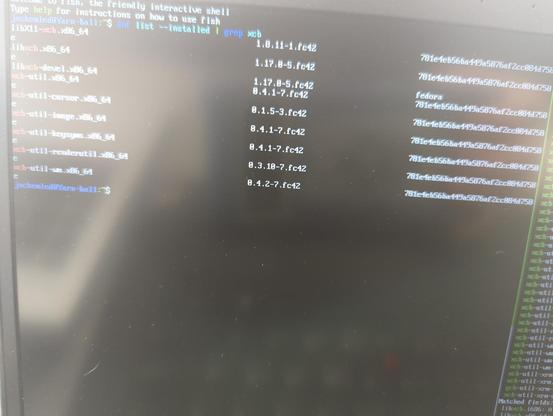
That's possibly the solution, but I have no idea why it's suddenly needed or why it disappeared if I had it before. dnf can't find those when I search for them.
This shit is for X11!!!! I thought I had been using Wayland. Maybe plasmashell depends on XWayland working? I don't get any results for those two specific things, but what if I just install libxcb? Does it come with those two things?
I already have it installed!! I have all of the xcb stuff already installed!
@jackemled a quick and dirty idea would be to install a different desktop and tell sddm to run that for now, something like twm is small, but it's X11 and weird because it's old, otherwise xfce is a good choice as a backup
@theking I don't even have X11 installed on this laptop apparently💔
Maybe I could install Sway?
@theking Or is Qt a big Wayland thing & not just a Plasma thing? If anything depends on Qt I won't be able to use it until I fix Qt. I don't even know how to manually start a desktop like that or tell SDDM to use a different one. On my desktops at home SDDM has a dropdown menu in the corner to switch between Plasma-X11 & Plasma-Wayland, but I don't know how to add entries to that menu.
@jackemled qt is a app framework type thing iirc

Installing twm should automatically pull X11 and add it to sddm

@jackemled @theking Qt is a GUI toolkit for application development in C++ that predates the first versions of the K Desktop Environment

KDE Plasma and KDE Gear are the most prominent use of Qt on Linux, but they by no means own Qt (infact, plenty of Windows-only software such as AMD’s Radeon configuration tool thingy are built with Qt)

As for Sway: it doesn’t depend on Qt, you can install and use it even with broken Qt

@Reiddragon @theking Thank you! I'll probably use Sway as a backup then.
@Reiddragon @theking Or maybe Niri if it doesn't depend on Qt😳
@jackemled @theking afaik only Kwin depends on Qt. Most other Wayland WMs are built on wlroots instead, which is its own thing and doesn’t depend on any toolkit
@Reiddragon @theking I'm starting to think I was actually using X11 the whole time 
My issue seems to be related to X11, unless XWayland is that vital of a component. I also don't have the option to switch display servers on the login screen like I do on my desktop, which I do know has both X11 & Wayland installed.

@jackemled @theking most compositors that I’m aware of can be used without XWayland (labwc straight up kills the XWayland server if you don’t have any X11 clients running for long enough, and Sway allows disabling it in the configuration file, with both of them only starting the XWayland server after an X11 client tries to connect (unless configured otherwise))

What’s the issue, exactly? reading the thread I’m seeing something about getting kicked back to SDDM after logging in?

PS: turns out I’m actually running w/o XWayland right now

@Reiddragon @theking When starting the computer, it boots as usual & correctly shows the SDDM login screen. When putting in the correct password, it seems to log in & shows the black screen with a cursor that it usually does before Plasma loads, then it goes back to the SDDM login screen. When putting in the incorrect password, it never leaves SDDM & gives a "login failed" password. Since the results look different I know I'm successfully logging in. When switching to a TTY it also allows me to log in with no issue & access my shell.
@Reiddragon @theking Also it turns out I'm definitely using Wayland, because all of the Wayland stuff is installed. I have some X11 stuff installed too but it seems to just be for XWayland.
@jackemled @theking you can also check with echo $XDG_SESSION_TYPE
@Reiddragon @theking It says tty.
@jackemled @theking oh, you have to type that while inside a desktop

@jackemled @theking sounds like SDDM itself is broken

tbh Idk how to help there as I’ve been rolling without a display manager for years (I just log into the TTY with sway autostarted on TTY1 from my .zlogin)

also, I know I’m not being helpful with this, but I just blame Fedora (nothing that isn’t gnome works properly on fedora)

@jackemled

even though it was found.

Do this in a terminal:

export QT_DEBUG_PLUGINS=1

Then log into Plasma again and look for something like "cannot open shared object file: No such file or directory)" as an error because I'm willing to bet the issue on that most of the time when someone reports to have a QT "plugin" being unable to load despite being "here" is a missing package in their system.

@Foxarc The journalctl stuff it told me to look at suggests I'm missing a package, but I'm unable to find a package by the names it gives. I posted specific quotes later in the thread. Are you saying look for that message in journalctl?
@Foxarc Filtering journalctl --user -xeu plasma-plasmashell.service through grep for ".*such*file*or*directory*" doesn't find anything, & I don't think I can scroll through the output myself because my motherboard beeper goes off whenever I press a wrong button & it's loud in class 

@jackemled

it's loud in class  

Alright, let's pause here and wait later when you're done with class.

You already have a laptop they gave you to study.

Focus on the other laptop because else you're going to stress too much for nothing, it's not worth it believe me.

@Foxarc I already have all of my stuff done for the hour, so I have time to focus on the laptop. If I just run it through cat in tmux I can switch to copy mode to scroll instead of using less, then I don't get the beeps. Or I can just use the --no-pager option.
@Foxarc I did this, but the output is identical to before. I ran it through md5sum to check & the hash of a log file made from it now is the same as one made before.
https://furry.engineer/@Foxarc/114438535035069774
Foxarc (@[email protected])

@jackemled > even though it was found. Do this in a terminal: ```export QT_DEBUG_PLUGINS=1``` Then log into Plasma again and look for something like **"cannot open shared object file: No such file or directory)"** as an error because I'm willing to bet the issue on that most of the time when someone reports to have a QT "plugin" being unable to load despite being "here" is a missing package in their system.

Furry.Engineer - Duct tape, hotfixes, and poor soldering!
@jackemled Maybe post the full log if you can here? There might be something else going on that you are not aware of it yet.
@Foxarc It's way too long to post here, but I might be able to share it with a file host.
@jackemled Try https://filebin.net/, I used to recommend https://file.io a long time ago in college but now it's bought by AI company and it became unusable at all while filled with ads.
Filebin

Convenient file sharing. Registration is not required. Large files are supported.

@jackemled Try creating a new user and see if it doesn't crash anymore?

If so, then you have at last a working desktop for class to work with until you figure out what is crashing your desktop.

@Foxarc Qt stuff suddenly can't load anymore. I don't know why. I'm happy that I was wrong about it being my desktop rice, but I'm mad that it's something I don't know how to fix! Creating a new user won't help.
https://furry.engineer/@jackemled/114438448501283117
Luna Lactea (@[email protected])

Systemd can't start plasmashell. "This application failed to start because no Qt platform plug-in could be initialized. Reinstalling the application may fix this problem." & "qt.qpa.plugin: Could not load the Qt platform plugin 'xcb' in '' even though it was found." Maybe I can export this log to a text file & copy it to my phone. Somehow this laptop is still connecting to Wi-Fi so I can use magic-wormhole. If that doesn't work I have ADB installed & I can use that to copy the file to my phone.

Furry.Engineer - Duct tape, hotfixes, and poor soldering!
@Foxarc They're letting me borrow a shitty Windows 11 laptop with CoPilot & stuff all over it. Most of what we're doing today is in a book so hopefully I won't have to use it much.