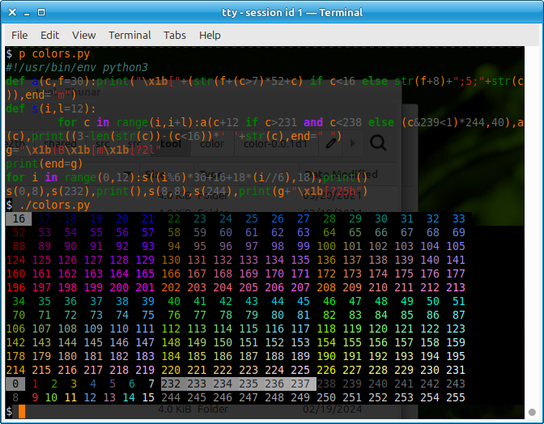
i'm trying to articulate my approach to colours in the terminal and I guess it's:

1. make every program use the 16 ANSI colours, except for neovim, theme that with 24-bit colour because theming vim with ANSI colours is a pain
2. pick a terminal emulator theme I like for the ANSI colours
3. use “minimum contrast" in the terminal emulator to avoid having unreadable text because something chose a bad combo of ANSI colours for my theme

@b0rk this reminds me of is the phrase "angry fruit salad" used to describe how things look when your color choices are wrong.
@b0rk
Sounds like the aproach I'd like, but how "conceptual" can the 16 ansi colours be made? Is it possible to have things configured so I can switch between a light and a dark theme on the desctop -- including terminal windows -- and have things inside the terminal just work?
@rkaj some terminal emulators definitely let you set a different light mode and dark mode theme, i’m not sure how to make vim adjust though

@b0rk @rkaj This program allegedly does that: https://github.com/f-person/auto-dark-mode.nvim/blob/master/lua/auto-dark-mode/init.lua

Seems they have neovim send a DBus request to figure out what the color is. Probably regular vim could do something similar. Vim's 'bg' settings' auto-detection doesn't get it right on my computer when I reset it as opposed to when I'm starting Vim which does make it get it right, so I am unsure whether Vim does this by default at all.

E: auto-dark-mode works on more than Linux
vim defaults to dark on startup, no matter what

auto-dark-mode.nvim/lua/auto-dark-mode/init.lua at master · f-person/auto-dark-mode.nvim

A Neovim plugin for macOS, Linux & Windows that automatically changes the editor appearance based on system settings. - f-person/auto-dark-mode.nvim

GitHub
@b0rk TUI Applications need to either pick all colours, or none. Your three points emphasis why this is important. Another approach would be to set TERM to something that does not support colours.
@b0rk This is pretty much exactly my model.
@b0rk
I feel like the minimum contrast thing is more useful when you have some applications that mix your ANSI color theme with their own 24-bit colors (black != white is a more reasonable assumption than black != #ffffff in my experience)
@kartoffelsaft totally! I definitely run into problems where applications are just mixing ANSI colours though, like fish's default theme has this “bright yellow on bright black" combo which looks pretty bad (IMO) in my colorscheme but I'm sure is fine for others

@b0rk That sounds similar to the journey I've been going through lately. I tried make vim (and neovim) play nicely with a 16 ANSI color scheme and wrote down what I learned. Maybe there are some interesting things in there for you?

https://hamvocke.com/blog/ansi-vim-color-scheme

A 16-Color Vim Color Scheme - Ham Vocke

I built a vim / neovim color scheme that follows your terminal's colors scheme.

@ham that's really cool! it's a good reminder that part of the reason using 24-bit colour in vim makes my life easier is that I use graphical vim a lot which can't use my terminal colours
@b0rk 8-bits is more my speed.
@b0rk
I recently had an idea for a feature that terminals could implement that I think would help a lot. The basic 16 colors are always used in the context of an escape sequence for setting the foreground or background (or underline) color, so a terminal could actually have separate fg & bg palettes. Setting the colors on one palette to fairly light and the other to fairly dark would basically solve contrast issues. A terminal with this feature would allow configuring e.g. bg-red and fg-red.