In 1968, Douglas Engelbart revolutionized computing by showing the mouse, hypertext, and collaborative computing in "The Mother of All Demos". Most of his ideas are now part of everyday computing, but one device—the keyset—failed to catch on. Let's look at Engelbart's demo and the keyset. 1/N
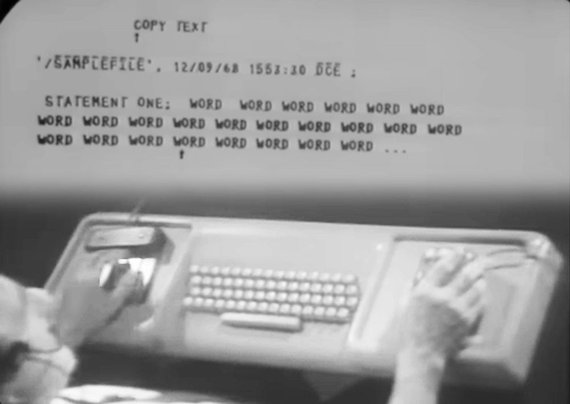
Engelbart's demo was like a PowerPoint presentation over Zoom, projected onto a large screen. He collaborated with co-workers 30 miles away, talking with them, editing shared files, browsing the code online, and clicking links with the mouse (which he invented). Impressive for 1968!
Engelbart's demo was later called "The Mother of All Demos". But first, an Intel demo at Comdex got that name. In 1990, Iraq invaded Kuwait and Saddam Hussein promised "The Mother of All Battles" in the Gulf War. "The mother of all..." became a meme, applied to many things including Intel's demo.
In 1994, Wired writer Steven Levy wrote a book "Insanely Great: The Life and Times of Macintosh, the Computer that Changed Everything". He discussed how Engelbart influenced the Mac, calling the 1968 demo "the mother of all demos". The name stuck, ensuring the fame of Engelbart's demo.

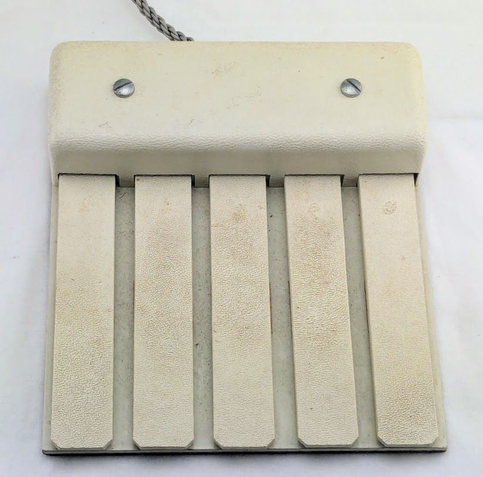
Engelbart's daughter, Christina Engelbart, loaned me a keyset, so I built a USB interface for it and plugged it into my laptop. I had a hard time using the keyset and I'm not surprised it didn't catch on. Supposedly it takes "only" a week to learn, too long for me.

https://www.youtube.com/watch?v=DpshKBKt_os

Using a vintage Engelbart keyset with my Mac

YouTube
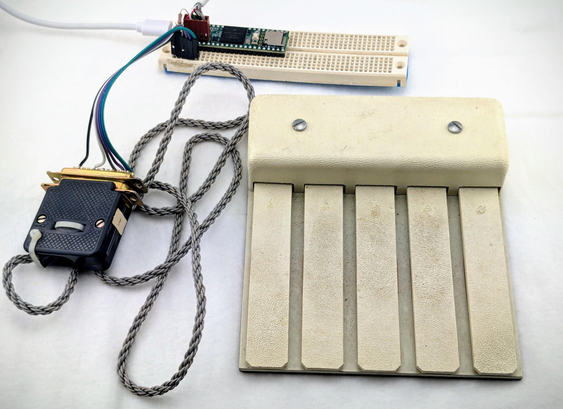
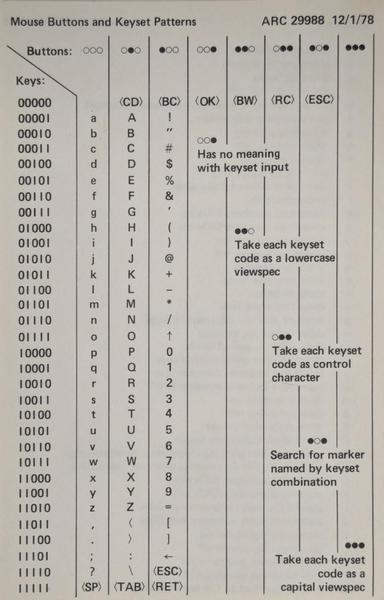
Here's the vintage keyset with my USB interface. I used an Arduino-like microcontroller (the Teensy) to make the keyset act like a standard USB keyboard. To get upper case and special characters, you click mouse buttons at the same time. Too much coordination for me!
This reference card explains what keyset presses and mouse buttons generate each character. Memorize this chart and then you too can use the keyset. A much steeper learning curve than the mouse.

@kenshirriff i’ve looked at the keyset many times at the CHM

i’ve been turning the five buttons on the guitar hero guitar into a real instrument, so i think a lot about how i imagined the keyset would work

i honestly didn’t envision a 1:1 mapping with binary, that’s like qwerty being abcdef

i thought it would have been arranged by frequency of letters to ease of use, for example, vowels being the single key mappings, like:

10000 - a
01000 - e
00100 - i
00010 - o
00001 - u

anyways, thanks for sharing, i appreciate the deep dive

@kenshirriff I took some time to process the https://en.wikipedia.org/wiki/Letter_frequency and map it from more ergonomic to less ergonomic. i'll be publishing an app i'm calling "typing simulator" in the near future that makes "1 week" seem like nothing, once turned into rhythm based video game 🙃

const characterMapping = {
'00000': [' ', '.'],
'10101': ['?', '!'],
'11101': ['@', '#'],
'10111': [':', ';'],
'11111': ['<', '>'],
'10110': [',', '"'],

'10000': ['a', 'A'],
'01000': ['e', 'E'],
'00100': ['i', 'I'],
'00010': ['o', 'O'],
'00001': ['u', 'U'],

'11000': ['t', 'T'],
'01100': ['n', 'N'],
'00110': ['s', 'S'],
'00011': ['h', 'H'],
'10010': ['r', 'R'],
'01010': ['d', 'D'],
'00101': ['l', 'L'],
'10100': ['c', 'C'],
'01001': ['m', 'M'],
'11100': ['w', 'W'],
'01110': ['f', 'F'],
'00111': ['g', 'G'],
'10011': ['y', 'Y'],
'11010': ['p', 'P'],
'01101': ['b', 'B'],

'01011': ['v', 'V'],
'11001': ['k', 'K'],
'11110': ['j', 'J'],
'01111': ['x', 'X'],
'10001': ['q', 'Q'],
'11011': ['z', 'Z']
}

Letter frequency - Wikipedia

@kenshirriff (if curious about "why those symbols", i'm an ardent student of hyper text and have a shorthand format for generating screenplays-- so the typing sim 'lore' will be you're a student in a film class writing scripts.)

@kenshirriff i put the "typing simulator" up on the homepage since it ties together so much of my work into one demo. when entering keys, it triggers the synth-- i need to map all the chords to progressions now, but all the basic ones are mapped.

you don't need a guitar hero guitar to play it, but it does work better on a gamepad. would be really interesting to connect to a keyset.

up/down will "strum" and enter the chord as a key-- nothing held is going to be a period and a space, respectively (up/down)-- j,k,l,h,u are the five buttons, so you can use that to simulate the five chords and w/s are up/down; carry over, but left/right will move up and down midi notes, players start on middle c.

https://sillyz.computer/

Silly'z Computer