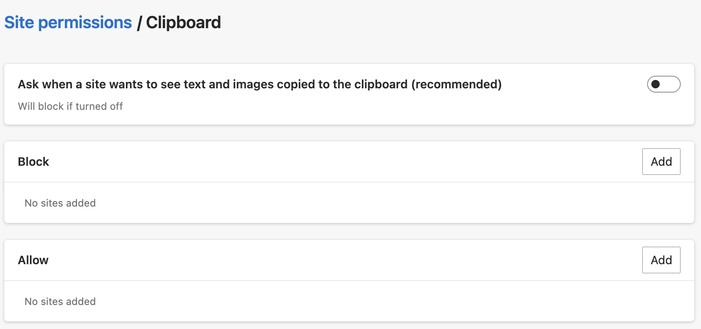
A web browser should *NEVER* be able to look inside your clipboard without an explicit user action (such as ctrl-v). Honestly, this should not be a controversial statement. Microsoft Edge is one of the browsers that ships this dangerous capability. Here is the dialog you need to hunt for to turn this API off.

@torgo So

on = the site requests, the browser asks if the site can have the content of the clipboard
off = the site requests, the browser denies the request

Isn’t the on behavior the same as with camera/microphone?

@yatil yes but it's much more obvious when a site is accessing your camera/microphone because you can see the camera light and OSs show an indication of when your microphone is being used. A site that has clipboard permission could be watching your clipboard at any time the document has focus. It should be noted that the spec includes normative privacy considerations https://www.w3.org/TR/clipboard-apis/#privacy-async. I think some of these MAY statements should be MUSUs. I would probably still turn this feature off.
Clipboard API and events

@torgo Fair. Maybe for stuff like this a time limit should be added, like “ask again after 1h, 2h, 4h, a day, never”.

@torgo @yatil
I don't quite get the problem here, so I must be missing something.
If a site wants to access the clipboard, the browser will ask me, yes? Isn't that ok, since it is asking me?

Or is the problem that a site can ask to begin with?

@CuillereNessie @yatil the problem is that this permission can be gamed (eg. https://www.malwarebytes.com/blog/news/2025/03/fake-captcha-websites-hijack-your-clipboard-to-install-information-stealers) and the normative requirements on user agents https://www.w3.org/TR/clipboard-apis/#privacy-async are not strong enough to mitigate these attacks.
Fake CAPTCHA websites hijack your clipboard to install information stealers

An increasing number of websites use a clipboard hijacker and instruct victims on how to infect their own machine.

Malwarebytes
@torgo @yatil
So if understand correctly edge does not provide the necessary protection from these kind of attack with the setting turned on. Is that right?
@torgo The article you linked is only describing a copy command, which is not something new and it is not related to the permission to see the content of the clipboard which landed last year.
@CuillereNessie @yatil
@Exagone313 I linked it as an example of how bad actors "game" permission requests, rather than as a specific example of an exploit of this particular issue.
@yatil They are just shifting the responsibility. Ctrl+V should be giving the page only that particular current content of the clipboard. Not a blanket permission to read from clipboard anything at any future moment. Like if I want to send a payment, I also don't give them password to my bank account so they can pull the money, because that would be insane, right?
@chebra This has nothing to do with ctrl+V. This is the page asking for the clipboard as a result of a button press.
@yatil *the page* should not be asking to *pull* data from my clipboard. Ever. But also this permission doesn't just give it one piece of data, it says "hey this page is a friend, they can come and go to your clipboard any time they want", no page on the internet should be trusted that much. I just don't think this should be all or nothing. But Microsoft instead of implementing a middle ground will just say "well the user marked it as trusted so it's their problem..."
@chebra Sorry that you feel you need to argue this out with me, but I have no power to change this. I’m also not a fan, see other threads of this discussion.
@torgo In fairness, it's something required if you want to make a text editor that allow pasting by clicking a paste button, which led to the infamous "you need to press ctrl+v to paste" prompt in Google Docs that many users get mad at without knowing the caveats of this. That being said, I'm sure people (like Apple or Mozilla... surely not Google) could have suggested an API that allowed that and didn't have this caveat.
@qgustavor @torgo The other browsers now handle this by showing a little [paste] menu behind your mouse pointer when the site tries to programmatically paste. It's clunky, inaccessible, and should let users allow-list new keyboard shortcuts, but at least it enables the functionality.
@jyasskin @torgo I saw this when using Photopea on Firefox, but it seems like a workaround to make it more privacy-friendly. I would prefer if this behavior would be standardized and better planned so it fells less clunky. Also, I guess Photopea is mainly developed for Chrome, since the behaviors differs from browser to browser, sometimes it causes the website to glitch (it keeps showing the paste prompt over and over again even after I allowed).

@torgo I consider #MicrosoftEdge and #Windows as #malware for shit like this and the option to basically load malicious SSL certs with a single HTTPS request...

https://github.com/kkarhan/windows-ca-backdoor-fix

GitHub - kkarhan/windows-ca-backdoor-fix: Fixes a critical backdoor in Windows' CryptoAPI, which allows to unconsenting Update of CA Certificates in the background. See https://www.heise.de/ct/ausgabe/2013-17-Zweifelhafte-Updates-gefaehrden-SSL-Verschluesselung-2317589.html

Fixes a critical backdoor in Windows' CryptoAPI, which allows to unconsenting Update of CA Certificates in the background. See https://www.heise.de/ct/ausgabe/2013-17-Zweifelhafte-Updates-gefae...

GitHub
@torgo I seem to remember Edge is based upon Chromium. Are other leading browsers safer?
@toadofsky I actually think Edge is pretty good in terms of "safety." But it needs to be configured - e.g. turning off AI features, enabling "Strict" tracking protection, blocking third party cookies... But at least it gives you easy access to these settings. Safari is also good and has stronger privacy behaviour for the async clipboard API (which is the API underlying this behaviour) but doesn't specifically allow you to turn the feature off. I'm not sure what Firefox's mitigations are.
@torgo Personal machine was off. Work was on and got turned off quickly.
@torgo There's a discussion *in 45 minutes* in the Editing WG about a new feature that would accomplish the use cases that previously needed this permission-guarded any-time access to the clipboard contents. They really need any-time access to the _types_ on the clipboard, like iOS allows for apps without a warning, and we'll see how Firefox and Safari feel about adding that to the Web.
@torgo Firefox and Safari seemed fine with this approach. ("smaug: this looks like a reasonable proposal so far" in https://lists.w3.org/Archives/Public/public-editing-tf/2025Mar/0000.html) They'll do another review once there's proposed spec text.
[Minutes] Editing WG - 2025-03-13 from Wenson Hsieh on 2025-03-13 ([email protected] from March 2025)

@torgo Wait a sec. Why can a browser or any app *request* the clipboard content? This seems to me like a massive security flaw of the OS. The browser should not be in control of this at all.

@skaphle @torgo

An app that can't request clipboard content is an app with no clipboard support by definition.

Nearly all desktop apps do it.

On web pages it is not nearly as important, because the browser provides input fields and their context menus, so web pages don't need it as much. But web apps with desktop-like interfaces need it to be that way.

Yes, that means that any text, photo or whatever you ever copied in a desktop app has been available to the rest of running desktop apps, since circa 1990.

@torgo Another good reason to not use and uninstall edge!
Kevin Karhan :verified: (@[email protected])

@[email protected] I consider #MicrosoftEdge and #Windows as #malware for shit like this and the option to basically load malicious SSL certs with a single HTTPS request... https://github.com/kkarhan/windows-ca-backdoor-fix

Infosec.Space
@torgo Or you can just use a better browser that doesn't have this enabled by default @qutebrowser
@torgo @amcvittie wtf is the user story for this, even??? NO! o.O
@nothe @torgo “As a user I want all my info scooped up for AI purposes because .. wait. NO I FING DONT”
@amcvittie @torgo right? but like... what do they even THINK that the story might be?? I'm genuinely confused as to what feature this could support.
@nothe it's this kind of editor-within-browser user needs that it's generally there to support: https://github.com/MicrosoftEdge/MSEdgeExplainers/blob/main/ClipboardAPI/clipboard-change-event-explainer.md … which are totally valid use cases – as long as there are sufficient safeguards against misuse. BTW this is the kind of work we do in @tag when something like this comes up for review, see https://github.com/w3ctag/design-reviews/issues/1017 for a review of a similar API.
MSEdgeExplainers/ClipboardAPI/clipboard-change-event-explainer.md at main · MicrosoftEdge/MSEdgeExplainers

Home for explainer documents originated by the Microsoft Edge team - MicrosoftEdge/MSEdgeExplainers

GitHub
@torgo @tag ah, thanks for answering my exasperation with facts! :)

@torgo never is a strong word

browsers are user agents and should do what the user tells them to. they should ship with defaults that suit most people

but, as it stands, every time browsers forcibly gate something behind their extremely conservative idea of a user action it makes my life, and my users' lives, worse

I'd be interested if you know of any real world malicious use of the current API given that it has been around for so long

@bovine3dom it's a good point. We have a design principle https://www.w3.org/TR/design-principles/#safe-to-browse in the @tag Web Platform Design Principles doc that says "it should be safe to visit a web page." That's to protect users' privacy & security against bad actors. So when we in TAG feed back on a proposed API, we are looking for its developers to have done some thinking about "abuse cases" and possible misuse.
Web Platform Design Principles

@torgo I think my issue with this kind of thinking is that it doesn't consider the tradeoffs between security (in a fairly narrow sense) versus innovation. If I can't think of a fantastic use case for some new API that will change the world, that says more about me than it does about the API.

It's interesting that the example of ordering food is used - the web won the battle against applications on desktop but it is a rounding error on mobile. In part because of its conservatism, IMO

@tag 1/2

@torgo given that apps have worse security than the web, why does TAG think the answer to winning market share from apps is "even more security"?

Do you have evidence that people would switch to the web from apps if that was the case? My impression and experience is that people will trade security for convenience at almost every opportunity.

@tag 2/2

@bovine3dom because web needs to be better than apps at privacy and security – that's literally its differentiator. Without that, web becomes just another apps platform and we might as well all go home.

@torgo I totally disagree :)

for me the main differentiators are:

- ease of first use (no "install")
- ease of discovery
- ease of task switching
- the ability to copy-paste (although Google Pixels have built in OCR which negates this somewhat)
- ability to modify websites as i want them with ad blockers, user scripts, user styles (e.g. dark mode, reader mode). Frameworks like NextJS are making this worse
- better accessibility
- worse persistence
- worse notifications
- worse battery life

@bovine3dom yes, I think those are also differentiators of the web – AND that because of a lot of those features (the ease of discovery, ease of first use, accessibility) there must also be better privacy & security. Also I disagree with "worse notifications" because I think the guard rails that the web puts on notifications make them better. However, I sincerely encourage you to leave feedback on our reviews https://github.com/w3ctag/design-reviews/issues or on our design principles https://github.com/w3ctag/design-principles.
Issues · w3ctag/design-reviews

W3C specs and API reviews . Contribute to w3ctag/design-reviews development by creating an account on GitHub.

GitHub

@torgo sure, some of them are only possible because of the security by design of the web versus the security by policy of app stores. The speed/ease of iteration/deployment of the web is why I personally develop websites rather than apps. But I think you're overestimating the direct value of security to end users.

Notifications can be spammy, yeah, but they're also the reason why I'm talking to you now from an app when 15 years ago I would have used a website.

1/2

@torgo as a worked example, I currently keep up to date with the news via the web. The main reason I keep doing that is because of the ease of multitasking. Three years ago I would have mentioned the ease of copy paste and the ease of ad-blocking, but both of those advantages have now gone thanks to improved OCR and system level support for DNS over HTTPS.

I'll consider commenting, thanks, but I find the politics exhausting. Apple/Google have big pockets and big incentives for apps to win

2/2

@torgo

Never use microsoft edge. Better, switch to linux.