 andrew_bidlaw
Was this reply helpful?
Was this reply helpful?
…microsoft.com/…/99bb073a-948e-4ccf-b14f-46e192fa…
Please updoot another commenter who sent it first instead. And, also, take a long look at the issue as it’s hilarious too. Just like theirs, my laptop would try to update every reboot and cancel it seeing less than 40% battery because the battery is, well, long dead and the laptop is plugged into a wall socket all the time. Once a safeguard against idiots it grew idiotic itself.
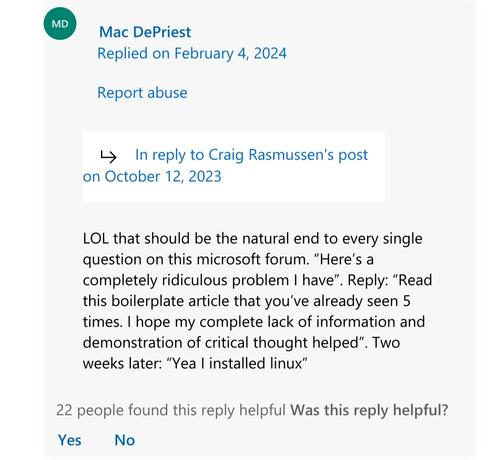
Found the post on the forums. The screenshot omits the comment from Craig who said “I ended up wiping windows and installing Ubuntu instead”.
I found this reply helpful too, and so should you.
Hehe.
Thank you, I’ve updated the post body.
I saw a great one yesterday.
Question: Help, I can’t boot, here’s the error code. I’m stuck in a loop and can’t get into windows.
Answer: Open Microsoft explorer, navigate to…
You know, last time I’ve reached the MS forum, there was a support person there answering “No, there’s no way to disable the Teams pop-up that appears over your shared screen when you mute the microphone. Lots of people ask the same question, and the developers have no plans of changing this”.
The answer was complete, helpful, and completely out of the normal for the forum. The only thing more out of character was if Teams actually had an option to make it work as any sane person would expect, but then, this is not on the forum people.
“What about DropBox? It’s this recent startup…”
Man, sometimes I forget how long xkcd’s been going
The Microsoft support forums are on a whole level of their own, when it comes to being useless.
sfc /scannow and the troubleshooting button in the settings do fuck all, and compared to the usual systemd journal, the event log rarely gives you any useful information whatsoever
sfc /scannow and the troubleshooting button in the settings do fuck all
Hey, that’s not true! sfc takes forever to run, so it’s a good way to waste time and get even more frustrated.
sfc /scannow does fix certain problems, just not nearly as many as the Microsoft support forum would like.
I do agree with you on the log, although that’s often because whichever component is misbehaving just doesn’t believe in error logs. I’m looking at you, Nvidia.
DISM /Online /Cleanup-Image /RestoreHealth and pray it fixes everything before you reinstall.
sfc /scannow fixed it surprisingly. Glad that’s on my “these programs only work on Windows” system.
Does it solve whatever Windows problem they were having?
No? Then it is not helpful.
It is like asking for help to fix a hole in your pants, and someone replies with “just buy a skirt”.
I’ve replied to someone having a problem with Linux to just install Windows. It is the exact same useless vibe.
Ok, but what if the problem was that you didn’t like the door color and you weren’t allowed to paint it because of your landlord.
Are you still going to move your entire life to a different location?
Most problems on the Microsoft forums aren’t going to explode their computers.
It has to be something that is nearly fully outside your control but is affecting you, there are probably milder problems as examples but I think this apt.
In the metaphor, half of the answers are asking you to do a useless workaround, blame you and/or are irrelevant to solving the problem. Hence the leak, where the answers are telling you to try running your taps for 10 minutes, put a bucket under the leak, telling you that there is no leak and that’s actually a water fountain, etc.
Are they still experiencing whatever problem they were having?
No? Then it is a solution. Not the solution, and not a possible solution for everyone, but it is a solution.
You “fixed” the issue by giving them 10 more problems.
Are you also giving them alternatives to all the software they use daily that isn’t compatible with Linux?
What if they have hardware that is incompatible? Like Nvidea and certain printers?
You are essentially telling them to rip out everything and start anew. Which just isn’t feasible or even necessary when they just have one problem.
So no, you did not fix anything.
Did you completely miss the part where I said “Not the solution, and not a possible solution for everyone, but it is a solution”? I don’t know what you think the usual troubleshooting process is, but it doesn’t start with “uninstall Windows”. Obviously the user was sufficiently intelligent to consider the advantages and disadvantages of switching, and based on that information, chose a course of action that they thought was correct, and it ended up being the solution to their issue.
I don’t know how else I can spell it out for you. Computer users are not dumbasses. They have agency over their own actions.
Ask about a specific error code on a windows forum: unhelpful boilerplate nonsense.
Ask about the vaguest symptoms of a recurring problem on a linux forum: a neckbeard wizard will show up and have you type 30 cryptic commands in your terminal and everything will be fixed.
The funniest part about this is that almost every linux installation is totally different from every other one, whereas every windows installation is almost identical.
But really, I certainly wouldn’t enter any random commands I was given from the internet on a linux machine unless I knew damn well what they did.
The microsoft forums are the one place that could be fully automatized. You post a problem about anything, really anything. Can’t change wallpaper? Can’t login? Screen flashing? Files disappearing? Constant loud pitched noise? It’s all the same. The answer, whatever your issue, is sfc /scannow, “Restoration point” and “Reinstall”.
And arguably, that last step will most likely make the issue go away, at the price of not having a fucking clue as to what was wrong, losing a lot of time afterward, and having a fair chance of re-doing the same things, causing the issue to show up again. Great stuff.
I said this before on another thread, but the only time sfc /scannow actually did something was when I had a machine with a drive that had a few bad blocks.
And of course it didn’t actually fix anything because a system DLL was corrupt so DISM couldn’t even repair the system, meaning the only solution was to reinstall windows.
or that it’s unfixable
Just out of interest. What are some of these unfixable issues?
Also - not just when something breaks? Like, you want to change the color of something, an icon, the default response to a key bind or behavior…. There are so many times when I’m forced to use commercial software and there’s some inane extra thing that is messing up my work flow, and there’s no way to change it.
My Arch machine has only the things I want on it. I don’t have to dig into registry keys to disable Cortana or whatever. When I’m running on poverty hardware, dwm/xmonad are bare enough DEs that I can internet browsers smooth and fast.
Linux will let you do whatever you want as long as you are smart/determined to spend hours googling.
Honestly a month ago me and my friend were looking at microsoft forums. One of which was somebody asking why tiktok was preinstalled in windows 11. Forum admin replied that it was bloat from a manufacturer of the hardware. It was a homebuilt computer and fresh copy of windows 11 home.
28 more people said windows 11 did this by default, the admin eventually realized it was not accidental or a fluke. Which he previously eluded to.
Shows the current state of windows 11
User: Hi! I’m having a problem. The sfc command doesn’t work. Is there a solution to this?
Microsoft Support: * panics *
As a user, it seems to me that Microsoft figured out a way to get the customers they care about to hire and pay for their own “Microsoft support” people.
If I have a problem at work with one of those M365 websites I use, or with the Windows partition I don’t, and I can’t fix it myself, the person helping me is going to be a fellow employee and not [email protected].

 Jumuta
 bamboo
 TheImpressiveX
 Sabata
 BigDaddySlim
 pewgar_seemsimandroid
 jia_tan
 mlg
mlg photonic_sorcerer
 itslilith
 Steamymoomilk
 caseyweederman
 Possibly linux
 Die Mart Die