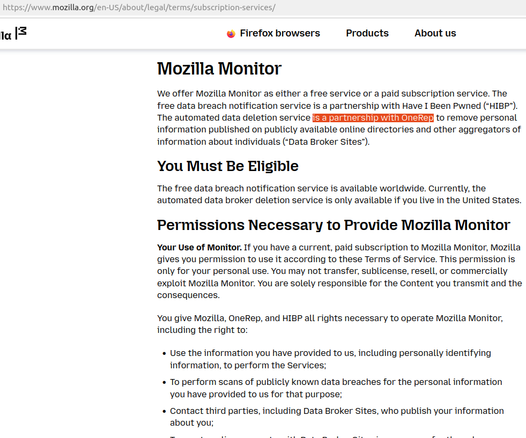
WTF Mozilla? I'm hoping they just forgot to delete this verbiage from their terms of service, which suggests they are still working with the personal data removal service OneRep.

https://www.mozilla.org/en-US/about/legal/terms/subscription-services/

Last year, Mozilla said it was dropping its partnership with OneRep after a story I published showed its founder had created dozens of people-search services and was even running one of the larger ones whilst selling services to help people remove their information from these sites.

https://krebsonsecurity.com/2024/03/mozilla-drops-onerep-after-ceo-admits-to-running-people-search-networks/

Mozilla Subscription Services

Mozilla
@briankrebs I stopped supporting and using Mozilla a few years ago when the CEO said that we need to police the Internet and promote net neutrality. Seems like they are still up to their games, shame.
@Xuebit @briankrebs What do you use currently?
@LoseFriendsandAlienatePeople @briankrebs Vivaldi all the way. Chromium based so it (unfortunately) adheres to most web standards, can take chrome plugins, privacy focused, good customization. I am currently exploring gecko based browsers (not firefox) for development and testing, looking for something lightweight, so if you have anything in mind let me know. Cool username by the way 😄

@Xuebit @LoseFriendsandAlienatePeople @briankrebs Idk about lightweight, but there are also forks of Firefox with telemetry and bloat removed. I've been daily driving WaterFox for a while. Performance wise, LibreWolf is probably the snappiest out of the box.

Then again, no Firefox fork can really compete with Chromium in terms of rendering/JS performance. I do quite like Vivaldi, but it has a tendency of randomly crashing without any warning on every system I've ever installed it. Not enough to make it unusable, but I also want to fight the Chromium monoculture as long as I can, so the crashes nudged me back in that direction.

@gordoooo_z @LoseFriendsandAlienatePeople @briankrebs Yes, as much of a fan I am of Vivaldi it does crash on me randomly sometimes. In regards to your point about the chromium hegemony I like the fact items on the web work better, but I agree with you, so I may have to spoof my user agent. I'll have a look at those projects, thanks.

@Xuebit @LoseFriendsandAlienatePeople @briankrebs Word of warning: spoofing your user agent won't really help you when it comes to performance. Anything that makes heavy use of WebGL is just not going to be the same. I've managed improvements messing about with Betterfox configs, but there's just no getting around the fact that these days, the front end tech stack of the web is a ship steered largely by Google/Chromium.

Compatibility is fine, but Chromiums rendering engine and JS runtime are just kind of hard to compete with on performance. Other than that, it's completely cromulent; I can only think of one case in recent memory where I encountered a cross-browser testing issue between Chrome/Firefox (Safari on the other hand... might as well be IE8 😤), and that one case was actually a translucent blurred glass effect that works in FF, and not in Chrome (and 2+ years later, still doesn't? Purely visual though, so not worth reimplementing), surprisingly enough.

But yeah, I do keep a user-agent spoofer around. There is the rare (and very dumb/lazy) site/service that doesn't even attempt cross-browser testing, and blocks "unsupported" browsers*. Snapchat Web comes to mind, but it works completely fine (other than just being hot garbage in general lol) once I spoof my user agent. It doesn't happen that often though, but ymmv.

*I thought those days were well behind us, but it's entirely possible some of the devs on a platform like Snapchat are young enough to have never even heard the word "ActiveX," let alone have the visceral reaction I just had typing it out.

Ok, I'm rambling. Time to get off Mastodon and maybe do some actual work instead 😬

@gordoooo_z @LoseFriendsandAlienatePeople @briankrebs Good to know, I didn't know the differences, I was referring to a user agent in Vivaldi to report as a gecko browser. Help the representation. You have yourself a follow, I like learning stuff like this. If you have more stuff like this send it over!

@Xuebit @LoseFriendsandAlienatePeople @briankrebs And I thought I was talking too much 😅 My feed is far from topical, but hopefully you're into nerdy computery things, and/or really like hearing someone complain about WordPress (probably why I've spent that last 12+ hours not getting anything done lol).

Anyway, can't say I fully understand your motives for spoofing a Gecko user agent in Vivaldi?

@gordoooo_z @LoseFriendsandAlienatePeople @briankrebs Help out the Internet stats. I've been running into 'fun' wordpress issues recently, just recently got my site up and running and learning wordpress, confused is an understatement, still is all good fun though.

@Xuebit @LoseFriendsandAlienatePeople @briankrebs Ah okay that makes more sense I guess lol

Yeah WordPress was not my favourite thing. All I ever wanted to do was write code, both back and frontend, but in the time between first starting out, and actually feeling competent, the internet had changed quite a bit.

Having spent a few years or so working with it though, it has its charms. My biggest complaints are with the ecosystem around it that makes learning it a lot harder than it has to be, because everyone would rather sell you a plugin, and maintaining it harder, because not all of those plugins are very good, or very maintained.

I'm happy to share tips n tricks though.

@gordoooo_z That is one thing I am learning too, all the plugins are either paid and not very great, or free and non functional. Although the silver lining is that if you have SSH access to the server then you can remediate a lot of that manually. I do, but not root, my plan is to learn wordpress and website management then move to self hosted. It's fun though, do you have any resources that helped you learn?

@Xuebit If you have experience with PHP, that could save you some trouble. A lot of plugins are just replacing what could be a single function in your theme's functions.php file with the same single function, plus a bunch of extraneous features you didn't ask for, plus some weird terrible interface shoehorned into your wp-admin. If so, WordPress works in a way that is unique, and initially kinda confusing, but actually very simple in concept, so the starting point would be learning what action hooks and filter hooks are. You don't *need* to know PHP though; that is after all WordPress' whole selling point, but it really helps if you want to keep plugins to a minimum (you really do lol).

Other than that, the best advice I can give you is to save yourself a ton of heartache, and never Google the words "best wordpress themes." WordPress themes are dead imho, and mostly a waste of time (the fancier and flashier they look, the worse they are. I promise).

Instead (here's something I never thought I'd do, recommend a wysiwyg page builder lmao) install Elementor and their Hello theme, which is a plain barebones theme designed to work well with Elementor. There are other page builders, and they are all going to drive you absolutely up the wall. WP Bakery, Avada... all designed to test the limits of the human psyche.

Anyway, then install Pro Elements, which enables most of the features of Elementor Pro for free*, most important being the Theme Builder, which will let you build a header and footer and have them apply automatically to every page.

...that is assuming you haven't already set up the frontend to your liking, and managed to avoid the premium theme hellscape.

@Xuebit *Elementor is open source, so it just flips the publicly available bits that block you out of the Pro features, except for anything that relies on their infrastructure (Elementor Kits) and pro support, obviously. Morally dubious? Maybe, but it's legal. Plus, Elementor has the distinction of having a product that so genuinely improves the experience of running a WordPress site, that they're basically the only major plugin developer with an affiliate program whose affiliate links don't offer any kind of discount. They'll be fine; trust me 😅

@Xuebit For what its worth, I have all my WordPress clients hosted on Cloudways, so I don't have root access either. You can get by without it, although Cloudways gives me root access in the form of being able to tell chat support what command I need them to run on my behalf lol. It's an annoying extra step, but in an uncharacteristic moment of practicality, I decided a few years ago to stop running my own Linux servers, and moved my clients from Linodes and DigitalOcean Droplets... to Linodes and DigitalOcean Droplets managed by Cloudways. It's been a delight (I'm not trying to sell you anything, but I'll happily send you a referral code if you want one 😋)

...aaaaand that's *really* my queue to get to work. Happy to answer more questions at a later time, but right now I need to be an adult for a bit. Also omg I feel so bad for OP's notifications. Let's maybe move this to another thread, huh?

@gordoooo_z I guess I am just running my own server, so the control would be nice, and as someone that love Linux it is a plus. Thank you for the heads ups though, I will definetly take you up on that offer if I need it. Currently on BlueHost, they're ok, but they messed up my SSL cert and usernames.

All good man, thank you for the help, if you need any help with networking or security feel free to ping me, happy to help out for free.

@Xuebit If you like configuring your own Linux box, Apache, etc, then you'll definitely appreciate something like DigitalOcean or Vultr. The performance/dollar is better than any of your Bluehosts, Dreamhosts, etc. and you literally just get a fresh Linux install with SSH access. You pick the distro, SSH in, and make it do internet things lol. These days I keep that sort of thing for my personal projects. It just didn't feel like the right way to be handling client sites. They don't pay me to be a sysadmin and I don't pretend to be one lol
@gordoooo_z Oh yeah, I agree with you, if you are running a business then you don't want to be a sysadmin when you are managing the sites. I am going to see how much time overhead running my site in a VM takes and decide from there. But I certainly agree with you, minimal is way better, I have a quote that I live by "Perfection is not achieved when there is nothing left to add, but when there is nothing left to be taken away."
@gordoooo_z I don't have experience with PHP, but open to learning if it helps me, I have been learning the basics of CSS and a small amount HTML. I have read a bit about functions.php, It seems important, so I'll learn a bit more about it. Action hooks and filter hooks, got it, is that wordpress specific thing?
Oh, I have tonnes of plugins at the moment and it is bothering the hell out of me, just going through the process of install try out, keep around, I haven't got to the remove part yet. I have a free theme currently and it is ok, but could be better.
"all designed to test the limits of the human psyche" lol, I have been tested by this, but not that far thankfully.
Thanks for all the pointers, this is a fun journey so far, especially learning a new skill, coming from a networking background it is a nice change of pace, I am just doing it on the side for my blog.

@Xuebit I might be overcomplicating things tbh (the one where WordPress is the mandatory wrong tool for every job 😅). Things are a lot simpler when you're actually using WordPress as a blog engine (the one thing it is truly good at), so you can definitely get by w/o Elementor. HTML and CSS are the kind of thing you can pick up the basics of pretty quickly, and then learn as you go, so that'll definitely help you to get your okay theme closer to where you want it. Just make sure you make any customizations in a child theme, or all that work can be gone when it updates (think of a child theme kinda like a .conf file in ~/.config, and your main theme's files as config files in /etc/. All it takes is one `sudo apt update` to have all your customizations replaced lol).

The hardest part for me was getting used to the way themes are broken up into a million tiny little snippets in separate files, so there's a learning curve to just finding which file actually contains the bit of HTML you want to edit.

@Xuebit As far as plugins are concerned, they're basically unavoidable. Millions of people have been running recipe blogs and affiliate marketing slop factories for decades, probably with a minimum of 45 plugins, and probably making a decent living off of our suffering.
From a technical standpoint though, the quality of the code varies wildly, so less is always better. Over time, you'll find ways to get certain things done without a plugin, or at least find alternative plugins that do the same thing, without spamming your admin panel or slowing everything to a crawl.

Don't get me wrong, I prefer to code my way out of a corner, but it's not mandatory, and I would not describe WordPress as my favourite thing to write code for.

@gordoooo_z Hmm, ok, I will keep the child theme in mind and check that out on mine.
Oh yeah, I know what you mean, I have been learning that too, the tiny little bits of a theme scattered everywhere and trying to find how to change what I want. I think as time goes on I will try wordpress.org in a vm, I have a year of my subscription, so my plan is to go self hosted after the year is up, use a VM to test changes and things.