 Maiq
MaiqHow do I never see this again?
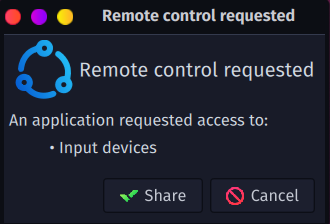
you’ve got something connected that’s triggering the prompt, and kde on wayland issue is making it pop up over and over again. i think this one is as old as plasma 6 itself is.
try disconnecting all unnecessary input devices when playing. just usb mouse and keyboard. wireless is fine if it uses its own non-bt dongle.
or if it won’t open up a different can o’worms, switch to x11 for gaming sessions.
Before Wayland was a thing, Steam used a X11 extension to send Mouse and Keyboard presses, which means that for a while, if you used Wayland you couldn’t emulate KB+M with your controller at all.
A while so long, that someone created a work around. Extest is a “adapter” that simulates the old X11 extension Steam was using and sends the keypresses using it’s own virtual input device, therefore completely bypassing the pop-ups.
While that wasn’t it’s intended function, and it is technically unnecessary now that Steam has added support for the proper ‘Wayland way of doing things’, I can confirm it still works just fine. I use Steam input all the time with no annoying pop-ups.
It can be a bit annoying to install however. If you’re using Arch, grab it from the AUR. Bazzite ships with it OOTB, I believe.
 adarza