I vibe with this. Does anyone have any examples of where and how any vendor’s dialogs around passkeys might lead people astray? The more feedback, the better.
https://infosec.exchange/@adamshostack/113743707996398149
Adam Shostack :donor: :rebelverified: (@[email protected])

@[email protected] I think the biggest thing is to (a) ensure dialogs are clear about what software is presenting them (b) where it plans to store the key and (c) letting people configure what their preference is for passkey management. Err, “things are”

Infosec Exchange

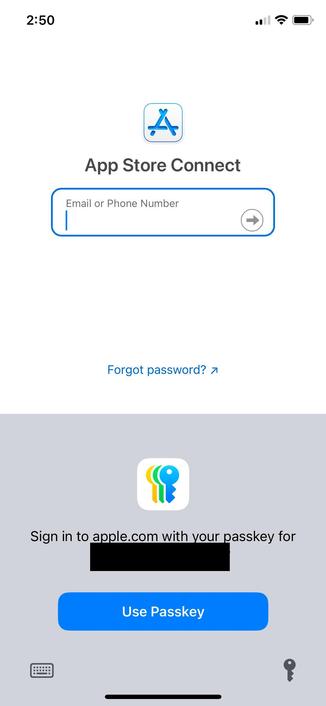
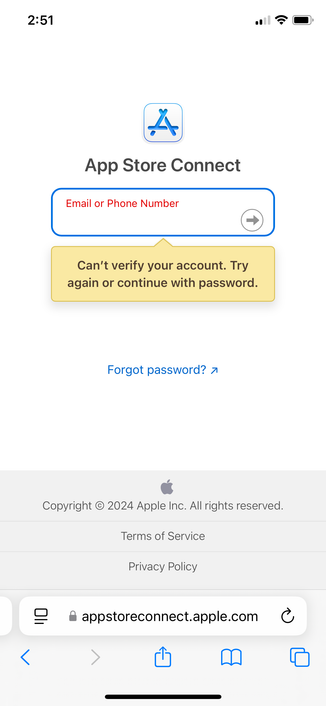
@rmondello Safari always offers to use a Passkey in the username/password field of Apple’s own websites (e.g. App Store Connect), but the website complains about the username or pw being blank. Every step of the way I have to dismiss the passkey offer and even manually click the submit button instead of pressing Enter, or it will revert to the passkey.

It shouldn’t be insisting on submitting the form with a passkey & leaving the username/pw fields blank if the website requires them to be filled

@rmondello apart from that issue, I (even as a developer myself, can’t imagine what it’s like for the less technical) usually get thrown off by mismatched terminology between the website and browser UI. I’ve seen sites ask for a “security key”, “device biometrics”, “platform authenticator”, and even terms like Face ID or Touch ID. Then Safari’s UI comes up and uses the word “passkey” seemingly out of the blue.