
I'm sure a lot of web folk are going to say "wow you're late to the party" but the fact that the <h1> tag's text size shrinks for every <article> or <section> it's inside of, but the other tags (like <h2>) do not.

That is a *BONKERS* decision and it's apparently intentional
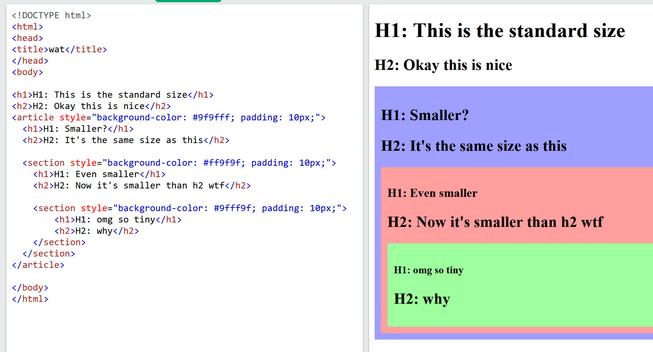
I didn't even word that statement right, that's how confused I am right now
@JoshJers i think the plan was to have them all shrink like that, but nobody did it so they just half- gave up?

@irina from the look of the standard it looks like it only calls out H1, I wonder if that was supposed to be an example and people took it literally?

https://html.spec.whatwg.org/multipage/rendering.html#sections-and-headings

it would definitely make *more* sense if they were to all shrink (or none shrink) though 😀

HTML Standard

@JoshJers i can't find the name of it so i can't find it, but i think the plan was they'd all do that, so they implemented it for h1, but nobody cared so they never did any more? something about using the article and section tags instead of the different H levels

someone will know the name of the thing I'm thinking of, but googling keywords has led me to nothing

@irina @JoshJers

Yeah pretty much

standards folks thought there needed to be an outline algorithm to determine the tree structure of headings that are out of order, and browser developers, accessibility experts, and screen reader devs all said they don't plan on implementing it https://www.w3.org/Bugs/Public/show_bug.cgi?id=25003

But the spec also included sample CSS that does this resizing and that part did make it into browsers somehow https://github.com/whatwg/html/issues/7867

25003 – modify required heading mappings to reflect reality

@irina @JoshJers funnily enough Firefox is slowly shipping a fix that removes that CSS because they wanna be careful about web compat https://bugzilla.mozilla.org/show_bug.cgi?id=1883896
1883896 - Remove UA styles for :is(article, aside, nav, section) h1 (Nightly only)

RESOLVED (zcorpan) in Core - Layout. Last updated 2024-12-16.

@Osmose @irina legitimately baffling they didn't just add like an <h> tag which is the variable one and leave <h1> alone while they were adding 8 million other tags

@JoshJers @Osmose @irina

"But we have to be backward compatible to people who only every used h1 and don't know about h."

Yeah, let's support very, very old websites that start with <!DOCTYPE html> ...

@wakame @JoshJers @Osmose @irina

I still run a couple of websites like that, so I'd rather they did stay supported.

@celesteh @JoshJers @Osmose @irina

Yes, by now we likely have websites that use both HTML 5 and can be described as "very, very old".

But back when HTML 5 was new, a decision to streamline headings a bit (just a little bit) would have been great.

@wakame @celesteh @Osmose @irina imo they should have added a new <h> tag and had that be the "use this and it'll change size as you dip into sections" or something, and left h1-6 alone
Embroidery Trouble Shooting Page

Embroidery Trouble Shooting Answers to all your questions about Embroidery problems

@Yuvalne @JoshJers @Osmose @irina

Reminds me of this "boost" behavior in Android Chrome:
"If you don't explicitly set the font size, we assume that it's a 'legacy' website and simply set a huge fontsize for you."

@Yuvalne @wakame @Osmose @irina god this site makes me fucking lose it every time I see it again
@JoshJers @Osmose @irina See, that's a great idea! You should've been invited to the decision table.

@JoshJers @Osmose @irina they did, in XHTML 2 https://www.w3.org/TR/xhtml2/mod-structural.html#sec_8.5.

But everyone hated that spec so they backtracked

XHTML™ 2.0 - XHTML Structural Module

@irina hahahaha amazing

great job W3, 10/10 no notes

@JoshJers wait wat
@eniko I spent so long debugging this because I thought surely there was something fucky in my css but it's just ... like this? And it's *in the spec like this*????

@JoshJers @eniko

I think the idea is that there's really only supposed to be one <h1> per page, and if you have them in an <article> you probably want it to be a sub-article of some sort with a smaller main title. I admit it does get a little out of hand once you nest multiple articles but that is a pretty odd use-case in which you're probably using custom CSS anyway overriding the defaults.

@amin @JoshJers this would make sense if it applied to h2 h3 etc too but it doesn't >_>
@amin @eniko I ... sorta? ... get the intent behind the shrinking H1 but it's *wild* that they apparently just said "yeah fuck it, H1 can shrink and the rest can stay as-is"

@JoshJers @eniko

What's strange to me is that it passes past the first article element. With the first, the h1 is just shrunk to match the normal h2 size. After that it gets ridiculous.

@JoshJers @amin @eniko I guess they didn't expect people to mix "put an H1 inside a bunch of sections" and "use decreasing H2-H6 tags" in the same page?

No idea why they wouldn't expect that, web developers will do any cursed thing you can imagine once your content's run through five people and two frameworks in four languages, but oh well

@andrewt @amin @eniko I only noticed because I'm generating pages from markdown and the markdown goes in an article tag so h1 and h2 were the same size
@JoshJers @amin @eniko yeah, html has always been like this, it's the one language where we say "syntax error? what the hell, let's have a go anyway" and it's because half the web is built from terrible chimeras of a dozen systems all trying to write the same document, you can't expect anything reasonable

@andrewt @JoshJers @eniko

"darkgrey" is lighter than "grey", which is the moment I realized the true situation.

@amin @JoshJers @eniko hahaha of course it is

@andrewt @JoshJers @eniko

iirc they reasonably set "grey" at a 50% between light and dark, but then copied all the other color names from X11 which had "darkgray" as lighter than that 50% mark.

@amin @andrewt @eniko truly it is misnamed because it's really "light black" (not a shitpost)
@amin @JoshJers @eniko I mean this is probably 50% without gamma correction...
@andrewt @JoshJers @amin @eniko I did layout for offset printing of complex documents in HTML and CSS, and I came to the conclusion that no typographer was ever consulted in the making of either spec.

@oscherler @andrewt @JoshJers @eniko

Yeah, haha. I tried following typographic principles to make readable.css, my classless CSS framework, but it's definitely not easy. :)

https://readable-css.freedomtowrite.org/

readable.css

readable.css is a CSS framework that provides all the beautiful design with none of the distracting fluff.

@amin @oscherler @andrewt @eniko Just wanna say that I appreciate everyone who goes through the trouble to actually make a light and dark theme (at leastusing the theme preference selector)

I just did so on my blog ( http://drilian.com ) and it's not hard as long as you're careful about how you refer to colors

(also as an added bonus it usually ends up making you use a more limited palette and not just throw color tags around willy nilly, which is better for maintainability and consistency anyhow)

JoshJers' Ramblings

@JoshJers @oscherler @andrewt @eniko

Yep! And CSS custom properties (variables) are so useful when doing so.

@amin @JoshJers @eniko

I indeed always use only one h1, similarly to why a book only has one title. That and SEO; as far as I know h1 tags are ranked as most important, therefore one cannot have multiple most important headings.

@stardust @amin @eniko yeah I'm generating pages from markdown and its main header thing is h1 so I got what I got

@JoshJers @stardust @eniko

Yeah, makes sense. When generating from Markdown I usually use frontmatter to specify the title, so it gets its own special treatment.

@amin @stardust @eniko I did the same but I wasn't prepared for single-hash to also be h1s 😀
@amin @JoshJers @eniko Basically yeah. This was going to be the Document Outline Algorithm which never got implemented and was scrapped. Mozilla actually made plans to stop doing this in its default stylesheet recently but I don’t know if there has been progress; seems like it’d break compatibility.
HTML Accessibility API Mappings 1.0

HTML Accessibility API Mappings (HTML-AAM) defines how user agents map HTML [HTML] elements and attributes to platform accessibility application programming interfaces (APIs). It leverages and extends the Core Accessibility API Mappings 1.2 and the Accessible Name and Description Computation 1.2 for use with the HTML host language. Documenting these mappings promotes interoperable exposure of roles, states, properties, and events implemented by accessibility APIs and helps to ensure that this information appears in a manner consistent with author intent.

@JoshJers
but heading levels are supposed to be hierarchical

I don't think you're supposed to have more than one h1 per page

and even then, how the hell does this fit into the hierarchical model???

@tthbaltazar apparently because it's so common to like nest code from generators and it was frequent that they all used H1 tags they just said "fuck it, nested H1s get smaller now in these elements" but didn't also specify the same behavior for the others

it's a *baffling* choice

@JoshJers
LOL So we're told in every HTML guide, that one should use h1 only once per page and now you're telling me h1 is the only heading tag handled properly when used multiple times per page. 🤡

@JoshJers

wow, that's absolutely disgusting, and also something i've come across and just given up on figuring out because typography is something i enjoy and the webshit committees absolutely despise for some reason

@JoshJers div div div div div div ID hell makes more sense now.
@JoshJers I love how silly HTML is and I love taking the silly HTML and making it pretty with CSS

@JoshJers

I didn’t know that detail, but I never write anything that uses UA defaults, so I don’t see it as an issue.

The problem is more the persistence of legacy h1-h6 rather than a simple contextual header per section, but I doubt we’ll ever be rid of it.

(Although you can write it in your own markup interpreter if you feel like it.  It’s fun.  Particularly because you don’t have to keep count of h levels.)

@JoshJers TBH I've been doing HTML since before there was HTML and since when are there "article" and "section" tags?
@tekhedd HTML5 added a *ton* of new tags, I believe as aids for things like screen readers and other machine-parsing structure

@JoshJers @tekhedd semantic tags help to identify areas of importance and focus for crawlers and assist accessibility for screen readers and the like.

It also aids the dev experience by wrapping important parts in something other than div div div div div xD

@indiealexh @JoshJers yah.. helping web crawlers with useful context used to be a positive thing, it seems like such a long time ago.