 Nina Kalinina
GDPR banners before GDPR banners were invented
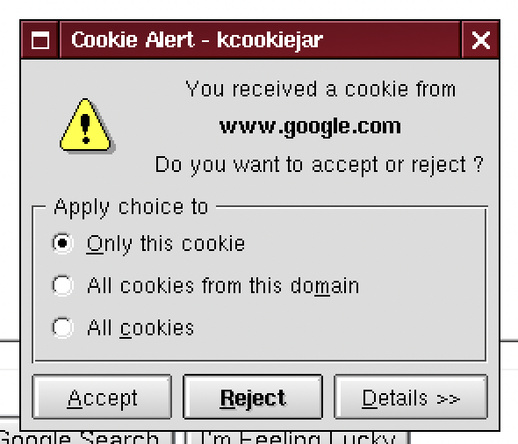
@MennoWolff @nina_kali_nina
I have the solution if you're using a Chromium-based browser:
1: Navigate to `chrome://settings/content/siteData`
2: Set *Default Behavior* to `Delete data sites have saved to your device when you close all windows`
3: In *Customized Behaviors* -> *Allowed to save data on your device*, click on the “Add” button, and add every website you need, under this format:
If you don't know the cookies you need, `[*.]example.com`
If you know, `subdomain.example.com`.
@nina_kali_nina
I believe that:
1: Cookies are being used for absolutely everything
2: Cookies are not separated by necessity (as in login cookies being separate from everything else)
3: Even if those first 2 are accomplished, people are not given the choice to opt-out of cookies that aren't really needed.
Also, it's important to note that I'd have 600 MB of storage used by cookies, if I didn't setup my YouTube filter list
1/2
@nina_kali_nina
Here's my YouTube cookie list (I don't use an account there, but this lets me save storage without losing my recommended).
Assuming you've used my solution for Chromium-based browsers, navigate yet again to `chrome://settings/content/siteData`, go to the **Allowed to save data on your device** part, and add:
`consent.youtube.com`
`youtube.com`
Have fun! 😀
 Menno
Menno thatonecoder