FOLLOW PACK NEWS - Added to Cybersecurity and USPoliticsBooster Packs

Download and import the updated csv files to add the new accounts to your lists:

CYBERSECURITY >>> Cybersecurity-list.csv: https://docs.google.com/spreadsheets/d/e/2PACX-1vT1kwhmiytfhp6vhsE1bKGrigQBHgeNhRaPjIjem4vgl5ejviQhsuh1RR39P49mAtFDPKEqmuouG8nq/pub?output=csv

US POLITICS BOOSTERS >>> USPolBooster-list.csv: https://docs.google.com/spreadsheets/d/e/2PACX-1vQRbos9d6LHWT9_vqZSRuxiDWXMeSzc0mN16L_bz4eEZi-KtBkvv7KCQGVr8nXPoyjccvF26b3XtXhv/pub?output=csv

Check out the Mastodon Migration federated blog for much more Follow Pack info, including FAQ and Directory of all available packs >>> @mastodonmigration.wordpress.com

1/2

Follow Pack Instructions

- Click on a FollowPack .csv file link to download
- Click on Preferences (gear) icon on bottom right
- On mobile or narrow desktop click top right "hamburger" button
- Click Import and Export >>> Import
- Import type dropdown: Select “Lists” (NOT “Following list”)
- Verify that ‘Merge’ is selected (IMPORTANT)
- Click Browse... button >>> Select “[file name] – list.csv”
- Upload >>> Confirm
- Now check your "Lists"

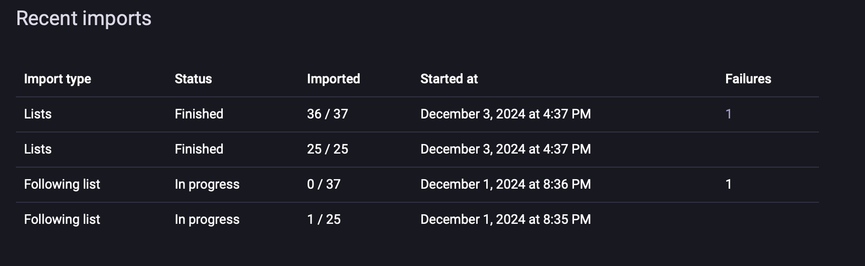
@mastodonmigration I tried importing some lists yesterday. How long does the import normally take? It’s been about 24 hours and still shows as in progress. Refreshing the browser didn’t change it either. Clearly, a CSV file would t take 24 hours to go anywhere, so something went sideways for me

@snick8484

Seems like something went wrong. Did you get a new list? Is it populated?

@mastodonmigration I downloaded the lists from a post yesterday. I guess I will log out of the browser and then back in and see about trying again.

@snick8484

Which list?

@mastodonmigration climate and the smaller cyber/IT one.

@snick8484

Hmmm... should work. The process is pretty thoroughly tested. Perhaps start over. Re-download a smaller pack and try again. Read the instructions carefully. You need to select 'Lists' not 'Following list' as the import type.

@mastodonmigration that’s probably the issue. I did following lists. I don’t recall seeing list but I’ll give it another shot.

@snick8484

Here is what it looks like on Android...

@mastodonmigration Thank you. This time I choose the correct list and it worked much better. There doesn't seem to be a way to get rid of the following list versions...