
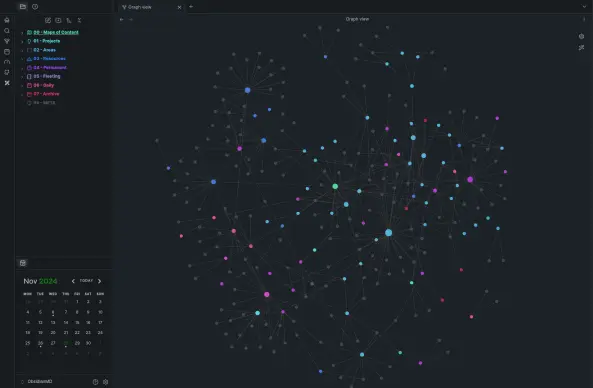
I've been using a PARA + ZETTELKASTEN hybrid method for the past few days and so far this seems to be going great. Everything is organized with more notes to be written or transferred over in time.

#obsidian #obsidianmd #linux #linuxmint #notetaking #zettlekasten #para #markdown
@sam May I ask what those numbers in front of folders are for? I've noticed many people use them, but I'm not sure why. Are they meant to organize the folders in a specific order?
@lesley Yes they are used to order them in a certain way for me it goes;
00 - Maps of content (my Menus for different parts of the vault)
01 - Projects (limited time things I'm working on)
02 - Areas (parts of my life that is on-going)
03 - Resources (Research & other things I didn't create myself)
04 - Permanent (Links that shouldn't really change)
05 - Fleeting (Quick thoughts & notes)
06 - Daily (Well my daily notes)
07 - Archive (Archived notes that are rather not related or not central in my life anymore)
99 - META (Things that make the vault run e.g. Images & Templates)

Hope this help you in the future, would love to see how you layout your vault :3
@sam Thanks. Mine is pretty similar to yours, though I am not doing PARA.
@lesley It wouldn't take much for PARA

- Projects
- Areas
- Resources
- Archives

I just feel this is very slim for some of the things I do with my vault / want to do in the future.
@sam Hi, I'm curious if you link entries from your daily notes to the MOCs, which I imagine are mostly for your projects and areas.
@DaveRyder I don’t really link to daily notes from my MOC as there’s no need to link something that is normally a passing note about the day, sometimes talking about a note in writing and why.

Hope this helps