
speaking of UI, @Gregmaletic noticed an interesting new macOS ui concept

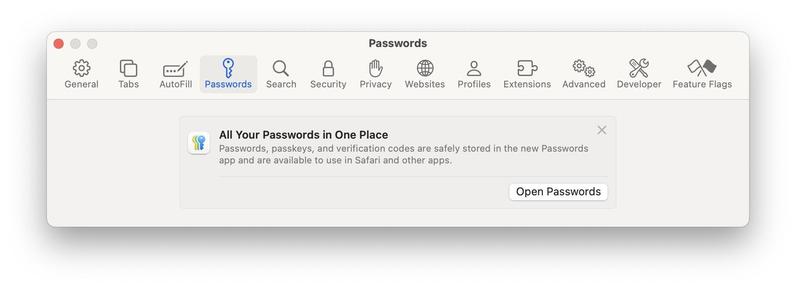
passwords are gone from safari prefs in 15.1, right? so if you open passwords prefs, you get a little message telling you where they are.

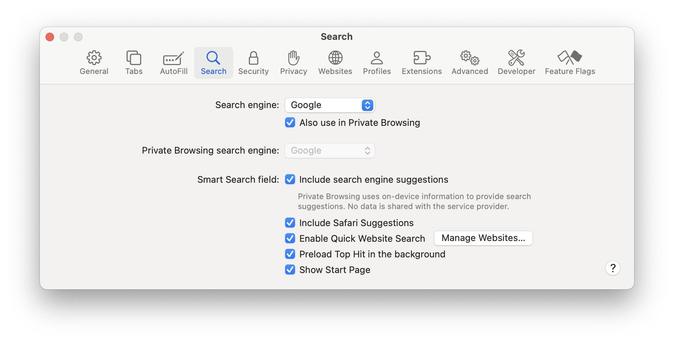
but… if you click the little “x” on the message… the PASSWORD SECTION VAPORIZES from your prefs toolbar!

innovative! makes sense! i wish it would’ve used the “poof” animation! anyway go out there and clean up your prefs toolbar folks
@cabel this but for the "itunes movies" and "itunes tv shows" apps in the TV box please 🙂‍↕️

@cabel I really, really, really wanted people who were used to going into Safari’s prefs to figure out where their passwords went. I am delighted by the solution, even if it’s a little heavy.

Sadly, we didn’t do something as nice for people used to using System Settings > Passwords.

@rmondello @cabel I've had a few calls from clients in a panic, wondering where their passwords were. After explaining they were fine. I love the idea of preserving the older way to explain how to now find the same feature and then have it go away.
@rmondello @cabel Would it help for us users to note this in the Feedback app? I guess it would be a “Settings app” report, not a report on the Passwords app, yes? Or would it get more attention if it was feedback on the Passwords app?