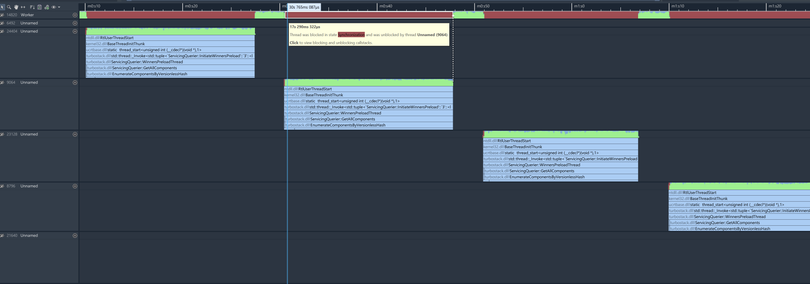
So I got a new machine. Windows 11. Brand new. It's stuck updating. It is taking ages. Why? Well, I don't have any definitive answers but my most basic instinct is to always attach a profiler -- I recommend the excellent @superluminal .

It turns out that there is this thing in the background, TiWorker.exe, and it's taking its dear time while burning through CPU cycles. This is part of the "Windows Module Installer" service, which handles updates.
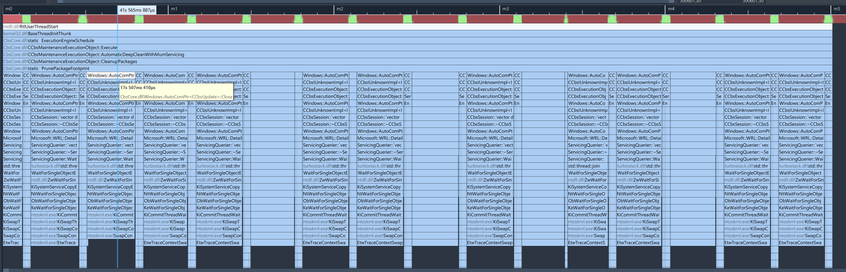
Why does it take so long? Some cleanup! Seemingly, for every single package, we:
1) create some "Execution Object"
2) execute it
3) clean it up
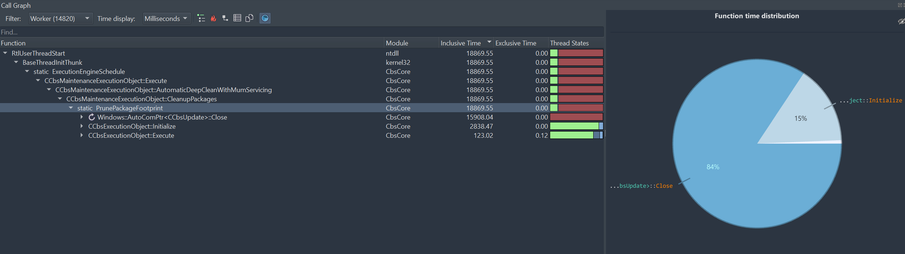
Creating the object takes 2.8s. Deleting the object takes roughly 16s. Running the actual operation takes 125ms. So about 99.5% is just overhead.
Deleting the request takes 16s because every new request spins up a new "Servicing Querier", which then starts preloading "all components" (16s!), and we need to wait for this to finish before we can move on _and then repeat the same thing for the next package_.
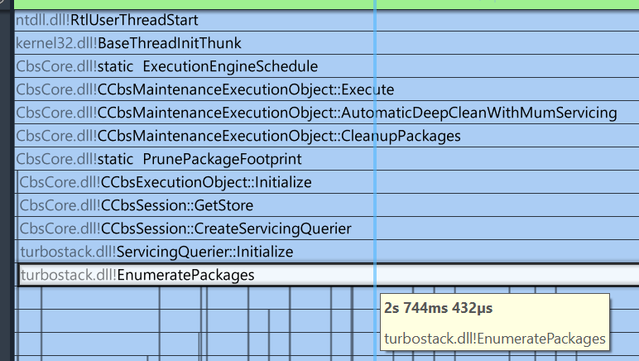
Creating the request takes 2s because it enumerates all packages. Does it have to do that from scratch every time? The request by the way spends the majority of the time just persisting state to disk. (Maybe that's necessary because someone might kill this?)

I have no idea whom to tell that at Microsoft. Is this a known problem? Are there good reasons for this? Am I holding it wrong?

But I have done some back-of-the-napkin math: At roughly 19s per package, and assuming I have 10000 packages installed, and assuming there are no additional such steps, the update will hopefully finish in 53 hours.

I'll add a post when the update has finished.

@sschoener Once again begs the question "what the hell is everybody doing?!"
@molecularmusing I think I answered what everybody's doing pretty conclusively: waiting for windows update to finish 😛
@sschoener @molecularmusing This highlights how superluminal is awesome and how shitty windows is.