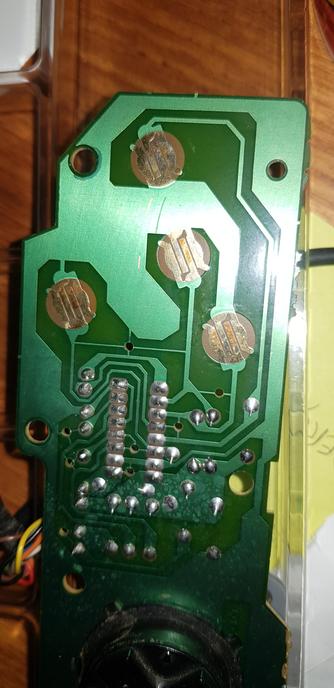
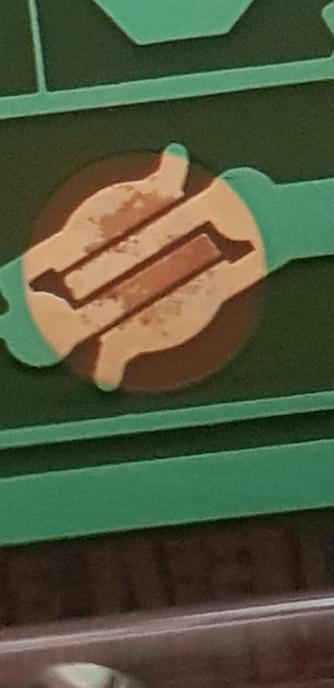
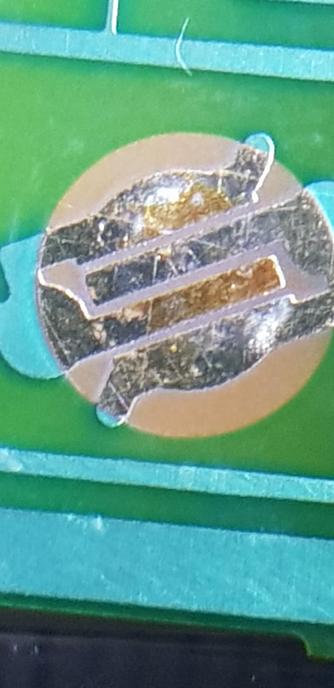
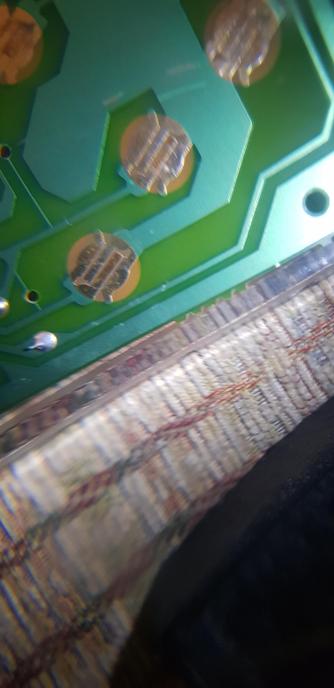
I have an og Genesis / Mega Drive controller, but some of the buttons aren't working. I took a look at the PCB and my guess would be that it's either oxidisation or corrosion on the contacts, but I don't know where to go from here.

I tried cleaning it with a toothbrush and isopropyl alcohol, and when that didn't work I tried wd-40 contact cleaner. Neither seemed to have any effect on the brown bits.

Does anyone have any advice?

@scutterman It might also be the membranes (buttons), or the connection to the chip/port. Sega gamepads use a single wire per button, but those wires are multiplexed, so each wire returns a different button state when one of the wires is high/low. A pinout should tell you which buttons are on the same output wire.

@pawv Thanks. I checked the buttons last night and they all seem in really good condition (both membrane and contact).

I just took a look at the board and I can't see any surface level damage but there may be something going on that I can't see.

@scutterman okay then it sounds like you need a continuity tester. Most multimeters have these built in, but if you don't have one but you do have some scrap wires, an LED, a reisitor, and a battery, you can jerry-rig one together. In essence you're looking to see if a stretch of wire makes a complete circuit (circle). If so, it lights up. If not, it doesn't, and that tells you where the problem is.
@pawv I have a multimetre, I'll hunt down the manual and see if I can use it for continuity testing. Thanks!
@scutterman No problem. Continuity-mode is usually a icon that looks like a speaker. Alternatively, any mode where when you touch the two leads and the screen actually changes can work in a pinch. Multimeters need continuity to make most measurements. As long as there's a noticable difference between the leads touchig or not, that will do the job.

@scutterman in this case we just want to know if we're making a complete circuit. Specific measurements don't matter.

I.e. it's a complete circuit if the meter actually does something.

@pawv That explained it really well. I did a quick test of the gold pads and confirmed no connection when one probe was on some of the brown area on the B button pad.

It'll take me longer to test all of the connections from each pads to each pin, but I think I have the hang of it now.

@scutterman I'm glad to hear ☺️. Electronic repair is an awesome way to learn this stuff.

The buttons should have one side of the button pads connected to the ground pin on the multiplexer chip, and the other side to one of the input pins. Pressing a button creates a complete circuit, by connecting the input pin on the multiplexer chip to ground. If everything works on the input side, then the problem may be on the output side. If you can confim everything works on both sides, then you've unfortunately learned the chip itself may be broke. It's less common, but it does happen.

If you do reach that point, I'd double check that bending the connector wire different ways doesn't break the circuit. Gamepad do get a lot of stress (yanking), it it's possible something in the connector or on the controller side got damaged, and there could be a sweet spot where things do still work.

@pawv If it does turn out the chip is broken, I have an identical gamepad so I might try a transplant to try and get one working. I'm hoping it does turn out to be either oxidisation or wear on the gold pad though.

@scutterman You can check if the brown parts are to blame if you probe the silver side and the brown side. If it works for both they might be "fine", just less than ideal.

If you have a soldering iron, you should be able to cover the old pad (even the brown stuff) with solder. In theory the solder should naturally flow in the shape of the original pad. If it doesn't, just make sure you don't accidentally bridge the two half's of the pad. That's what the membrane buttons do (i.e. it's pushbutton because pushing makes a complete circuit).

@pawv It definitely lose continuity when probing silver / brown areas compared to silver / silver. On some of the pads it's a complete loss, on others it's just less reliable.

The good news is that probing either side of the brown areas still has continuity, so it looks like it might be built up on top - or at least not going all the way through.

Adding a layer of solder is definitely an option if I can't clean it off, but I'll need to practice on something else first.

@scutterman if you can confirm that the not-working buttons all go over the same wire, that tells you something is happening at the chip. It doesn't mean the chip is faulty, but it's possible something is jammed-in or broken at the connector. If you have a multimeter, putting it on buzzer mode (continuity), you should be able to probe the pins on the connector, and the output pins on the multiplexer chip.

My assumption is that this is where the problem lies, somewhere between these two points. If that's the case, you can chop off the connector and replace it with a brand new DB-9 connector. These should be quite cheap to buy from China (AliExpress), as long as you don't mind buying a pack of 5.

@pawv When I was testing it out, the only button I couldn't get to work at all was the B button - though I'm not sure if Aladdin uses that button or not.

The other buttons were anywhere between "mostly reliable" to "sometimes worked"

@scutterman curious. If you want on more things to try, try cleaning the contacts (pins) of the connector with a toothbrush and some isopropyl alcohol. Stab it with the brush, trying to loosen any buildup, just to rule out the connector.
@pawv I cleaned the connector and the port on the console a couple of nights ago. That's when I opened it up and saw the metal pads on the PCB were not looking right.