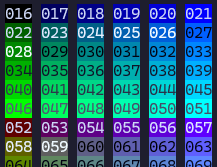
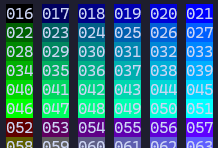
I've been messing around with colours in the terminal today and it's giving me a lot of appreciation for iTerm's "minimum contrast" feature, which can take almost unreadable output and turn it into something which is not too bad

feels like a really great way to fix problems where the colors are clashing for whatever reason (the orange bg is an unfortunate accident)

(first image is ngrok in my terminal without the "minimum contrast" rule, second rule is ngrok with minimum contrast set to 40)

also has anyone used a terminal emulator other than iTerm2 (especially one that runs on Linux!) that has a "minimum contrast" feature for colours? I'd love to know what it is!

("minimum contrast" lets you set a threshold and automatically adjusts your terminal colours so they have at least that much contrast)

edit: answers so far include tabby, kitty, ghostty, and Windows Terminal

(2/?)

@b0rk Tabby also seems to have this "minimum contrast ratio" but I've never tried to see how well it works. I found some issues about it, though:

https://github.com/Eugeny/tabby/issues/9607

Minimum Contrast Ratio broken for light themes · Issue #9607 · Eugeny/tabby

Describe the problem: When setting the minimum contrast ratio under Appearance it will work on dark themes like Tabby Default. But if you use Tabby Default Light it will not work. I am on MacOS wit...

GitHub
@slyecho thanks, just installed it and it works great!
kitty.conf

kitty is highly customizable, everything from keyboard shortcuts, to rendering frames-per-second. See below for an overview of all customization possibilities. You can open the config file within k...

kitty
@bruno thanks will try to make the link in the post clearer, it's text_fg_override_threshold. I haven't tried it, would be curious to know if it doesn't work
@b0rk seems that Ghostty has such option.

@b0rk And ghostty has `minimum-contrast`:

# The minimum contrast ratio between the foreground and background colors.
# The contrast ratio is a value between 1 and 21. A value of 1 allows for no
# contrast (i.e. black on black). This value is the contrast ratio as defined
# by the [WCAG 2.0 specification](https://www.w3.org/TR/WCAG20/).

Web Content Accessibility Guidelines (WCAG) 2.0

@b0rk I hadn't realised until now that Windows Terminal can do this (or something similar).

Under "Appearance," there's a setting "Automatically adjust lightness of indistinguishable text", and when enabled it adjusts the foreground text colour for better contrast (see screenshots). TIL!

@b0rk it looks like Windows Terminal may have a setting: https://learn.microsoft.com/en-us/windows/terminal/customize-settings/profile-appearance

I haven't had a chance to poke it yet, though

Windows Terminal Appearance Profile Settings

Learn how to customize the appearance profile settings within Windows Terminal.

@b0rk Just discovered that Warp has this. For "Enforce minimum contrast" you can choose "always", "only for named colors", and "never". Not quite sure what "only for named colors" means in this context.
@b0rk wow! What a cool feature!!
Terminal Appearance in Visual Studio Code

Visual Studio Code's integrated terminal allows customizing its appearance in various ways.

@b0rk Is your terminal normally orange? That would annoy me more than any dim font 🤣
@uncledave nope, I'm not sure why ngrok is using that colour
@b0rk wow, that is amazing! Do you know if other terminals support that feature?
@b0rk This sounds great. A few tweaks for the user's personal vision and it would be an excellent accessibility aid for folks a bit like me
CD @simontatham
@b0rk whoa! This completely solved a regular pain I have with my favorite emacs color theme - viewing 3-way diffs always end up having unreadable colors and I end up switching themes just for diffing... Now it just looks fine all the time. Thank you!
@b0rk "candy corn color scheme", how very October of you
@b0rk woah! if anyone replies with a terminal application that runs on linux and has it too, id love to know
@b0rk I believe `text_fg_override_threshold` does that in kitty: https://sw.kovidgoyal.net/kitty/conf/#opt-kitty.text_fg_override_threshold
kitty.conf

kitty is highly customizable, everything from keyboard shortcuts, to rendering frames-per-second. See below for an overview of all customization possibilities. You can open the config file within k...

kitty