
There's an area of town that takes about 15 minutes to get to by bike from where I live, but well over half an hour by public transport. I don't go there very often, so whenever I go by bike, I have to stop constantly and look at my phone for directions

It would been ideal if I had some way to hold my phone in place in front of me so I could quickly glance at it for directions, but I realized what I could do instead: I could enable voice navigation in Google Maps and use my earbuds, right? I've done that once or twice when walking in an unfamiliar city, and it worked pretty well!

(Except for that time it seemingly wanted me to walk straight across a heavily trafficked road without first getting to a crosswalk)
Spoiler alert for the rest of the thread, but I can't say the voice navigation works all that well for cycling in Sweden!
First off: My phone is set to English. This meant I got the directions read aloud in an American text-to-speech voice, which was fine and all, but predictably it had no idea how to pronounce Swedish street names. And by no idea, I really mean no idea. The average native English speaker isn't known for being very good at pronouncing foreign names, but this text-to-speech voice makes not only all those classic native English speaker mistakes but also a brand new class of mistakes!
If it sees a part of a street name that looks sufficiently unlike English, it will just plain make something up. It won't just mess up every vowel in the word, it'll replace entire syllables with wildly different ones. Why? I can only assume that this is a machine learning model that was only trained on English words and names. Same principle as when LLMs "hallucinate" about things they don't know
(Side note: After my cycling trip was done, I checked if Google Maps had an option to set the navigation voice language separately from the system language, and it did! And you could set the app language separately too! But if you set the voice language to anything other than the app language, it would not read street names. Even though the same voice could read street names if you changed the app language to match. what?????)
Not a great start, but hey, most of my cycling route is on unnamed cycling paths, not on named roads. And even when I'm on a named road, does it really matter what the road's name is? Google Maps just has to tell me when to turn left and when to turn right, and I'll get to my destination. Right?
Well, it can definitely tell me when to turn left and right, but for some reason it does so up to 10 seconds before the turn! That's fine when there's only one turn ahead, but the reason why I have so much trouble remembering this route is because there's lots of little paths everywhere. I would frequently be told to turn, turn at the turn that was right ahead of me, and then get a "you went the wrong way" signal because I was supposed to turn at the *next* turn
As for why it was designed like this, I can only guess. Was it designed for cars, which drive faster than I cycle? Was it designed for cyclists, but only tested in big American cities where bikes go on the same roads as cars and there's always plenty of distance between intersections? Was the GPS accuracy just not good enough with my phone in my pocket? Probably not that last one, because the directions were early no matter what direction I was traveling in, never late
Notably, when I was supposed to travel alongside a road, it never told me which side of the road I was supposed to be on. When I was coming up to a certain road where knew I had to be on the right sidewalk to make a later turn to the right, it just told me "turn left to [incomprehensible]", not "cross the street and turn left to [incomprehensible]". Another sign that this might not have been tested in cities where you for the most part don't cycle on the actual road
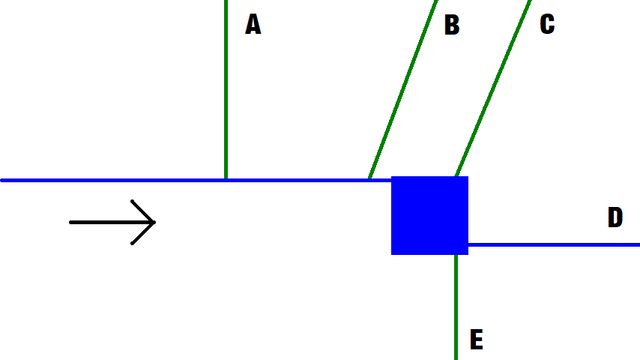
I've saved the worst part for last. Here's a scenario I encountered on my way back home. I'm where the arrow is, traveling in the direction of the arrow, and the navigation voice has told me to turn left. The blue path is a large cycling path, and the green paths are smaller paths. Where should I turn?

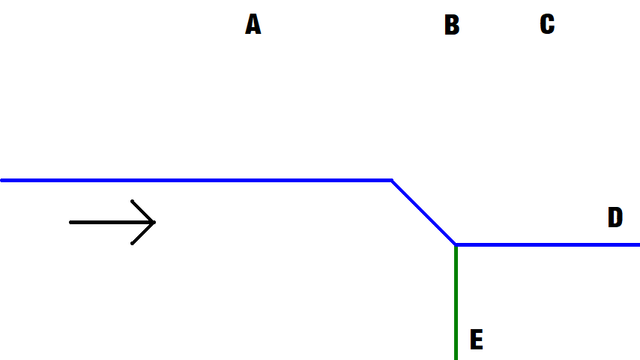
The answer is... D. You see, this is what the situation looks like in Google Maps' reality

It thinks I will automatically turn 45° to the right at the rectangular area, and then considers the choice between D and E to be the only turn that exists in this area. In reality, I couldn't even see D and E, because there were houses in the way

Not modeling every tiny path in between houses is something I can understand on its own. Modeling the rectangular area as a simple line is something I can understand on its own. But when this gets fed into navigation, and the navigation tells to me turn left when I have to turn slightly to the right... No, I don't think I'm going to be using this system again