PSA: iOS 18 launches later today and many of your favourite apps are adding new Dark Mode app icons, yay!

BUT there’s a bug where sometimes icons won’t adjust correctly when they’re first updated.

Restart your phone and you should see the correct icons 😍

(Then go leave a ⭐️⭐️⭐️⭐️⭐️ review, because we’ve all worked our butts off all summer 🥵)
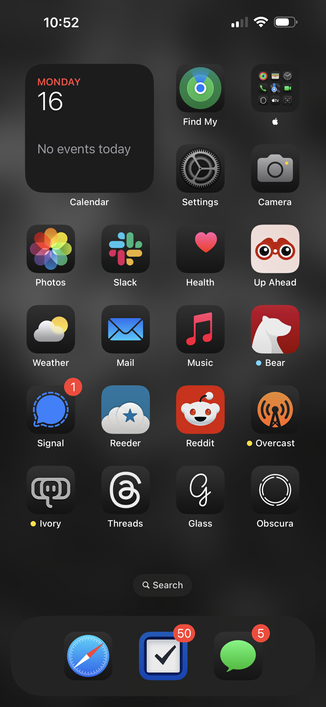
The dark mode icon bug’s not real, it can’t hurt you

The dark mode icon bug:

@BenRiceM 1-10 how bad is photos.app now?

@flogehring I have *very* mixed feelings.

Parts of it are brilliant, I love the customisation options.

But there are some bizarre navigation choices, collections always show newest items at the top which is very jarring, and are presented in a very strange way that sort of mixes sheets, carousels and regular detail view transitions

@BenRiceM @flogehring At least they’ve removed the idiotic carousel on the photo grid itself. 🥲
@BenRiceM I dislike it when iOS uses a dark icon just because there’s a dark context in light mode. It looks so weird.
@jeffwatkins intentionally or if there’s a bug?
@BenRiceM I don’t know, because the last app I worked on didn’t support dark mode (still). I’ve noticed it in passing and was kinda surprised. It may have been an OS issue.
@BenRiceM Funny thing: my apps’ dark icon didn’t show at first, but it did show the dark icon when mirroring the iPhone to the Mac 🤷🏻‍♂️. Restarting the iPhone fixed this.