 Dharam Kapila
Some exciting updates to @funnelcapture! Capture sketches, doodles, and calendar events 🚀
- Create and send sketches to your favorite apps 🎨
- Capture events to your iOS calendars 📅
- Enhanced markdown formatting ⌨️
🔊✍️
Some exciting updates to @funnelcapture! Capture sketches, doodles, and calendar events 🚀
- Create and send sketches to your favorite apps 🎨
- Capture events to your iOS calendars 📅
- Enhanced markdown formatting ⌨️
🔊✍️
@dharamkapila @funnelcapture Hi! I’m checking out Funnel again, after being away since 1.0 (looks good!), and I have a couple of quick questions:
1) The release notes (image 1j talks about a «Todo button». Where is this? I don’t have any formatting when adding text (image 2). (I’m on the Beta, so this is not a complaint! ☺️)
2) I’m a NotePlan user. Would it be possible to add the other calendar note types as options as well?
Keep it up! 🫶🏻
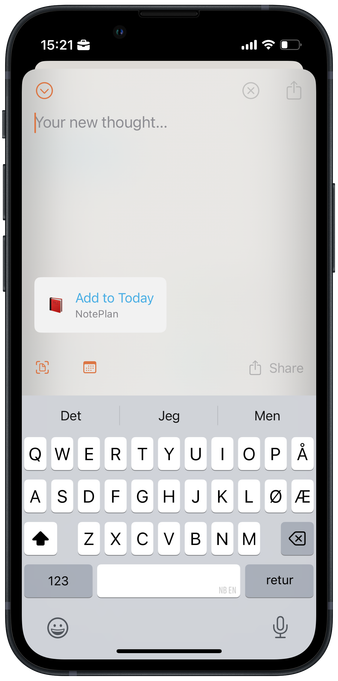
@havn @funnelcapture hi! Thanks a lot for trying it out again :) The Todo (and more buttons) will show up if NotePlan (or other markdown based apps) are selected. Let me know if that is not working.
And regarding other calendar note types - do you mean Weekly notes?
@dharamkapila @funnelcapture Ah, I see! Makes sense. Not sure if anything can be done to improve that discoverability… 🤔
(Also, on my Mini phone (image 1), the Italics disappeared behind «Send», heh. I can scroll, though!)
They have several! See image 2. (Let me know if something like knowing the naming convention helps. Also, what happens if the daily note isn’t created yet..?)
@havn @funnelcapture yes, agree that by default it is not as discoverable. Not sure how that can be addressed though.
Regarding the scrolling for Italics, I will try to see what can be improved here - because there are plans to add even more buttons on this bar in the future.
And will look into adding support for those other calendar notes on NotePlan :)
@dharamkapila Maybe you could put some tools there and have them grayed out? And when you select a destination, it does what it does now.
Or (at least if you remove the calendar) you could write “Select destination to get tools” or something. Writing it with the calendar there could work as well, but would be a bit busy. But could be a good idea for the first couple of captures?
Re: Hidden tools, adding a shadow to the left of Send _when something is hidden_ could help.
@havn yes, thanks - I will play around with some of these options to see what works best :)
And also on adding a shadow to the left of Send.
 Erlend