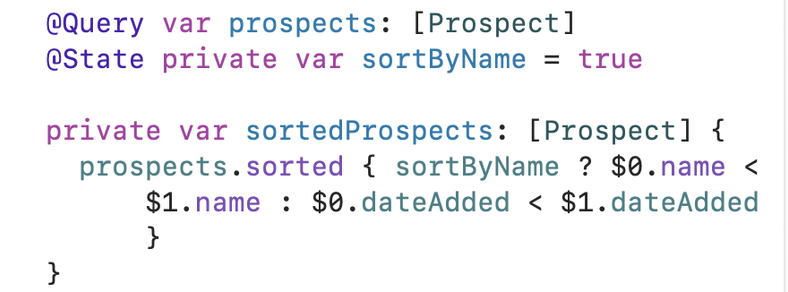
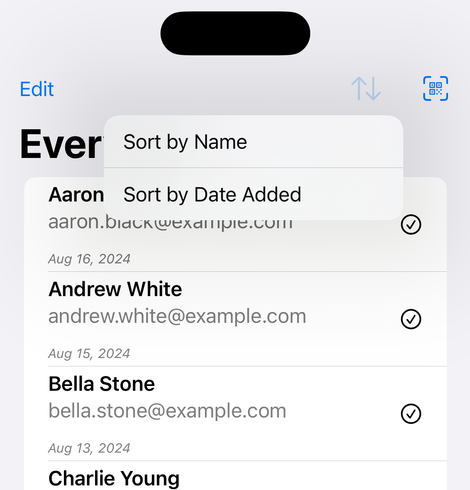
🎉 I just finished Day 85 of the #100DaysOfSwiftUI at https://www.hackingwithswift.com/100/swiftui/85 via @twostraws. The sort challenge bedeviled me and tbh I'm not sure I have the right approach, as I am doing an in-memory sort, so how will new prospects sort correctly in this case? @bigmountainstudio's SwiftData Mastery in SwiftUI was very helpful here in the approach and in how to mock data for the preview.
Day 85 – 100 Days of SwiftUI

Follow the 100 Days of SwiftUI and learn to build apps for free.

Hacking with Swift
@SuzGupta I admit to having a “sortedX” property in my views, too.
@JoshHrach Hmm, the way you say that makes me think perhaps it’s not best practice? In all seriousness, once I finally finish this course, I should try to get at least a small internship so I’m forced to learn more and faster (and get more feedback)!

@SuzGupta I'm not saying it's not best practice. But if there's a better way, I'm not doing it.

I think this approach is very obvious and easy to follow.

@SuzGupta mocking data for the previews has actually been the most challenging part of using SwiftData for me! amazing how often it's the previews that source of my problems

I dunno if it helps but for the sorting I added a creationDate property to the Prospect class and then used @Query with SortDescriptor to sort by that date like we did waayyy back in this previous project:

https://www.hackingwithswift.com/books/ios-swiftui/dynamically-sorting-and-filtering-query-with-swiftui

Dynamically sorting and filtering @Query with SwiftUI - a free Hacking with iOS: SwiftUI Edition tutorial

Learn Swift coding for iOS with these free tutorials

Hacking with Swift
@delightedcrow @SuzGupta Check out the new PreviewModifier https://developer.apple.com/documentation/swiftui/previewmodifier. It has an example of using it with SwiftData
PreviewModifier | Apple Developer Documentation

A type that defines an environment in which previews can appear.

Apple Developer Documentation
@ccjensen @delightedcrow This looks handy, thank you. I like how we can set it up once and use it from different previews. Also yum potato chips :)
@delightedcrow I suspect this is the better approach. Once you added the creationDate property, did the scanner button still work for you in the simulator? It didn't for me (and I did not delve into how to fix).
@SuzGupta Oh yes, I did have that issue! Deleting the app on the simulator and then rebuilding it worked for me!

@SuzGupta I'm pretty sure the issue had to do with me not giving creationDate a default property when I first added it, so SwiftData didn't know how to do a data migration for the model with the updated property (and then just crashed when trying to add a model with the new property to the old container).

But also just deleting the app and its data and then rebuilding to make sure it started fresh was an easy way to not deal with data migrations 😅

@SuzGupta ok sorry for all the replies but this made me so curious I had to go back and test it and yeah.. just giving creationDate a default value like Date.now woulda fixed my problem without the silly work arounds 🤣
@delightedcrow No apology needed — it’s terrific when social media actually leads to discussion and learning!