oh yeah, I should also do some tech posting. here's why I think your tools' man/help/README pages should start with a few examples.

so on Saturday I was at a show and hanging out with a friend in the VJ booth. the next artist is about to come on and /just/ sent a youtube playlist of background clips.
I get yt-dlp installed on the VJ's computer, and run it on the playlist. we get the first video, then get stuck downloading a 4k video. the internet in the venue is shit. she has to switch user accounts and start the show, so we abort the download and she starts with the first clip.

I start thinking "how can we salvage this" and remember I have termux on my phone. I should be able to install yt-dlp, and then use a cable to copy the files over. okay. workable.

I pip install yt-dlp, and open the README. to set the scene, there's extremely loud music going, it's dark, there's flashing lights, someone is getting a tattoo a bit behind me. I'm on mobile data and it's not great. I feel under a lot of pressure to get these clips downloaded fast! I need to set the resolution to 720p. that's it. this should be simple.

Here's what I see:

after a minute or two of scrolling past 30 badges, a giant table of install options, how to compile the project from source, how to fork the project, I say "fuck this" and go start downloading the third video in the playlist.

so now I'm tabbing between termux to manage the individual downloads (instead of the full playlist), a tab where I have the playlist open, and the README. my attention is SO split.

should I have done a find-in-page sooner? yes. was I thinking clearly? no.

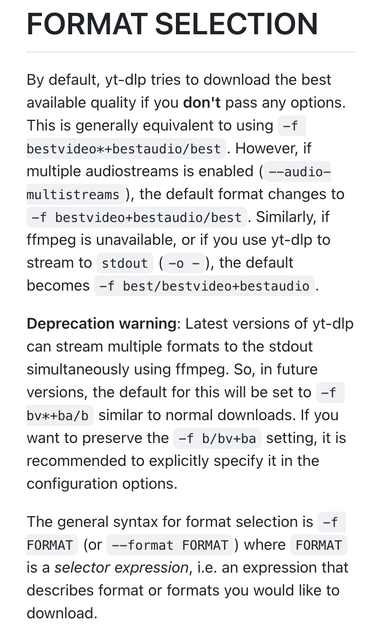
eventually I find "--format" which tells me to go to """see "FORMAT SELECTION" for more details""". alright, I can do that.

the entire first screen of text is useless. immediately after this first screen is a link saying "tl;dr navigate me to examples." very helpful. let's look at these examples.

again, the ENTIRE FIRST SCREEN is useless. and I have to keep scrolling back and forth on my little phone screen with the flashing lights and loud music and also tabbing back and forth to manage the ongoing downloads.

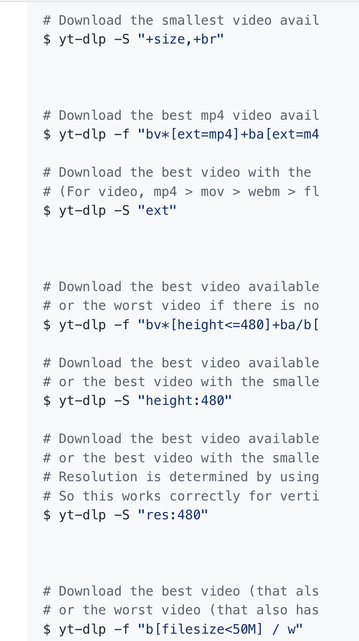
these options, I will save you the reading, are all about different ways to download the best video. one for the worst video but I don't want that either!

the next screen has such oddities as this:
`$ yt-dlp -f "bv*[height<=480]+ba/b[height<=480] / wv*+ba/w"`

after attempting and failing to parse this DSL I read on a bit further:

# Download the best video available with the largest height but no better than 480p,
# or the best video with the smallest resolution if there is no video under 480p
$ yt-dlp -S "height:480"

# Download the best video available with the largest resolution but no better than 480p,
# or the best video with the smallest resolution if there is no video under 480p
# Resolution is determined by using the smallest dimension.
# So this works correctly for vertical videos as well
$ yt-dlp -S "res:480"

this is a lot of words for me! do I want res or height? smallest dimension? best but no better else or if largest smallest AUGH

I go to youtube and there is a selector that says 720p, I want THAT.

I pick res even though it comes later (so I would expect to be more specialized) and it works! great! but since I couldn't find it earlier, I have like 4/8 videos downloaded, so I can't pass the playlist link and I have to manually type commands for the rest.

this is a scenario that really would've been helped by adding 3-5 of the _most common_ uses of the tool at the top of the README.

instead I had to find "video format options" (format, mind you, not resolution - when I saw this I thought it was like, mp4 vs webm) and then go to another section, then read through a bunch of weird examples to get to two different "download this but smaller" commands.

(the --help wasn't any better; it's pages of options and then it links to the README anyways)