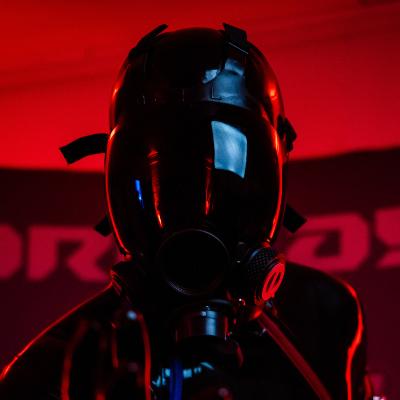
I think I can say it now.
The hardware part of the Screen10 is now complete for this version.

I can wear it, I can manage to see though it (although a bit blurry), and it looks SO FREAKING COOL

Now, onto making it easy to control and some extra fun stuff

#KinkElectronics #KinkMaker #KinkDIY #S10Mask #Maker #Cosplay #RaspberryPi

Also yeah, I think I'll settle on calling it the "Screen10" from now on instead of whatever convoluted combo I kept changing and using before 😁

After some extra tests, using remote desktop and some debugging options, the battery lasts two hours and doesn't seem to get super warm!

I call that a success 😁

#KinkMaker #KinkElectronics

Someone suggested the idea of playing a game on the screen like a 2 player mario kart...

Split screen gameplay is a good idea!

My setup uses python... I'm sure there is a way to make a simple pong game 👀

https://bsky.app/profile/om64.bsky.social/post/3kuh7tunxxu2t

#KinkMaker #KinkElectronics

Om (@om64.bsky.social)

Need to find out how to do this so I can rock up to a meet and ask them if they wanna play Mario Kart on my face.

Bluesky Social
@Xantw0 what display did you use, and are you going to make a tutorial? THATS SO FREAKING COOL

@nikolaus Thanks 🥰
I plan to release the files someday once I'm happy with a version of it.

It is a costly and tedious process, but a good challenge for tinkerers 😁