How to download large datasets of (mostly legit) files to test malware detection tools thanks to CommonCrawl - A short presentation I gave last week at Pass-the-SALT:
https://passthesalt.ubicast.tv/videos/2024-rump-11-how-to-download-large-datasets-of-files-using-commoncrawl/
Slides: https://archives.pass-the-salt.org/Pass%20the%20SALT/2024/slides/PTS2024-RUMP-11-CommonCrawl_Lagadec.pdf
Rump #11: How to download large datasets of files using CommonCrawl

Pass the SALT Archives
In short, I used the tool commoncrawl-fetcher-lite from @tallison :
https://github.com/tballison/commoncrawl-fetcher-lite
GitHub - tballison/commoncrawl-fetcher-lite: Simplified version of a common crawl fetcher

Simplified version of a common crawl fetcher. Contribute to tballison/commoncrawl-fetcher-lite development by creating an account on GitHub.

GitHub
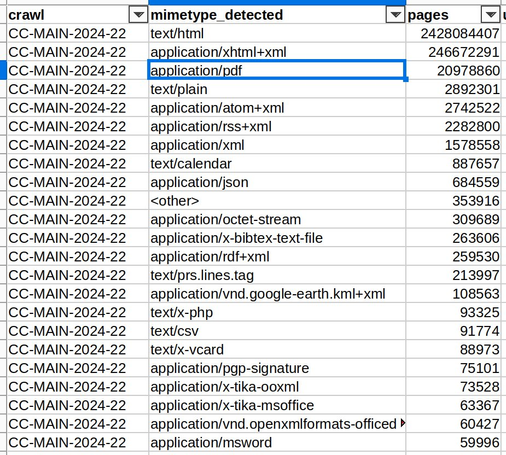
The first step is to pick the right mimetypes to get the files you need:
Get mimetypes-detected.csv from https://commoncrawl.github.io/cc-crawl-statistics/plots/mimetypes
Also pick the crawl ids from that CSV file.
Statistics of Common Crawl Monthly Archives by commoncrawl

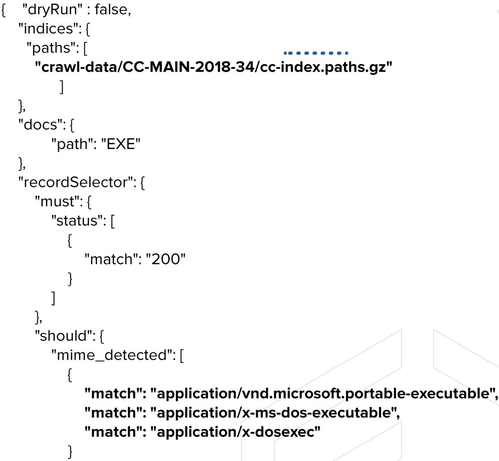
The second step is to edit the config file with those parameters. For example this one will download EXE files from the crawl CC-MAIN-2018-34:
Then you can run the tool for a few hours, and it will download thousands of files matching the mimetypes (mostly).
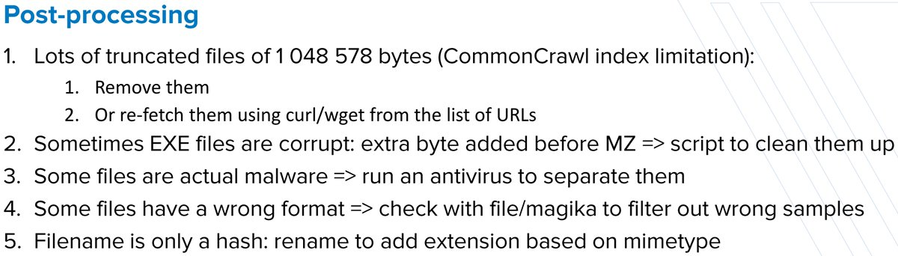
Some post-processing is needed after the download, as shown in the slides:
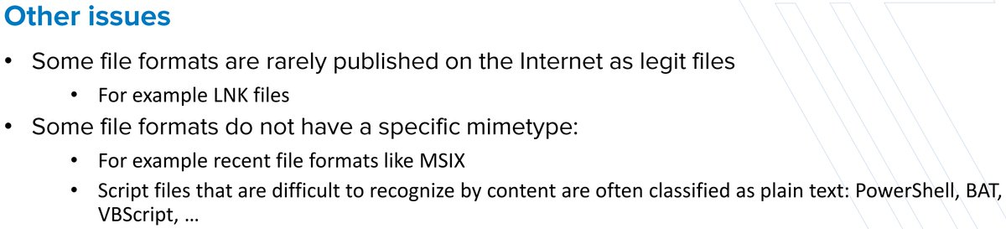
Other issues to keep in mind when using CommonCrawl:

@decalage @tallison I couldn't make this work, for some reason.

I'm interested only in Word and Excel non-malicious files (with macros; I can check that once they are downloaded), presumably from the latest crawl only (is there a reason to look at the older ones?) and I *think* I constructed correctly the JSON config file - but it isn't working (hangs).

Obviously, I'm doing something wrong - but I couldn't figure out what exactly.

There ought to be an easier way to say "get the latest index" and "get the file type(s) listed on that index"...

@bontchev @tallison Unfortunately it's still a bit rough when using CommonCrawl and the fetcher-lite tool, some manual steps are needed to write a proper config. Until someone adds some clever automation. 🙂
To make it work I just took the provided sample configs and edited them.
@bontchev @tallison Also sometimes it is useful to pick older crawls because they may contain more files matching the mimetype you are looking for.
You can see the stats for each mimetype/crawl in the CSV file.
@decalage @tallison But doesn't the latest crawl contain what is actually out there? If something is listed in an older crawl but not in the latest one, doesn't this mean that it is no longer available on-line?
@bontchev @tallison Each crawl actually contains the data downloaded from each URL up to 1MB. So with older crawls you can get files and web pages that are not online anymore. It's a bit like the web archive.