OK, interesting: iOS 18 beta 3 seems to be doing an intelligent auto-dark tint on some third party app icons. It’s reliably triggered by being a clearly delineated shape on a white background. Other icons just get a slight ‘darkening’ effect applied.

BUT! check out that Facebook icon invert. Some kind of computational icon design happening here. Wild.
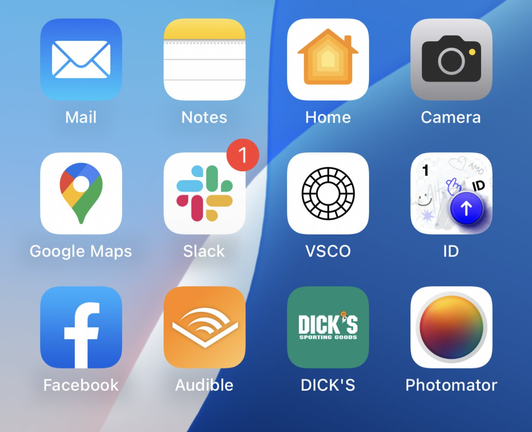
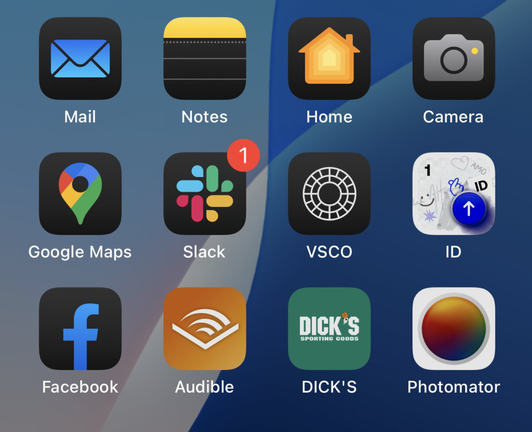
@sdw Looks like same logic on Facebook icon as Mail icon
@danielkasaj @sdw Logic seems to be White/Colour to Colour/Black. Even though the Colour is a gradient instead – other ones that might seem as gradients really aren't.
@sdw How does this get triggered, dark mode?
@jenzi You can set a theme to the icons in iOS 18. It’s either light, dark or colour tinted. This setting isn’t necessarily connected to light or dark mode, though you can do that.
It also applies to all icons equally and can’t be changed one by one.
@padraig Oh I see! I personally moved away from the platform with customizations for the one that just works so I would never uncover this on my own.
@sdw The Facebook icon looks nice tbh. Notes is rough though.
@sdw DICKS IS LOOKIN GOOD
@chockenberry @sdw YOURE FLESHY PALM IS SWEATY ISNT IT
@sdw something about the notes app icon in dark mode looks so wrong to me 🤔
@sdw thanks for providing neat examples of this!
@sdw what’s also interesting is the VSCO icon being completely inverted