RE: Accidental Tech Podcast 592, which speculates that macOS Sequoia pre-installs the iCloud Passwords browser extension for Chrome users.

It absolutely does not.

The discussed JSON file supports the user-installable extension communicating with the OS to securely access password data. See https://developer.chrome.com/docs/extensions/develop/concepts/native-messaging

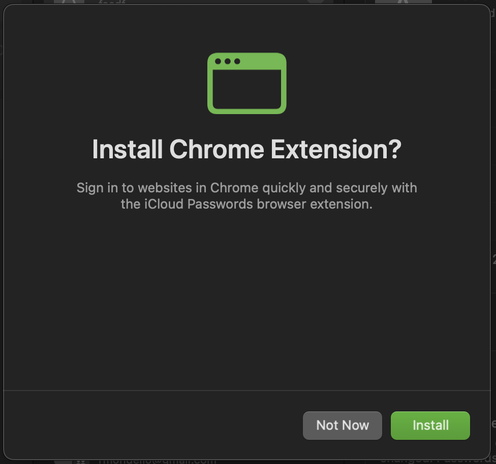
The new Passwords app does encourage Chrome and Edge users to install the extension on first launch, however. Button opens the browser to the relevant Chrome/Edge Web Store page.

Native messaging  |  Chrome for Developers

Exchange messages with native applications from your Chrome Extension.

Chrome for Developers
@rmondello What about a Firefox extension, do you know if it's anything on the works or something like that?
@manu @rmondello Yes please, Firefox support would be much appreciated!
@gregw @manu @rmondello I’ll add another vote for a Firefox extension.
@rmondello Thank you for clarifying! Follow-up next episode…
@rmondello yeah, yeah, but what about the right aligned passwords?
@softmaus I swear that if John gets a non-insignificant number of people to think that Passwords isn’t a great app because of how *checks notes* manually editing saved passwords and adding new passwords manually aligns text, I’ll run into the woods and never return. :P
@rmondello speaking of browser extensions… Firefox?

@rmondello I was just listening to that episode and thought to myself that must be exactly what it is — just the OS level helper.

I do have an oddity re: the extension, is it normal for this prompt to appear on the regular? I don't use Chrome as my default browser so I launch it only once or twice a week and I always seem to get this. This is all on shipping software. I looked around and couldn't seem to find anything about it. Otherwise it’s been a life/type saver and works great!

@rmondello I just finally got around to giving passwords a try now that the chrome extension works on MacOS. It's pretty bad user experience that you can't add new passwords from the Chrome Extension and it tells you to goto Safari/Password app todo it instead. Is it not possible to get it to work in the extension? Or is it just steering?
@msroest I think you’ll feel better about it when you’re running macOS Sequoia and you’re redirected to the Passwords App. (We think that the native experience can offer a better experience than the extension for manually adding a credential.)
@rmondello Cool yah that would make it better if it does the jump on it's own rather then having to be a manual step. Thanks for the info!
@rmondello does the browser extension support Linux use now? I have to use Ubuntu for work so having support would be great.
@Geekpulp @rmondello No, it doesn’t. It works only on macOS and Windows.
@szymonzielonka @rmondello makes me wonder why? Technical limitation? Not a priority? Both?
@Geekpulp @rmondello I suspect that the problem is the low popularity of Linux (not counting servers).