
This is an IOCREST-brand USB to RS-232 serial adapter, which I bought from a seller on AliExpress. It arrived in exactly the same time as an identical eBay listing said it would, for literally half the price - if eBay is still your default go-to for weird stuff like this, keep in mind dropshippers are probably fleecing you.

This adapter contains an FTDI chipset, not the much cheaper CH340, and it's time to see if this is the reason I couldn't get serial mice working natively on Windows 10.
And, yep - with Windows 10 told to enable serial mouse detection on boot, all you need is the right kind of adapter installed and a serial mouse plugged in when you boot up. Here's the FTDI-derived one working with my Microsoft Home serial mouse - you can see the adapter blinking to say it's receiving data when I move it around. #retrocomputing

So, question: Can I get some suggestions for software / tips and tricks for recording and reviewing raw data coming off a serial port? I'm a very long way from trying to reverse-engineer a novel protocol myself, but that's the eventual goal, and the next step I'd like to take is compare what I'm seeing coming out of a serial mouse with documentation online to make sure I really understand what's going on and how all this works.

Uh... #retrocomputing #reverseengineering ? boosts welcome.

Thanks for the suggestions everyone, I really appreciate them whatever their cost or niche. I'm sure I'll find enough resources here to carry a long way into the projects I have in mind here.

First draft for a less janky version of the first answer here: https://electronics.stackexchange.com/questions/63865/rs-232-serial-sniffing

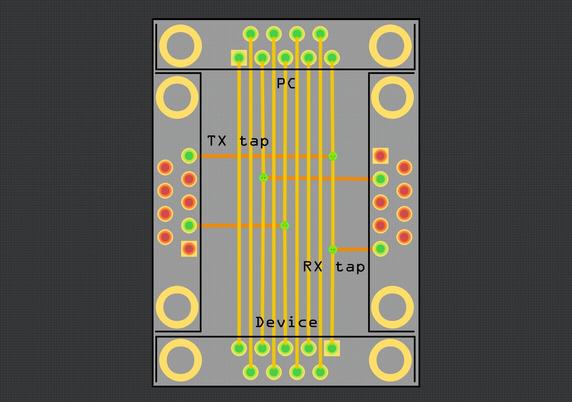
All nine lines are continuous from the PC end to the Device end (device end is male with pins, all others are female sockets), with the TX and RX lines also tapped out to the TX lines of the left and right ports, and GND is shared between all four ports.

I'll be adding this to my #SimpleBreakouts project once validated, so what might make this more useful to others? All 9 lines broken out to headers maybe?

RS 232 serial sniffing

We have a task in hand to sniff a RS232 protocol in a certain industrial automation setting (we have been asked to do this legally by the manufacturing company itself). We are planning to send a

Electrical Engineering Stack Exchange

@timixretroplays wait, that looks mirrored between PC and device? Eg pin 1 on PC is now pin 9 on device. You could get away with it if you flipped the device socket to the other side of the board.

I think tying the HW flow control signals out to their partner makes sense and would be useful, but it’s been a long time since I’ve dealt with them I can’t remember which ones should go to what.

Also, shield is not ground. Tie the connector shields together, but don’t tie the shields to ground. Do a 4-layer board, inner 2 layers are ground planes. Add a ground return via for every signal via that goes from front to back layer

@jpm the top port is a female socket and the bottom one is male, so pin 1 is on the left of both in this case - I don't think they bothered changing the square pin surround between the male/female part footprints. I could be totally wrong on this, but following the pin numbers it seems right, and I can put one of the ports on the other side if needed.

I'll tie the shields together, I overlooked that's what this one does - the image below is all I'm trying to recreate, in handy PCB form.

@timixretroplays aha gotcha