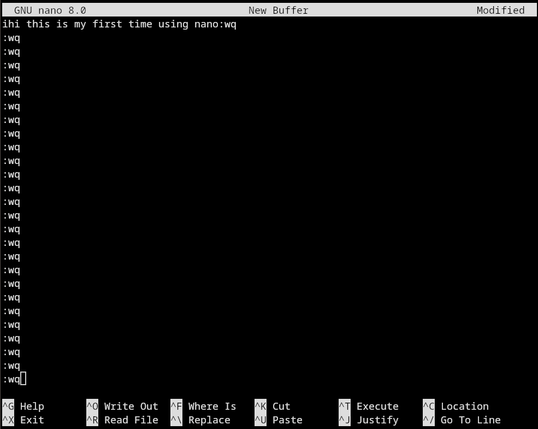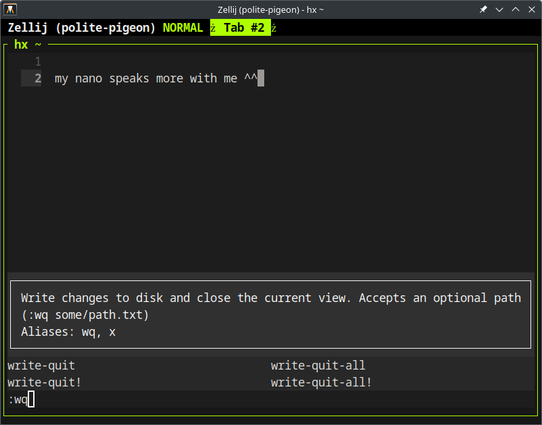

help i'm stuck
@systemd Just give up on your keyboard and unplug your computer.
@systemd I know it's a shitpost, but nano literally showing you at the bottom of the screen what its important commands are is one of the reasons I like it so much better :p
@HunterZ @systemd i hate emacs and vim passionately. nobody has time to remember all their arcane rituals to make shit work. last time i tried to shut down emacs i gave up and just bought a new computer.
@blogdiva @HunterZ @systemd in seriousness... the first time I used Linux I couldn't make ping stop pinging, so I pulled the plug
@ATLeagle @HunterZ @systemd LMAO i feel this on an existential level 😁

@blogdiva @ATLeagle @HunterZ @systemd I knew the DOS shortcut and it happened to be identical. Pure luck.

I keep nixing processes though when I want to copy stuff

@blogdiva @HunterZ @systemd The one time I was stuck on a machine with only vim installed, I found it easier to edit the files with sed and cat.

@blogdiva @HunterZ @systemd
BS. I use both, and after a decade you can usually even write basic Emacs Lisp without needing to google it.

Not that the modern Emacs with its customize interface requires much of that.

@blogdiva @HunterZ @systemd Both Vim and Emacs are answers to the question, what if the seventies had just... kept going?
@blogdiva @HunterZ @systemd
Same here. People who care that much about text editors either aren’t spending enough time actually thinking about what they’re typing, or need to take up homebrewing or gardening or something.

@blogdiva @HunterZ @systemd
Vim isn't so bad. For instance, if you want to find the word "foo", type :/foo/

If you want to find all occurrences of foo, type... hold on... I've got that right here... just a sec...

@bruce @blogdiva @HunterZ @systemd twenty eight years of mostly Vim-based editing, and I "know" maybe half a dozen things.

My hands OTOH (hang on what? anyways moving on) look like Leonard Bernstein at the piano.

@bruce @blogdiva @HunterZ @systemd incidentally I rarely if ever recommend Vim. You have to break your brain a little to get used to it, and I'm not comfortable suggesting such a path.
@randomgeek @blogdiva @HunterZ @systemd
Same. I love vim, but for most people, I recommend a graphical text editor like Kate.

if i need a graphic editor i use Geany but i mostly stick to nano

@bruce @randomgeek @HunterZ @systemd

@blogdiva nano does the job well. You’re not the only smart geek I know to prefer it.

But the best thing about nano is how shocked vi / emacs folks get when they see it on your screen

@bruce @HunterZ @systemd

@randomgeek @blogdiva @bruce @systemd nano has been my preferred *nix text editor for probably a quarter century at this point.

Modal editors should have been left in the 20th century.

@blogdiva @HunterZ @systemd not to mention (once upon a time) ed. But if you were using ed it was likely your job to know how to use it, and it was someone else’s computer, and they didn’t have enough money to replace it with one that had an X-windows console, or it hadn’t been invented yet. But this IS 2024.
@HunterZ @systemd Those don't stop the muscle memory, tho! Whenever I'm stuck in a ramdisk or something with just nano I end up with a ton of :ws in whatever I'm editing. 😩
@indigoparadox sometimes, i try going down with J or ) outside vim
@HunterZ @systemd
I typed X so many times.
@mian @HunterZ @systemd how do you type this? what key you hit on the keyboard?
Ben S. (@[email protected])

@[email protected] @[email protected] fair. This has been a widely-used notation for around 60 years, but I'll admit that collective memory fades over time: https://en.wikipedia.org/wiki/Caret_notation

Mastodon @ SDF
@HunterZ @systemd So do a version of this where someone literally types in ^X^X^X^X^X^X over and over.
@HunterZ @systemd because ^ is obviously control? And you've wasted space...
@HunterZ @systemd Nowhere does it explain that the ^ means control.
@hendric @systemd fair. This has been a widely-used notation for around 60 years, but I'll admit that collective memory fades over time: https://en.wikipedia.org/wiki/Caret_notation
Caret notation - Wikipedia

@HunterZ @systemd

shift+6+shift+x

Does not work either. Only prints ^X

Help!

@HunterZ @systemd

If we're playing the game of answering shitposts seriously, vim start screen does the same.

@systemd you aren’t hitting esc! that’s probably the issue!
@systemd ‘how to exit vim’ more like ‘how to exit nano’
@ari @systemd you don’t exit nano, nano exits you
@systemd 😂 Sorry I haven't see it was nano editor... It's a joke ? If not
Ctlrl + O
Enter
Ctlr + X
@systemd why are you typing :wq when it says right there you should be typing ^O^X /s