 2DArray
messing around with the playdate again
getting some perspective
getting fancier!
i'm a chronic bayer-hater so i replaced the structured dithering with blue noise, and to me it looks a lot nicer. runs at full speed on the real device, too!
starting on player-controls
the camera is following behind a car...but you can't really tell because the car isn't rendered yet
starting to draw a car and some tire tracks (the car is temp-art for now)
a floor
this drops my fps to 40 (max possible on playdate is 50) but i'm hoping/assuming i can find more stuff to optimize. worst case, locking the game to 30fps seems like it would be OKAY, and maybe even the more sane choice for a handheld (to save on battery power)
the real ideal thing would be if you could pick between 30fps (power-saver mode) and 50fps (try-hard mode)
better floor (now with ambient occlusion!)
back up to "usually 50fps" on the device, sometimes dips down to around 47
working on a drifting mechanic
it needs more tuning but i'm absolutely stoked about it already
starting to draw a proper car - i did this first version in a really basic way so i thought it'd tank my performance, but it turns out it still stays at like 45+ fps on the device. not bad!
i'm very bad at lowpoly modeling so the car accidentally looks like an old-timey beater, but i think that's sorta funny so i'll probably try to keep that vibe
night sky - drops me to about 40fps on the device, but i think i can still find more room to optimize
would be nice to add some clouds or something...
adding some presentation at the start of the race, and some basic timer/scoring stuff
all hail lobster font, lobster font will lead us to salvation
made a fancier finish-line and now i'm gonna need to write my own triangle-rasterizer instead of relying on the playdate sdk's fillTriangle() helper - i'd like to get rasterized meshes to use the same dithering as the walls/floors/sky, and also i need the meshes to get occluded by walls
custom rasterizer which allows the finish-line banner to be occluded by walls
working on replay recording/playback - yes, the clip looks the same as the others in the thread, but it's a pretty good run since i was retrying the map. if you think "i see places where the racing line could have been improved" then the game is working, lol
replay data is quite small: stores keyframes containing a bitmask of user-input states (one byte), along with how many frames you held that state for (one byte). a "normal" 30 second replay tends to be around 200 bytes
unfortunately i doubt there'll be a way to do any online-sharing because of playdate limitations (i'm gonna try to get libcurl to work anyway though - i think they use it for OS features, they just don't expose any networking stuff in their sdk at this point)
racing the ghost of your fastest run
smarter sampling on the floor...
when it samples the floor tex, it raycasts the texelspace grid to see how many screen-pixels it'll step along the scanline before hitting the next texel, and it can reuse the latest sample until then - fewer samples, sharper result!
it also does some smooth LOD, where it starts using a bigger and bigger "screen-pixel steps per sample" ratio as pixels get farther away
(before/after)
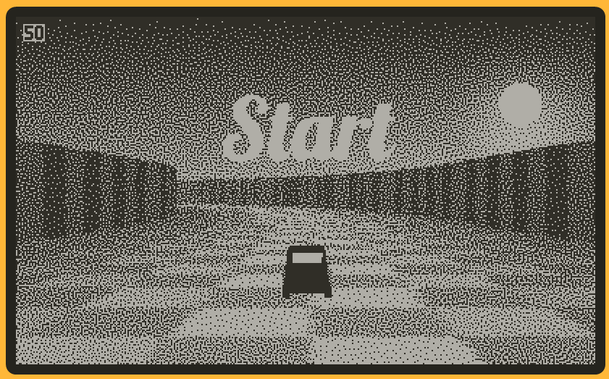
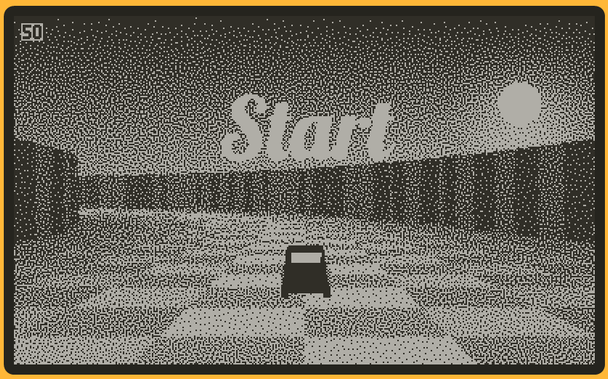
added a realtime shadow for the player's car
it only works on the floor (not the walls) but that's probably okay-enough for me
kinda going off the deep end here but now the car can cast its shadow onto the walls
it's kind of a ridiculously subtle effect, but it ties the mesh-geo, the raycaster-geo, and the skybox together, so uhhh maybe that's something
starting to think about a title screen but i'm not really sure wut to do yet
but hey i have an easy way to make text into 3D meshes (thank you, blender!) so that seems like a sane place to start
now we're talking!
been pretty busy for a few days, so not much progress here - but i've started getting into a track editor
initially this is just for me to make some built-in tracks, but i might polish it to make it user-facing if i can figure out a comfy way for people to share their maps
i can now save tracks as files, and then load them - the ghost-car in this clip is included in the track data. the spiral track file (including that ghost's replay) is 161 bytes
zipping the file actually makes it larger (241 bytes) so i think i did good. lol
conveniently, i already wrote a playdate serializer for C, for that previous music-maker app
here's the code for serializing/deserializing a track and its replay. serialization and deserialization use these same functions (the Serializer has a flag to tell it whether it's reading or writing) - so there's no need for annoying/error-prone "near duplicate" routines for input/output
it supports ascii format (more legible) and binary format (smaller file)
mostly boring backend stuff lately, but here's a clip of a track i made on the playdate and then loaded in the desktop simulator app - it includes four replays to compete against (bronze, silver, gold, author), and it seems like i can afford to show them all at once!
reduced the framerate to 30fps since it still beats that on the device, but in doing so i instantly radicalized myself into one of those "30fps is literally unplayable" people, so now i guess i have to optimize for 40 instead
(30 is fine with me in other games, i'm just used to 50 in this one)
whelp turns out i can't figure out how to get it back to 40 (particularly with 4 ghosts active) but 30 actually looks fine on the device - the lower framerate is only noticeable to me when testing in the desktop simulator
something something magic playdate screen. good enough!
added a way to save your replay from the daily challenge, as a way to "chess by mail" against your friends without having to author a map first
also a nice idea from @fsouchu: ghost cars become opaque when you're not touching them
fuck it, all the ghost cars can cast shadows too
adding some obstacles for extra level-design options
nicer tire-tracks: old version was 2D lines, new version is mesh-based. the main reason i did this was to get them to be occluded by walls, but they also gained some width variation to make them look a bit messier/dirtier
making some campaign-mode tracks - each one has four replays to compete against (bronze/silver/gold/author)
you'll unlock the next track if you get at least the bronze (or silver?) medal. maybe the author-ghosts are only unlocked after you get gold on every track? not sure yet
 fsouchu
@2DArray is the ‘grandpa’ car model really a match for the game? tbh I cannot connect endless drifting marks with a car that goes 0-100km/h in 5 minutes.
 Donswelt
@2DArray Nice! And I like the name.
@2DArray suntrack? the title screen totally misses the sun presence imho
@fsouchu i was thinking about drawing the sun...but i think at the moment i'm interested in getting the title card to look like it's own thing, instead of just showing what the normal gameplay looks like (dunno if it's the right call, but that's where i'm at so far)
the motion here is temp, but it's partway to something more interesting...
@2DArray excellent 👌
@fsouchu thanks!
ended up doing the less-fancy "pretend the nearby wall is a flat plane, project the car-mesh onto that" idea...mostly because it seemed easier to implement
now in the worst case, i get down to like 33fps (player car, player floor-shadow, player wall-shadow, ghost car, giant "START" mesh) but hey i'm still above 30 lol and i might be out of ideas for more wacky gfx shit to add, so i might be getting away with it
 Shane Celis
@2DArray That’s some smooth, stable dither. Wow.
 Felice
@2DArray That blue noise works incredibly well, and it's so stable. I wonder how I never heard of it in 20 years of rendering work. Looks just like error-diffusion dithering. Do you know if there's any good sample code I could look at? I'd love to play with it and get to know how to use it.
@Felice thanks!
implementation is dead simple: it's the exact same as what you'd do for Bayer dithering (dither pattern is a pixel-grid of brightness values, each final screen pixel becomes either black or white by comparing its intended brightness to a value in the pattern), but with a blue-noise texture as the pattern
i got a texture from here:
https://momentsingraphics.de/BlueNoise.html
in this case, the dither pattern is fullscreen, but tiling a smaller pattern is fine, too
 ruby0x1
@2DArray this is not blue noised dithered, I am shocked 😱
@fsouchu yeeep the mesh rasterizer is using simpler patterns everywhere so it can do the 32-bit-blitting stuff (when it knows there's no risk of wall-occlusion)
that said, I could probably bake a few blittable blue noise patterns for this. I'm not quite happy with the look of the shadow yet, so maybe that'd do the trick!
@2DArray I guess shadow on wall is doable no? are you drawing walls pixel row by pixel row?
@2DArray and yes, that’s called scope creep 😬
@fsouchu walls are "wolfenstyle" so they start by doing a per-column raycast, and save the resulting screenspace wall-heights to an array. then, during the fullscreen per-pixel pass (walls/floor/sky), it just has to check if a pixel is above/below the wall-range for its screen-x position
the shadow is a copy of the car mesh with a weird/flattened local-to-world matrix - what are you imagining for wall-shadows? all i've thought of is "pretend the nearby wall is a plane, project a mesh onto that"
 Mat
Mat@2DArray this looks so good!
 ikesau
 Christian Walther
@2DArray Maybe you can find a way to cram it into a QR code.
@isziaui does seem possible to export like that...but then you'd still have to get the data back into someone else's device!
best I've thought of so far is a companion app that you run on a PC, and they talk to each other over USB. not ideal, but it'd save you from needing to boot the playdate into data-drive mode, at least. an over-engineered version could talk to a webserver from there, lol
@2DArray hu… that would assume perfect frame alignement between runs
@fsouchu yep! floating point is deterministic and the app is single-threaded, so (at least as far as i've seen...) the only thing that's unpredictable is the user-input. i wouldn't be surprised if the simulator and playdate produce replays which are incompatible with each other due to compiler differences...but i haven't serialized any replays, so i haven't seen that happen yet lol. if it turns out to be a problem, i can resort to a heftier format!
@2DArray did you get anywhere with SIMD rasterization?
@fsouchu nope, lol. i still haven't tried the thing i was talking about at first, but i goofed around a bit with some related-but-less-drastic simd usage, and failed to get any actual speedup (which is what has always happened whenever i've tried to use simd in general)
@fsouchu i did get a nice speedup on the rasterizer by doing that "splat a slice of the dither pattern into an 8-or-32 bit scanline-strip all at once, instead of iterating individual pixels" thing (i already had start/end sub-indices inside each strip, so i did some bitwise shenanigans to create a mask with leading and trailing zeroes, then used that to splat the pattern)
unfortunately, i need per-pixel iteration for wall occlusion, so i can't actually use that 🙃
@2DArray 32 bits at once is what I do also - see the 3d sample in the SDK for a solid "fill line" starting point
 Alistair Hutton
@twitonatrain the dither pattern is storing u8 thresholds (to compare against a pixel's intended brightness), so it's not currently a blittable sprite! I could convert it into several ready-to-go sprites for different grey levels, but I imagine it'd lose some smoothness (especially in the sky, where it's a lot of smooth fades)...but maybe that'll become necessary at some point
@2DArray Ah, see I told you I wasn't paying enough attention. It's all looking lovely though.
@twitonatrain thanks! and honestly your idea is a good one which i've been trying to find ways to incorporate...i might have an avenue to use it in the mesh rasterizer (which does use blittable patterns!), if it can detect that a certain 32-bit slice of a scanline has no chance of being occluded by a wall (which means the per-pixel checks aren't needed there)