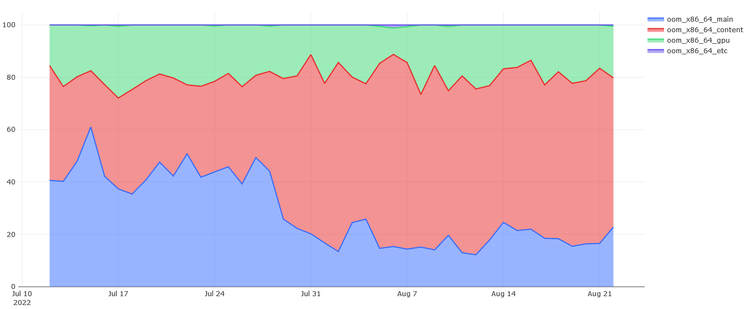
Memory errors in consumer devices such as PCs and phones are not something you hear much about, yet they are probably one of the most common ways these machines fail.

I'll use this thread to explain how this happens, how it affects you and what you can do about it. But I'll also talk about how the industry failed to address it and how we must force them to, for the sake of sustainability. ๐Ÿงต 1/17

First of all let's talk briefly about how memory works. What you have in your PC or phone is what we call dynamic random access memory. That is memory that stores bits by putting a minuscule amount of charge into vanishingly small capacitors (or not putting it in if we're storing a zero).

These capacitors continuously leak this charge, so it needs to be refreshed periodically - every few milliseconds - which is why it's called "dynamic". 2/17

This design is *extremely* analog in nature. When your machine needs to read some bits the capacitors holding them are connected to a bunch of wires. The very small voltage difference that happens in the wire is detected by the use of a circuit that turns it into a clear 0 or 1 value (this is called a sense amplifier). 3/17
So how can this fail? In a huge number of ways. Circuits age with time and use. The ability of the individual capacitors to hold the charge goes down slowly over time, the transistors in the sense amplifiers degrade, points of contact oxidize, etc... Past a certain point this can make the whole process end up outside of the thresholds required to reliably read, write and retain the bits in memory. 4/17
This can lead to different failures: a very common one is a stuck bit, which ends up being always read as 1 or 0, regardless of what was written into it. Another type is timing-dependent failures, which cause a bit to flip but only if it's not touched in due time by an access or a refresh. More catastrophic errors can affect entire lines - which is what happens when a sense amplifier starts to fail. 5/17
Either way, even a single bit error which happens once in a blue moon is catastrophic to a consumer machine. Sometimes it will cause a pixel to slightly change color, but sometimes it will affect an important computation and lead to a crash. Or worse: it'll cause some user data to be corrupted before it's written to disk, and when it is, the damage has become permanent. 6/17
If your machine exhibits rare but hard-to-explain crashes, or if you're forced to reinstall programs - or even the operating system - because of mysterious failures, or experience random reboots or BSODs, then it's very likely that your memory is failing and you need to replace it. 7/17

Diagnosing it is hard. Windows has a memory diagnostic tool which will catch the worst offenders and is easy to use: https://www.microsoft.com/en-us/surface/do-more-with-surface/how-to-use-windows-memory-diagnostic

It's not enough though, some errors can only be caught with more extensive testing. I recommend the open-source memtest86+ (https://memtest.org/) tool or the closed source memtest86 one (https://www.memtest86.com/) 8/17

How to Use Windows Memory Diagnostic | Microsoft Surface

Optimize your PC performance and prevent slowdowns with Windows Memory Diagnostic and RAM tools. Learn how to test RAM and improve performance with Windows Memory Diagnostic.

Surface
Naturally what happens on PCs also happens on phones, network devices, printers, TVs, etc... but you can't test them. This is a disaster because these failures are common, and they become more and more common as the device ages. If we want to have repairable devices that last for a long time, the industry will have to change its practices, but more about this later. 9/17

Now you might wonder: how often does this actually happen? The common wisdom on this topic is that hardware failures are so rare that software bugs will always dwarf them. As I found out this is demonstrably false.

While investigating Firefox crashes I've come to the conclusion that several of the most common issues we were dealing with were likely caused by flaky hardware. This led me to come up with a simple heuristic to detect crashes potentially caused by bit-flips. 10/17

Deploying this heuristic to Mozilla's crash reporting infrastructure has been eye opening: if I take the 10 most common crashes on Windows, 7 are out-of-memory conditions - that is, not bugs - and 3 are likely caused by bad memory.

You've read that right, three out of the ten most common reasons why Firefox crashes on Windows are caused by memory that's gone bad. 11/17

@gabrielesvelto I appreciate your focus on improving diagnosis. Those over-represented crashes distract people from real bugs. I don't understand why you included OOMs though -- allocation failures can and will happen, and it's our responsibility to handle them gracefully.

@rlb we've reduced OOM crashes massively in the past few years: https://hacks.mozilla.org/2022/11/improving-firefox-stability-with-this-one-weird-trick/

We already handle gracefully all the failures that we can realistically handle, but for a lot of them there's nothing we can do. That's especially true on non-Windows platforms where allocations never fails. Both on Linux and Android the kernel will kill processes to save memory without informing them or allowing for any type of reaction, so graceful handling is impossible.

Improving Firefox stability with this one weird trick โ€“ Mozilla Hacks - the Web developer blog

Poorly behaving web pages and apps are no longer capable of crashing the browser by exhausting memory, thanks to a simple trick.

Mozilla Hacks โ€“ the Web developer blog
@gabrielesvelto nice! The oomkill behavior is definitely hard to cope with. I've gotten a lot of mileage out of using the cgroups memory pressure signals, but it's certainly not perfect.