 Daniel, founder of js-craft.io
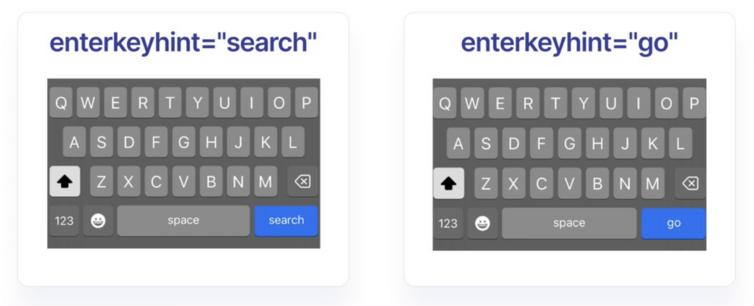
HTML tip: the “enterkeyhint” attribute allows us to change the label of the "Enter" key of a virtual keyboard and it’s supported by all browsers.
Example usage: <input enterkeyhint=“search” />
As @Sirs0ri pointed we can only have a predefined set of values; full list here https://developer.mozilla.org/en-US/docs/Web/HTML/Global_attributes/enterkeyhint#values
#css #javascript #development
Example usage: <input enterkeyhint=“search” />
As @Sirs0ri pointed we can only have a predefined set of values; full list here https://developer.mozilla.org/en-US/docs/Web/HTML/Global_attributes/enterkeyhint#values
#css #javascript #development

 sorry, mona can't come to the phone right now 🌺