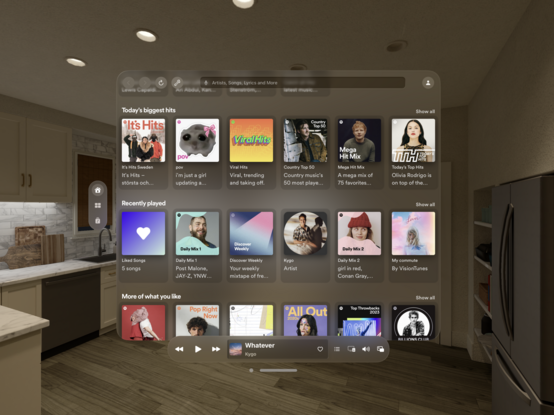
SwiftUI (and maybe visionOS specific?) question: how do you show a search bar in the middle of the navigation bar, like Apple does in a bunch of apps?
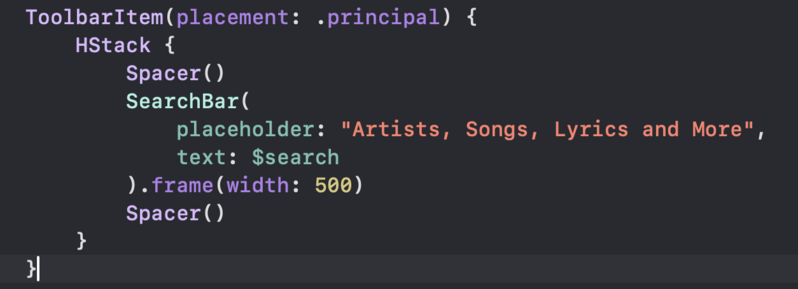
@christianselig I've looked into this. I was only able to archive this using UISearchBar (wrapped with UIViewRepresentable) and a ToolbarItem with .principal placement.
Wrapper for UISearchBar for SwiftUI

Wrapper for UISearchBar for SwiftUI. GitHub Gist: instantly share code, notes, and snippets.

Gist
@petergam Ooo, okay we arrived at a similar solution, I ended up just overlaying it though since I could not seem to get it to work nicely with principal (it kept just shoving it left) https://christianselig.com/2024/03/recreating-visionos-search-bar/
Recreating Apple's beautiful visionOS search bar

Many of Apple’s own visionOS apps, like Music, Safari, and Apple TV, have a handy search bar front and center on the window so you can easily search through your content. Oddly, as of visionOS 1.1, replicating this visually as a developer using SwiftUI or UIKit is not particularly easy due to lack of a direct API, but it’s still totally possible, so let’s explore how. First let’s get a few ideas out of the way to maybe save you some time.

@christianselig Cool, thanks for sharing. I might snap your solution for getting the corner radius right.
I think you can get around the problem of it being shoved to the left when you principal by wrapping it in a HStack with Spacers, but your overlay solution also works.