 Paul Hudson
In November, I released Inferno: an open-source collection of Metal shaders for SwiftUI developers, making it easy to create gorgeous special effects in your iOS apps. https://github.com/twostraws/Inferno

Two months later, I released Vortex: a high-performance particle effect system for SwiftUI, so you can bring effects such as confetti, fireworks, fire, and more into your apps. https://github.com/twostraws/Vortex

Today, another two months later, I just released my third and final open-source project, at least for now. It's called Ignite, and it's a Swift static website generator. Your entire site is written as Swift code, then compiled to HTML, JavaScript, and CSS. https://github.com/twostraws/Ignite

Why is Ignite different from other Swift website frameworks?
- Your sites automatically adapt to mobile, iPad, and desktop.
- You get modern web components in Swift – accordions, carousels, dropdowns, and more just work.
- Accessibility is baked into your HTML out of the box.
You can build a whole website using Swift if you want, or bring in Markdown and have those files become pages – it builds on Apple's fantastic swift-markdown library for lightning fast Markdown parsing. Just like Jekyll in Ruby, you can select layouts right in your Markdown.
It has a delightful, SwiftUI-like API, and where possible I've used similar names for elements and modifiers – get started by cloning the starter template. But it's built for the web: not replacing CSS/JavaScript, but building on top of them so you get great results fast.
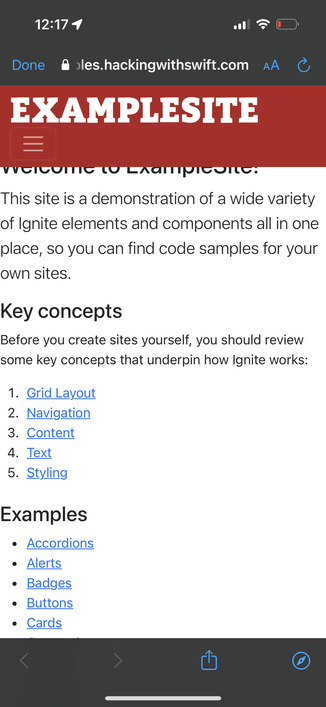
I've gone out of my way to document all the code as best as I can, and there's a new sample website that demonstrates a wide variety of controls alongside the code it takes to produce each piece of output: https://ignitesamples.hackingwithswift.com
 Ellen Shapiro
@twostraws seeing a couple css issues at the top on mobile if you don’t already have them in your backlog