 Pete Alex Harris🦡🕸️🌲/∞🪐∫
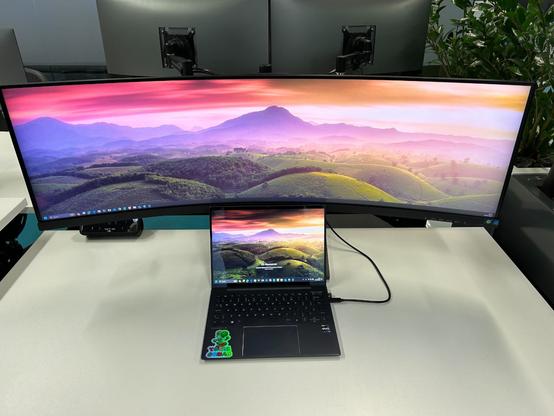
Work are letting us try out this monitor, which looks like a joke image begging for a caption, but is actually a real thing somebody thought needed to be made.
@henryk
The main use for this monitor I can see is if you have one of those "panoramic" photo settings on your camera and want to use it for screen backgrounds.
I can't think why else. I could have 6 windows open on one screen, but I couldn't concentrate on 6 windows open on one screen. I like the purposeful context switch of flipping to a different virtual desktop.
You don't play games much, do you?
@heycitizen there are programs that will do that for you. You define how you want to divide your screen.
I’ve always wanted to try one of these monitors, but they only come in standard res and my eyes won’t like anything less than a “Retina” quality screen. @petealexharris
Yeah, same; "my" guy tends to share his laptop screen unless he absolutely has to share the ultrawide (in which case I tend to move the Teams window to my 4k screen)
@petealexharris I have a monitor about two thirds this size at work.
For the most part, it's like having two regular sized ones except
1) It's harder to tile windows because you only have the left and right edges to dock against, and
1) if you share your desktop during a meeting no one can see anything because the image is microscopic when you fit it in a laptop display.
@badtux I code. I don't need a UI the approximate size of a nuclear power station control room on one monitor to do it. It does nothing a 3-monitor rig can't do with more flexibility, portability and failure tolerance.
So it's a pretty toy. And that's OK.
We're hearing the new M3 Macbooks can only run one external monitor .... so maybe this is a product with a niche /s
@petealexharris this is my current setup. Windows Power Toys has a tool called Fancy Zones that make it act like any number of virtual monitors.
I have full screened spreadsheets on it, but mostly it’s a three apps open copy pasta fiesta.
Also... did you know they fixed virtual desktops on windows and they’re now usable Winkey+Tab. Got a half dozen of those too.
 Charlie Stross
 Henryk Plötz
 Violet Madder
 Hurricane Daveosaurus
 heycitizen
 John Parkinson
 Chris
Chris Sheldon
 Duncan
 Flop_Ysh
 MacBalance
 The Essence of Woerm Sin
 sebsauvage
 AlisonW ♿🏳️🌈♾️
 adamrice
 Octorine
 Allpoints
 sleepy
 Badtux the Snarky Penguin
 dr_barnowl
 Aethylred
 Cuprohastes