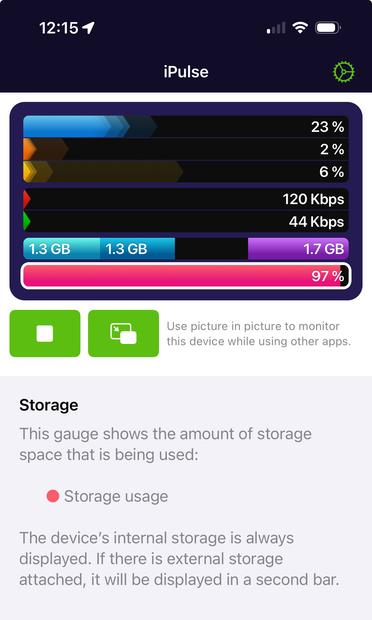
After over 20 years of monitoring your Mac, iPulse has come to iOS! Keep an eye on your iPhone or iPad's CPU, memory usage, true storage size and more. iPulse for iOS uses Picture in Picture mode so it can stay out of your way while you pinpoint potential problems. 🎯

iPulse is a one-time purchase that runs on both your iPhone and iPad. Head over to the App Store to grab the tool no developer or power user should be without.

https://apps.apple.com/us/app/ipulse-monitor-your-device/id6474695786

#iPulse #iOS #iOSDev

iPulse - Monitor Your Device App - App Store

Download iPulse - Monitor Your Device by The Iconfactory on the App Store. See screenshots, ratings and reviews, user tips, and more games like iPulse - Monitor…

App Store
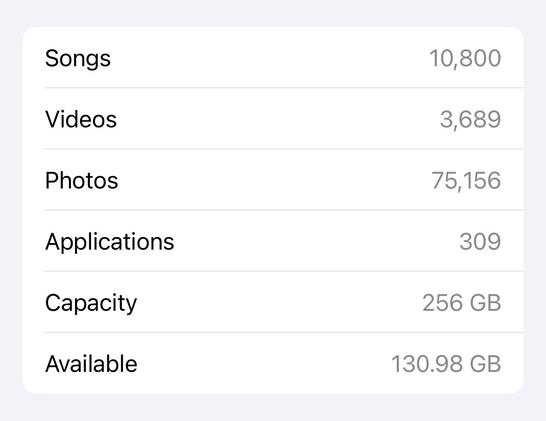
@Iconfactory hmm. It seems to be saying that my storage is 97% full when “about” says I have plenty of space. Had to turn audio alerts off:

@scanner @Iconfactory Same. I assume it’s counting purgeable caches and logs. Would be nice to break out non-purgeable storage.

I wonder what it looks like as an iPad app running on VisionOS? Does it report on the vm sandbox?

@kfury @Iconfactory I plan to try it out later.
@kfury (at "work" now so really trying not to go off in my own world for the next hour or two.. B-) )

@kfury @scanner Yes, that is correct. The storage display you’re used to seeing in Settings > General > Storage does not include cached data used by iCloud, iMessage and other apps.

iPulse shows these bytes as well and shows you how much *actual space* is being used.

As for VisionOS we can’t say since we don’t own any hardware to test on. I wouldn’t expect iPulse to behave correctly though.

https://iconfactory.world/@Iconfactory/112089998178067751

The Iconfactory (@[email protected])

@[email protected] The storage display you’re used to seeing in Settings > General > Storage does not include cached data used by iCloud, iMessage and other apps. iPulse shows these bytes as well and shows you how much *actual space* is being used.

Mastodon