After over 20 years of monitoring your Mac, iPulse has come to iOS! Keep an eye on your iPhone or iPad's CPU, memory usage, true storage size and more. iPulse for iOS uses Picture in Picture mode so it can stay out of your way while you pinpoint potential problems. 🎯

iPulse is a one-time purchase that runs on both your iPhone and iPad. Head over to the App Store to grab the tool no developer or power user should be without.

https://apps.apple.com/us/app/ipulse-monitor-your-device/id6474695786

#iPulse #iOS #iOSDev

iPulse - Monitor Your Device App - App Store

Download iPulse - Monitor Your Device by The Iconfactory on the App Store. See screenshots, ratings and reviews, user tips, and more games like iPulse - Monitor…

App Store
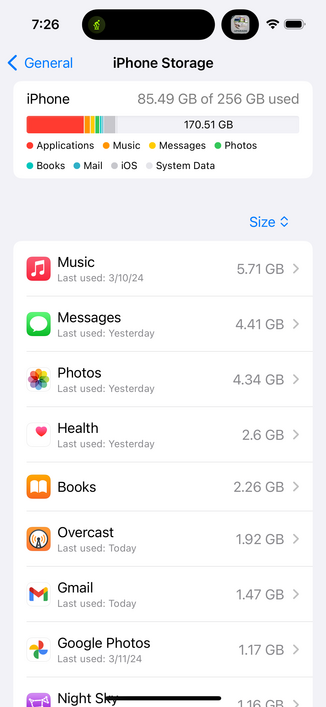
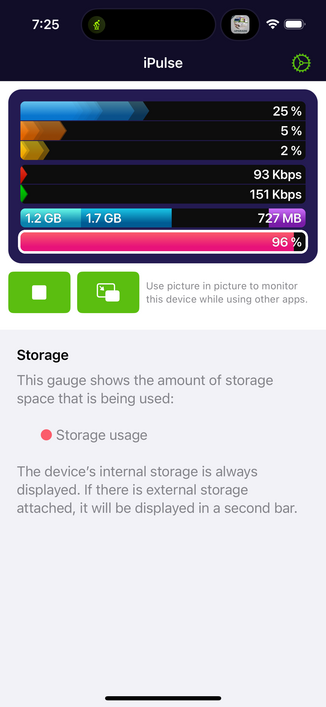
@Iconfactory This is great, but the storage meter seems to be wrong. It claims that the internal storage is 96% used, while settings claims that the internal storage is only 85.49 GB / 256 GB used. Not sure what’s going on here.

@mwest217 The storage display you’re used to seeing in Settings > General > Storage does not include cached data used by iCloud, iMessage and other apps.

iPulse shows these bytes as well and shows you how much *actual space* is being used.

@Iconfactory Is there a way to clear this cached data?
@mwest217 Cached data is stored in different places in iOS so it's not a simple matter to clear it unfortunately. Here's an article that outlines how to clear some, but not all of it - https://www.laptopmag.com/news/how-to-clear-cache-on-iphone-declutter-your-ios-device
How to clear cache on iPhone — declutter your iOS device

How to remove history, cookies and other data on your iPhone

Laptop Mag
@Iconfactory @mwest217 I'm having the same problem right off the bat. Turned off audio alerts on storage for now, but looking forward to seeing how you tackle the problem in future updates!