
@jorge I have one short question. I'm trying to install bluefin. However the installation fails for me. Is

$ sha256sum.exe universalblue-39-x86_64-20231108.iso
dcbae6f694785df38d11c234156e1e2e01b0f5a03b3e6a1f509cfe3fb46e9e1c

the correct iso file? Am I doing something wrong or should I file a bug report?
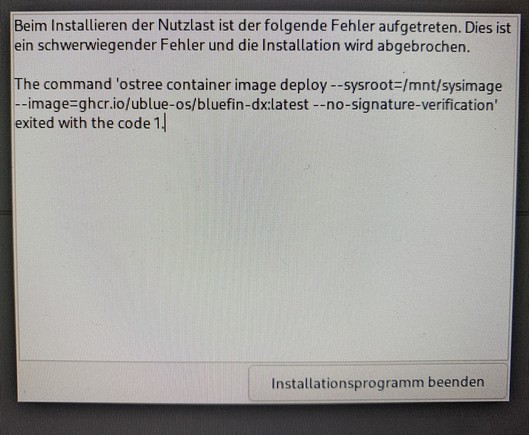
@pbeccard This error usually occurs if you're not on the network or if there's a network hiccup. We have an offline ISO that might work better: https://github.com/ublue-os/bluefin/releases/tag/v1.3.0

But still recommend being on a strong network during installation. There's been some great progress in OCI support in the upstream installer so hoping to not put people through this for much longer!

Release v1.3.0 · ublue-os/bluefin

1.3.0 (2023-10-27) Download bluefin-38-2023-10-27-x86_64-rc.iso Checksum Known Issues This ISO deployment will point to /var/ublue-os/image and then will automatically rebase you to a signed imag...

GitHub

@pbeccard After the offline install when you boot into it for the first time it'll install some flatpaks, after that a `just update` will rebase you to a signed image. After that is done then `just devmode` to toggle -dx mode.

I cannot wait for all this jank to go away lol.

@jorge Ah, my mistake. I should have read the documentation more throughly. It does indead say that you will need internet. I will try tomorrow again with internet available. I would recommend to rename the iso to universalblue-39-netinstall-x86_64-date.iso That's where my confusion comes from. I assumed t9 have downloaded an offline installer.
@pbeccard Not your fault, it's a terrible experience right now. 😀
@jorge The distribution does looks really interesting. I can't wait to try it. I will report back.
Thanks for your help. Enjoy your Christmas.