 Merlin Mann
Keyboard Shortcuts.
If you use a Mac, it's valuable to revisit this page at least once a year.
I can pretty much promise there's at least one thing here you didn't know you could do.
Yes. You, too.
Keyboard Shortcuts.
If you use a Mac, it's valuable to revisit this page at least once a year.
I can pretty much promise there's at least one thing here you didn't know you could do.
Yes. You, too.
Want to up your basic typing game?
Learn the text navigation commands, and your life will NEVER be the same.
You'll quickly realize you’ve been mousing around like a goddamned caveman.
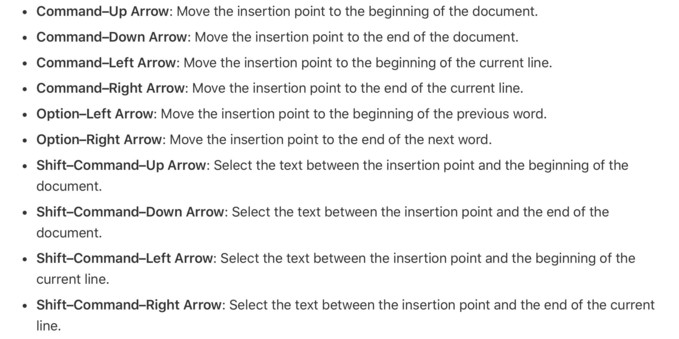
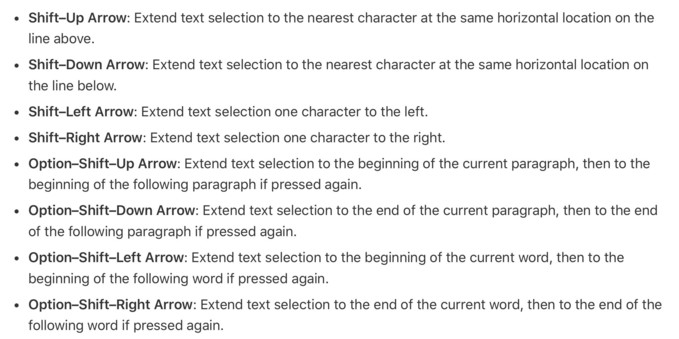
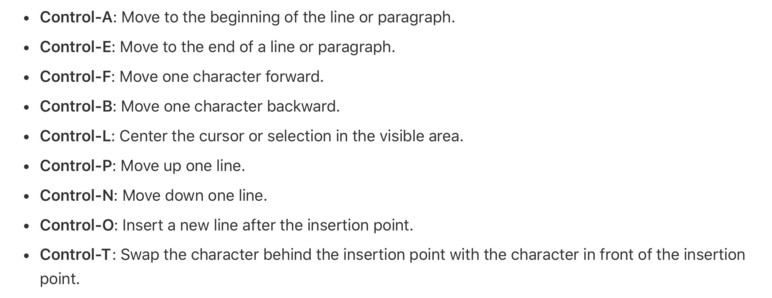
I have a colleague who is appallingly knowledgable about tech in general and Macs in particular, and he just learned about `Shift–Command–?` on Tuesday.
See, it's not just for getting to "Help."
Start typing, and it's also one-click access to every menu item in your current app.
Please try it right now. Hit `Shift–Command–?` and start typing.
@hotdogsladies this is awesome! Thanks for sharing it.
I do feel like a caveman.
@hotdogsladies this regularly elicits a “how did you do that‽” response from people.
Typing in the “Help” dropdown is one of the few things I attempt to teach tech-averse people as it allows them more naturally search for what they need.
It’s such a delight to teach them about this feature and/or shortcut. Allows everyone to feel like a “power user”.
@hotdogsladies Exception: If TextExpander is running with the default “Quick Actions” global hotkey setting (`Shift-Command-/`), it hijacks `Shift-Command-?`.
Easy enough to fix by removing that TextExpander hotkey assignment.
@hotdogsladies For years I had my menubar set to auto-hide, and `Shift-Command-?` was my way to get it to appear so I could look at the clock.
For I, too, am broken inside.
@hotdogsladies best tip ever, but it didn't work for me until a co-worker helped me find this _deeply_ embedded setting. That I had obviously turned off in my journeys somewhere. For the future people:
System Preferences | Keyboard | Keyboard Shortcuts… | App Shortcuts | > All Applications | Show Help Menu

 Cesar Cavazos
 noah
noah Alan McCoy
 Joe Rosensteel 🏳️🌈
 James Blanding
 Thomas N (old account)
 Champagne
 Justin Saucier
 John Siracusa
 Matt Quaiil