This potato of a laptop fell into my hands recently - an Acer Aspire One D257, running an Atom N455 @ 1.66 GHz with 1GB DDR3 RAM.

I've just popped an SSD in it. I'm thinking about using it only as a MAME machine to run the #Psion SIBO emulation, just for demos.

So... Maybe Debian? Possibly even running 32 bit (it is a 64 bit CPU, but that lack of RAM worries me). A lightweight DE or WM.

I could run Arch, but I really want this to Just Work™.

Any suggestions?

*chuckles with nerdy glee*

@kroc - worked first time, including WiFi!

@ActionRetro - because I know you love a bit of #HaikuOS

#Haiku

Home

Software ports for the Haiku operating system. Contribute to haikuports/haikuports development by creating an account on GitHub.

GitHub

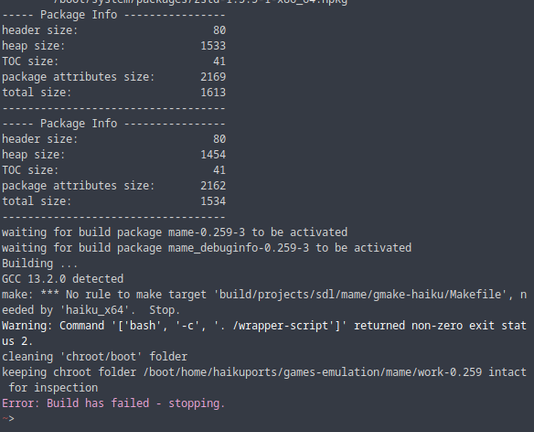
So, there's no python2 package for #Haiku anymore, so I can't build #MAME 0.226 from #HaikuPorts using #HaikuPorter. So I thought I'd just try jumping straight in and modifying the recipe to build MAME 0.259.

I've copied the patch file from the 0.226 port, just to see if it would work without modifying it. So the error I'm seeing *might* be because of that.

EDIT: It's *definitely* because of that - git is throwing a wobbly. But I have no idea how to fix it yet. Can I just sha1 the old files?

OK, plan is:

1. Extract another copy of the source files
2. sha1 the files that the patch wants to mod
3. Manually apply the patches
4. If it doesn't work, try to update the patches and try again
5. sha1 the modified files
6. Update the patch file with the new sha1 hashes
7. Try again with HaikuPorter

Well, so far unsuccessful.

Managed to manually patch #MAME 0.259 by modifying the patches for 0.226, but clearly there's something missing. I assume something should be happening before the "no rule to make target" error.

Right now I'm not sure who to ask for help. The MAME devs will probably remind me that #HaikuOS is completely unsupported. The #Haiku devs may not be able to help as it's not really a Haiku problem.

Time to shut down for the night.

#HaikuPorts #HaikuPorter

I need to spend time on other things today related to $dayjob, but I've posted on the #HaikuOS forum to see if anyone can help.

I've also asked someone I know who works on #MAME to see if he's got any ideas.

It's been a fun/frustrating tangent to work on, that's for sure!

https://discuss.haiku-os.org/t/attempting-to-update-the-mame-port-to-0-259/14077

Attempting to update the MAME port to 0.259

In an attempt to run the latest version of MAME on an old Acer Aspire One D257, I ended up going down a Haiku rabbit hole… The last time I touched a BeOS-like OS was 5 PE back in the 90s, so this has been a learning experience! I’ve made some updates to the mame-0.226 recipe and manually applied the patches, working out the differences as I went. But I’ve hit an issue early on with the build: make is complaining. make: *** No rule to make target 'build/projects/sdl/mame/gmake-haiku/Makefile' n...

Haiku Community

Final word: I do love the look of #Haiku. I also love being able to run #Vim on it, as well as Midnight Commander and bat.

Maybe I should have tried to build #NeoVim first, before trying #MAME?

#HaikuPorts #HaikuPorter

Well, bum.

With the help of a friendly #HaikuOS contributor, we've got a fair way through the compilation of #MAME. I'm currently only compiling the #Psion Series 3a emulation, just so that I can get something working. Then I'll expand out to more Psion machines, and finally all the others.

What am I missing? Which header hasn't been included?

#HaikuOS #MAME

#HaikuOS #MAME Update:

That last issue was fixed, thanks to @mavica_again who pointed out that FreeBSD once had exactly the same issue. One simple patch solved that.

https://github.com/mamedev/mame/issues/11271

So, now MAME compiles! YAY!

However, it's not *linking*. So not yay.

GCC toolchain build failure on FreeBSD-14-CURRENT · Issue #11271 · mamedev/mame

MAME version 0.254 System information FreeBSD-14-CURRENT amd64, i386 MAKE_ENV= TARGETOS=freebsd \ VERBOSE=1 \ LDOPTS="${LDFLAGS}" \ NO_USE_PORTAUDIO=1 \ NO_USE_PULSEAUDIO=1 \ NOWERROR=1 \ OPT_FLAGS...

GitHub

So, there's a NEW ISSUE!

Linking the main binary comes up with literally thousands of Lua-related "undefined reference" errors.

I'm pretty sure this is because of a change in #MAME 0.253.

https://www.mamedev.org/?p=523

"MAME now requires Lua compiled as C++ to work correctly."

Haiku's Lua package is C-only.

I'm looking at how Linux distros and the BSDs have solved this issue, then modifying these solutions to do it the #HaikuOS way.

So now I need to compile Lua! Fun times!

MAMEdev.org | Home of The MAME Project

The #MAME on #HaikuOS saga continues...

The person in the Haiku community that's helping me is getting errors compiling some MAME CPU code. I'm not getting those, but I think that's because I'm compiling MAME with a tiny subset (psion/psion3a.cpp) to get through the compilation quickly and make sure the "core" app works.

So, to see if I get the same errors, I'm currently trying to compile the whole thing. A VM with 3 cores on a gen6 i5 host is going to take time, especially in VirtualBox...

Still haven't got #Lua C++ to compile. I need to take a proper look at #HaikuOS's package scripts ("recipes") to see what I can do to either have two copies of Lua in the same project (like Arch does) or have a separate "liblua++" package.

I'm also considering trying to compile #MAME 0.252, which is before the change to Lua C++.

In better news, the Aspire One D257 now has a whole 2GB RAM. So that's nice.

#HaikuOS

Now *this* is cool.

I had a spare Lenovo M93p with an i5-4570T, 8GB RAM and 120GB SSD. Not the fastest box in the world, but it's flying with #HaikuOS compared to running in #VirtualBox on a much faster machine.

From getting it out of the box to starting the compile, it took about 30 minutes.

Add ssh, #tmux and #htop and I've got a little low-powered HaikuPorts build box that I can attach to from anywhere!

Almost every time I've hit a snag with compiling #MAME on #HaikuOS, the answer has been "look at what they did to get it working on #FreeBSD".

And this is #MAME running on the Acer Aspire One D257 potato.

If you look at the top-right corner of the screen, you'll see that those tiny Atom cores are working their socks off!

I don't think the #Psion emulation is running quite at full speed, but it's good. Audio is very choppy.

The MAME SDL interface is almost unusable, so I've run it via the CLI.

Still, the fact that we're even here is, to my mind, one hell of an achievement. Thank you to everyone who has helped me with this!

#HaikuOS

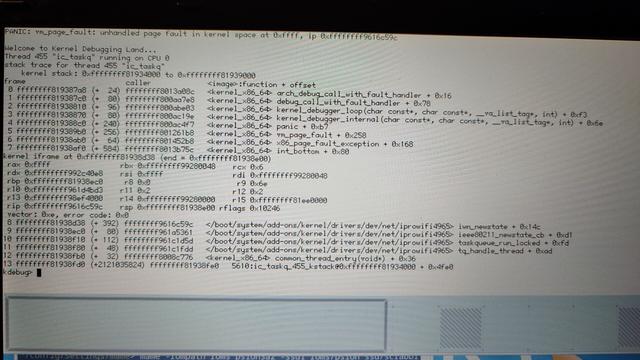
Ah.

Methinks the tiny Atoms might have got tired.

#HaikuOS #MAME #KernelPanic

Turns out it was a possible problem with the WiFi card. I was asked to log a ticket on the bug tracker.

Did a compile of #MAME overnight. I downgraded the version of Lua on my build machine to 5.3 just to make sure that MAME's build script was definitely using its internal version of Lua (5.4). It was, and I now have a shiny 144.2 MB hpkg file.

So I'm now just waiting for the PR to be accepted.

#HaikuOS

Started "writing up" (read: "copying all my toots and fleshing out the details") on my #MAME #HaikuOS shenanigans.

I want to point out that the real work on this was done by other people - providing suggestions and answers, and fixing my mistakes. I just put other people's patches together and took a wild stab at a handful of possible fixes for things.

I'm not sure where to post the write-up. I don't have a blog outside of my hackaday.io account. Do I post it there? Do I set up a new blog?

And we're done! The #MAME on #HaikuOS PR has been merged and is now available for everyone to compile.

One more OS that you can emulate #EPOC16 on! 😂

#Psion

@thelastpsion Kudos! I think I tried like once to build MAME and never finished 😄
@mmu_man Thanks! To be honest I did have some help. Hopefully the Haiku community will find some use. 😊