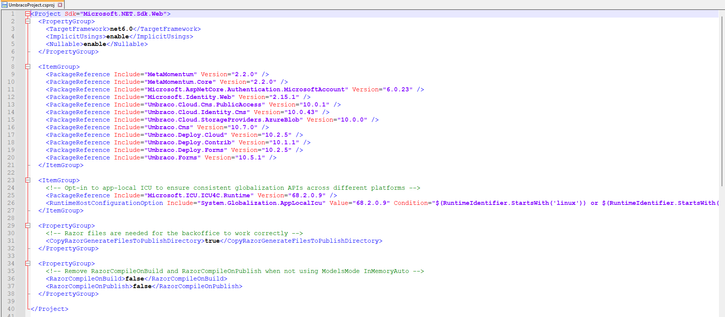
I've recently upgraded from Umbraco 8 to Umbraco 10.7.0 Cloud and when I tried to install the following package;

Install-Package Microsoft.AspNetCore.Authentication.MicrosoftAccount

I get the following error, see the attached image.

Any idea on how I can resolve this on my local machine?
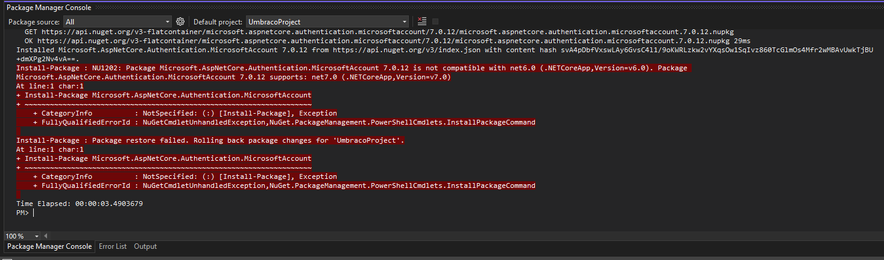
@webjaved Have you changed the .NET version in your csproj files to v7?
@joe that is what I will be missing! Let me check this.
@joe where exactly do I need to go in order to change this?
@webjaved In VS, right click on project > Properties > Target framework
@joe Legend! I've now set that to 7.0 https://prnt.sc/j7Gg-hnsxFb5
Screenshot

Captured with Lightshot

Lightshot
@joe I've now hit a build error when building the project. https://prnt.sc/4wCkrbXZIHMa
Screenshot

Captured with Lightshot

Lightshot
@webjaved So the problem you're having is related to some packages you're installing being for .NET 7 and some for .NET 6. All packages need to target the same version (make sure you're installing compatible package versions - the compatibility is listed on Nuget). All packages also need to target the same .NET version as all the projects in your solution.
@joe yeah, I was looking at that, will need to make sure the packages are all on NET 7 in order for this work. I'll get cracking on with that now and let you know how I get on, thank you :)
@webjaved Or install an earlier version of `Microsoft.AspNetCore.Authentication.MicrosoftAccount` that supports .NET 6:
https://www.nuget.org/packages/Microsoft.AspNetCore.Authentication.MicrosoftAccount/6.0.23#supportedframeworks-body-tab
Microsoft.AspNetCore.Authentication.MicrosoftAccount 6.0.23

ASP.NET Core middleware that enables an application to support the Microsoft Account authentication workflow. This package was built from the source code at https://github.com/dotnet/aspnetcore/tree/bc25dd5d39fd057f7cb28acb5ad4d9e925a375de

@joe Just done that and get the following https://gyazo.com/597933c05908252ff8ce8c6c19b6b330

Gyazo
@webjaved So because of this line here, we can see that Umbraco Cloud requires you install a version < 7 (i.e. 6). Since .NET 6 is the default .NET version for Umbraco 10, you'll probably need to use .NET 6 for everything.

@joe I think you are correct, looks like everything will need to be on .NET 6 for everything. https://gyazo.com/4a75aed6df2c50f4442a5521d610cca1

Look at the highlighted yellow text.

Gyazo
Haha! I think I am going to call it a day and tackle this tomorrow with a fresh brain! I don't think this is going to be straightforward for me.

@webjaved Umbraco 10 doesn't support running on .NET 7, so if you need to use Microsoft.AspNetCore.Authentication.MicrosoftAccount, you should go for newest v6.x (currently v6.0.23) rather than 7.x.

Many of Microsoft's packages align their versions with the target framework, so if you're not on the latest framework, you need to use the version of the package that matches your target framework.

@abjerner thank you, I have made some progress with this.

On the Skrift article I am following, I keep getting the following error.

It's in this file. AzureB2CBackofficeExternalLoginProviderOptions.cs

CC @joe

@abjerner @joe I've now got past that error and when compiling the code no errors are shown until I boot the site up.
@webjaved @joe I probably don't have the necessary insight to help you out. But what does your .csproj file (package references) look like now?
@abjerner @joe this is what it looks like at the moment.

@webjaved @joe does it help anything commenting out the "Microsoft.Identity.Web" dependency?

You should get this automatically from "Umbraco.Cloud.Identity.Cms", but probably an older version.

@abjerner @joe it looks like you've nailed it on the head, commenting that out and rebuilding the site and running it worked!
@webjaved Awesome. Checking out the dependencies on NuGet helped me spot that. Often useful to check there if you're having problems.
@abjerner I'll remember that for sure. Quick thinking!