 Large Heydon Collider
I upgraded my Notion Accessibility Tracker to support the new WCAG 2.2 success criteria. If you bought it already, you get all that from the same template location.

It also means I have deleted Parsing 🙌
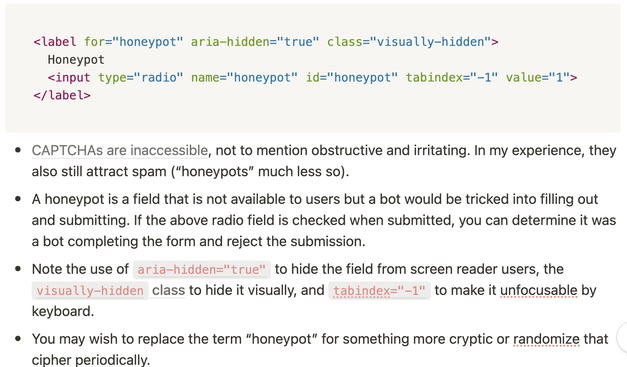
And in honour of the new Accessible Authentication SC, I've added a solution recommending honeypots over CAPTCHA (CRAPTCHA) https://www.w3.org/TR/WCAG22/#accessible-authentication-minimum
Web Content Accessibility Guidelines (WCAG) 2.2
Web Content Accessibility Guidelines (WCAG) 2.2 covers a wide range of recommendations for making web content more accessible. Following these guidelines will make content more accessible to a wider range of people with disabilities, including accommodations for blindness and low vision, deafness and hearing loss, limited movement, speech disabilities, photosensitivity, and combinations of these, and some accommodation for learning disabilities and cognitive limitations; but will not address every user need for people with these disabilities. These guidelines address accessibility of web content on any kind of device (including desktops, laptops, kiosks, and mobile devices). Following these guidelines will also often make web content more usable to users in general.
 Finley Ⓥ
@heydon Couldn't you make a bot that would scan aria tags like a screen reader would?
@finley Probably. Why do you ask?
@heydon Just thinking about the problem as a front-end engineer.
I might not be grasping the solution correctly, but I don't understand how you'd hide the form from the user in a way that a nefarious bot wouldn't be able to pick up on as well.
@finley Generally, bots aren't that clever. People who design them no about as much about accessibility and ARIA as any other developer.
@finley (but yeah, it is "security through obscurity")