
Anyone out there having trouble rendering views in a Stand By Live Activity?

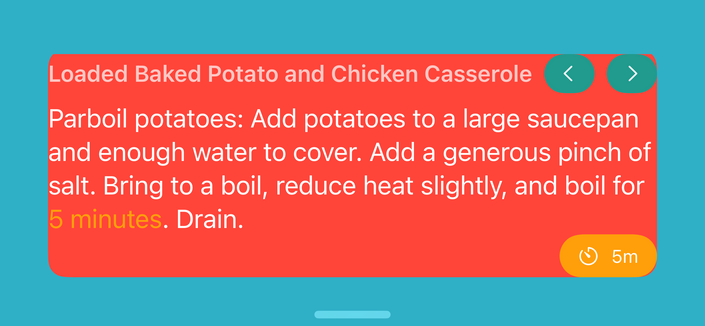
It seems there's a padding around our views we can't get rid of. 😭

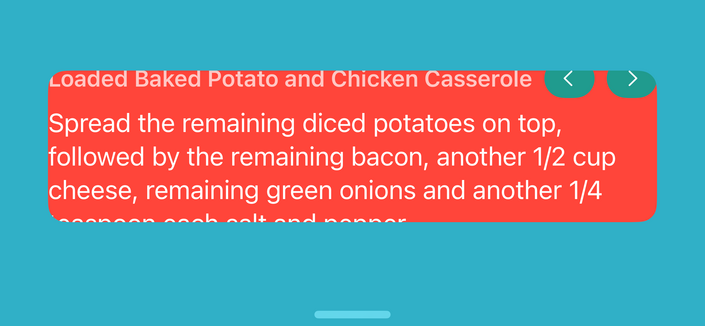
And when updating the activity via an #appIntent the frame doesn't always update correctly and cuts off content. See screenshot no 2.
#SwiftUI #standBy #ios17 #liveActivity #widget

@JagCesar Perhaps @joehribar knows?

@matthewcassinelli @JagCesar I ran into this issue too trying to show different content in the Live Activities on the Lock Screen and in StandBy. https://mastodon.social/@joehribar/110907157918114403

While I could show different content, the height of StandBy was always the same as the Lock Screen—that whatever the height is when the Live Activity is created in the ActivityConfiguration is the height for both.

I wasn’t able to figure out how to change the height, so please share if you do!

@joehribar @matthewcassinelli Thank you! I'll reach out to apple folks and see if they can assist. Will keep you informed if there's a fix for this.
@JagCesar FYI, Loving the live activities 😊 Just used them last night for the first time.
@pixel thanks Eric! As always, shoot us a message if you run into any trouble.
@JagCesar It worked great - made some brioche hamburger buns, almost completely using live activities. I do with there was some way to see the ingredients in addition to the steps, but I don’t see how that would be possible.
@pixel yeah we’ve been playing around with that. Haven’t found a good way yet. We tried using app intents, but unfortunately they only show the returned views when executed for a shortcut.
@pixel @JagCesar love to hear that! Did you try asking Siri for the ingredients? There should be an intent for that 😃
@fosiaDesign OH WHAT! I’ll try that next time!

@pixel @fosiaDesign Haha yeah of course, forgot about that! 😂

The default command should be "Hey Siri, Ambre Ingredients".

That should give you the ingredients in the current cooking recipe.