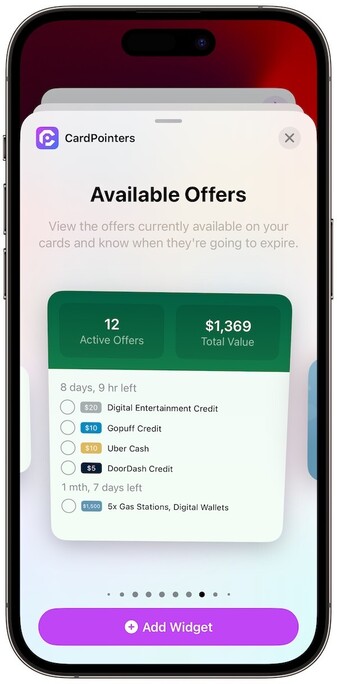
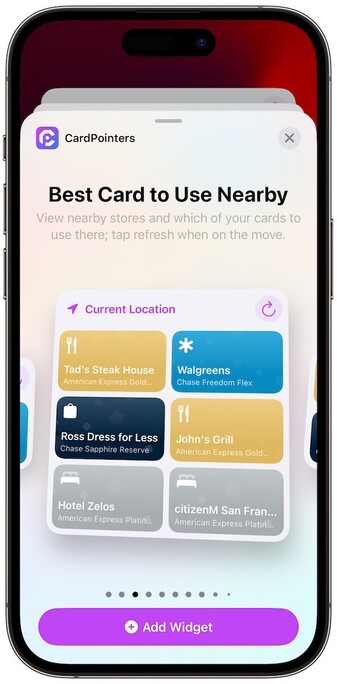
Really curious to see who’s building Interactive widgets in #iOS17

@Sarahp I added 3 new interactive widgets to CardPointers:

* Offers Widget allows users to redeem offers from their homescreen

* Nearby Stores has a refresh button and automatically updates stores around them without having to open the app

* Nearby Offers has a refresh button to update the list of stores nearby where you have free money from your cards

Suoer excited about the new feature!
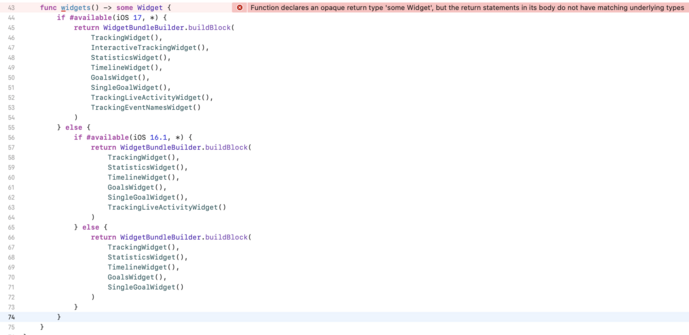
@emcro looking great! Are these widgets available only on iOS 17? And are you supporting iOS 16 for the rest? In my experience using the #available(iOS 17, *) in the WidgetBundle causes widgets to stop working on iOS 16.

@luksape thanks! Yep supporting back to 15. If supporting pre-17 still need to do the widget bundle trick:

https://www.avanderlee.com/swiftui/variable-widgetbundle-configuration/

Variable WidgetBundle configuration based on conditions

Use control flow statements inside a WidgetBundle to return a different set of widgets base on a if-statement condition.

SwiftLee
@emcro thank you! That looks super promising. But I'm getting slapped with "Function declares an opaque return type 'some Widget', but the return statements in its body do not have matching underlying types" Any tips how I could fix it? 😬
@luksape ahh I see yeah you do one in each function. Have lots of functions instead :)
@emcro I see. I just tried moving the second if/else block into a new function and.. it works! Thank you so much!! I was literally worrying about this for days.
@luksape glad to hear you got it working ! If you know how to do the same with app shortcuts please lemme know :)
@emcro I don’t know. What’s the issue there? I suppose annotating some of them as iOS 17-only isn’t a suitable solution(?)