Anyone manage to get custom enum parameters to work with AppIntents and widgets? Whenever I try to pass a value in, it seems it wants a generic “IntentParameter" instead of the actual value, which seems contrary to the WWDC videos just passing values. Am I doing something silly?
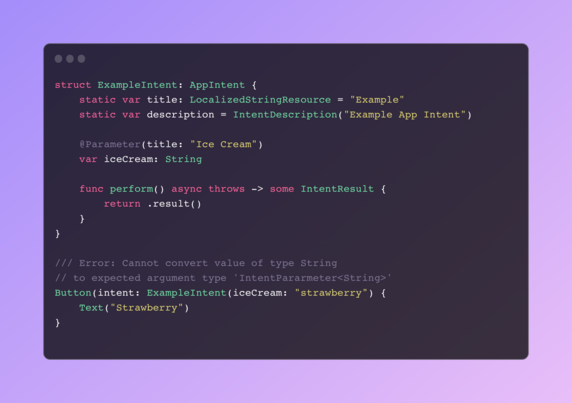
So apparently you just need to add manual constructors yourself for each parameter for some reason, wish the videos had sample code or mentioned that >_<

Thanks to @chockenberry for the tip plus some sample code:
https://github.com/chockenberry/Intentional/blob/main/Intentional/Shared/AppIntents.swift

Intentional/Intentional/Shared/AppIntents.swift at main · chockenberry/Intentional

A sample project for a more complex interactive iOS widget - chockenberry/Intentional

GitHub
@christianselig @chockenberry Do you mean a constructor that takes in each parameter, or a constructor for each of them?
@jordanmorgan @christianselig It's the init() for the AppIntent and can has as many parameters as you want (but you probably don't want anything more than an identifier to do a model lookup).
@christianselig I think adding a separate constructor does the trick
@christianselig I cannot find it in my project at the moment, but I am pretty sure I found this in the session video by @mgorbach from last year

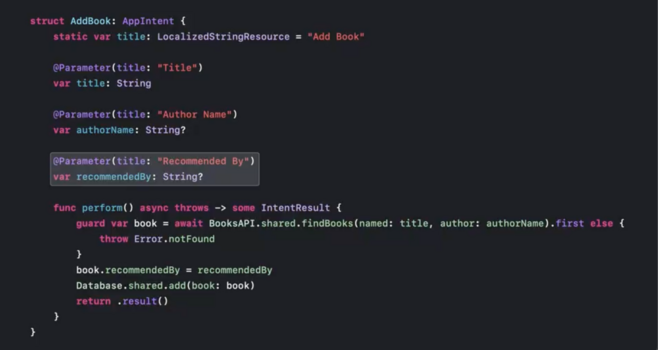
@DavidHaydl @mgorbach I watched that (and this year's videos) and didn't really see anything about that mentioned in any of their code samples for AppIntents, see attached for instance

Heck even the Emoji Rangers sample project this year doesn't do it, same error if you manually try to pass EmojiRangerSelection(heroName:) into an app intent button

@christianselig @DavidHaydl create your own initializer and write it in the obvious way (just set the property) and things should work! We cannot yet synthesize the correct initializer.
@mgorbach @DavidHaydl Ah, any way you could make the error more straightforward then, or maybe document this somewhere? It honestly never occurred to me that that would be the solution
@christianselig @mgorbach @DavidHaydl 100% second documenting this somewhere. A reply on Mastodon (of all places) is such a bad spot for such a great bit of advice to live

@bonney @christianselig @mgorbach @DavidHaydl for anyone reading this that’s about to implement interactive widgets (app intent with parameter)

I did it in a live stream, from nothing to working code. This init thing is one of the many things I bring up 😄

https://www.youtube.com/live/c3fNhtTeZSM?si=xdJeBVYOem-HQ5qx

Interactive Widget that starts playing podcast

YouTube
@JagCesar @christianselig @mgorbach @DavidHaydl I have this bookmarked for when I begin working on my iOS 17 app intents; I watched about half and it’s a great resource!
@christianselig Hey Christian,
How do you make these beautiful “screenshots” of code snippets?
@orisraeli @christianselig I suspect it’s an editor feature but I’m also curious to learn