
Interesting to me the App Store navigation bar title is raised up in iOS 17. Only reason I can think of why is to fit more ads above the fold.
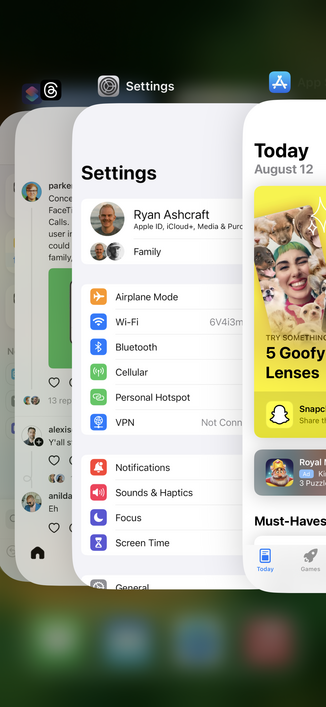
As @tomn94 pointed out, there's a new "inline" value for UINavigationItem.LargeTitleDisplayMode that resembles this layout.

https://developer.apple.com/documentation/uikit/uinavigationitem/largetitledisplaymode/inline

SwiftUI equiv: https://developer.apple.com/documentation/SwiftUI/View/toolbarTitleDisplayMode(_:)
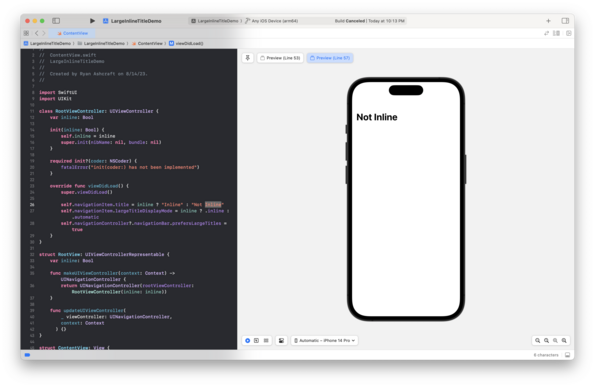
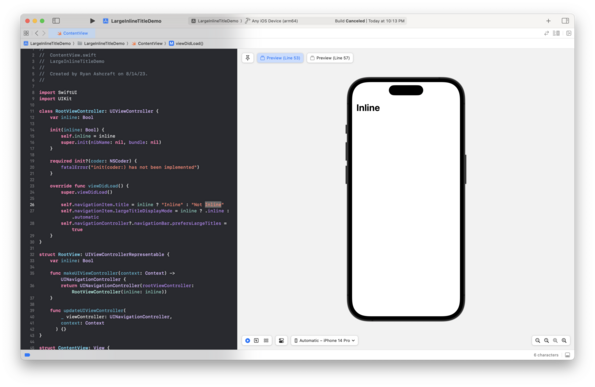
UINavigationItem.LargeTitleDisplayMode.inline | Apple Developer Documentation

There's never been a better time to develop for Apple platforms.

Apple Developer Documentation
toolbarTitleDisplayMode(_:) | Apple Developer Documentation

Configures the toolbar title display mode for this view.

Apple Developer Documentation
@[email protected] gah I searched. These new APIs are so hard to discover sometimes 😫
@ryanashcraft doesn’t help that it coincided with moving further away from the navigation bar named modifiers.
@ryanashcraft @tomn94 I didn’t know this is public API 🤯 kind of surprised
@ryanashcraft Could be, but I think it might be a good change across the board. I’ve always felt like the large title nav style left a lot of unnecessary and slightly white space.
@Timschmitz yeah I agree. It takes a bit to get used to but I prefer it
@ryanashcraft the cards below are so huge you don’t need to push down the whole screen to get things within easy reach.
@ryanashcraft have you tried UINavigationItem.LargeTitleDisplayMode.inline?
That’s new in iOS 17, I haven’t played with it yet to see how it looks like
https://developer.apple.com/documentation/uikit/uinavigationitem/largetitledisplaymode/inline
UINavigationItem.LargeTitleDisplayMode.inline | Apple Developer Documentation

There's never been a better time to develop for Apple platforms.

Apple Developer Documentation