Can't seem to figure out how to set the “Based on dependency analysis” setting on a Run Script build phase from an Xcode template (xctemplate). Anyone ever figured this out?
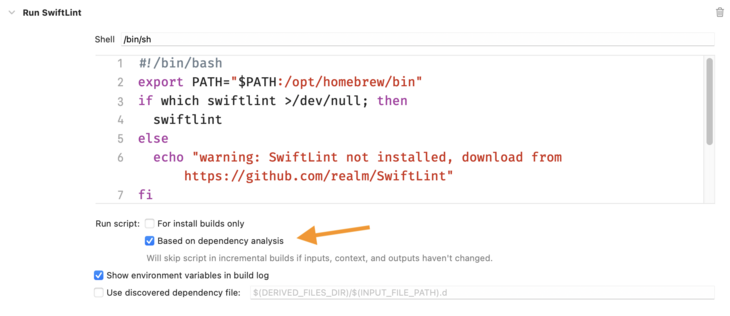
@simonbs SwiftLint does its own analysis to skip unchanged files so you should leave that checkbox unchecked.

Besides if you change your .swiftlint.yml file you probably want to re-lint your Swift files even if they haven’t changed.

@jpsim It was unclear from my original post but that's the thing: I want to uncheck that setting from a xctemplate configuration. I'd like to configure my Xcode template to setup SwiftLint.

@simonbs this a flag called something like ALWAYS_OUT_OF_DATE (I can find the exact one when I get back to a computer)

I used a cocoa pods post install hook to tweak this value in some cases.

@bens Not sure how to set that in an Xcode template but I’ll see if I can figure it out. Earlier I found that the property is called “alwaysOutOfDate” in the pbxproj file but referring that in an Xcode template didn’t work. Will see if the underscores make a difference.
@simonbs ok I was mis-remembering. We set `alwaysOutOfDate` to 1 (or 0) depending.
@simonbs Hey. This is a reply to a very old post from you but did you ever figure out how to do this? I have the exact same issue and your post is the only thin that comes up. I also looked at your github repo with templates and thes setting there (<key>BasedOnDependencyAnalysis</key><false/>) also doesn't seem to work.
@roelspruit Hey. I didn't. I've since moved to XcodeGen which handles this for me.
@simonbs ah thanks for letting me know. Then I’ll probably also stop pursuing this