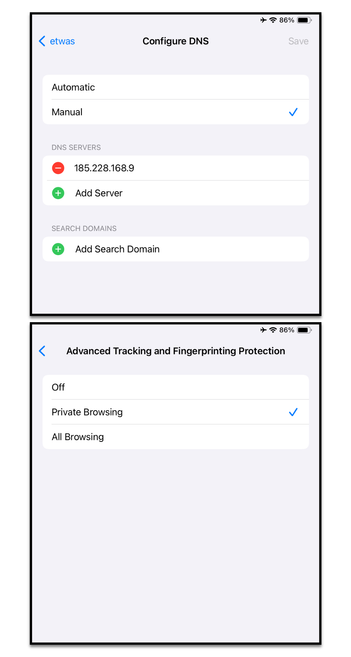
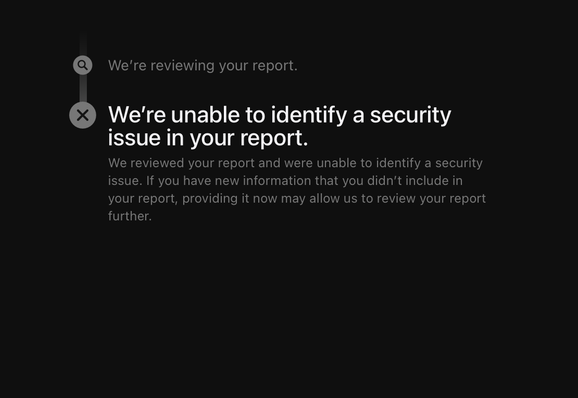
The "Advanced Tracking and Fingerprinting Protection" introduced in Safari in iOS 17 leaks DNS queries to Apple DNS server. Users who rely on custom DNS to block malware domains will be unprotected. We reported this bug to Apple, but Apple says it is not an issue.

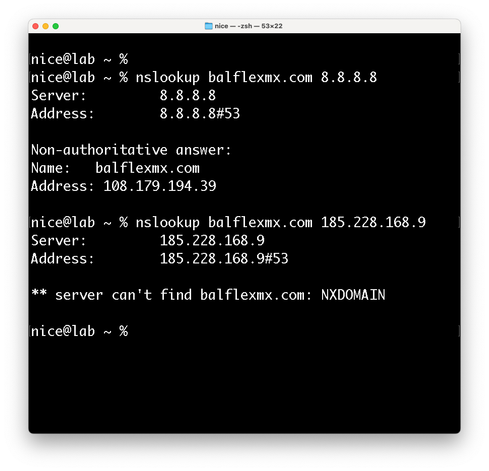
In our example, we configured the internet connection to use a DNS server from cleanbrowsing[.]org that blocks malware domains. With Advanced Tracking and Fingerprinting Protection enabled, we opened a website that should be blocked by the DNS server. Surprisingly, the page loaded. The nslookup command verifies that the custom DNS server does not resolve the domain name of this malware website. Network traffic shows that Apple's DoH DNS server resolved the website instead. In fact, only websites blocked by the custom DNS server are resolved by Apple's DNS.

🧵(1/2)

#privacy #security #cybersecurity #infosec #cybersecuritytips #iOS #macOS #Apple
🧵 (2/2)
The same applies when you use a family DNS server that blocks adults websites such as 1.1.1.3. Adult websites will open when "Advanced Tracking and Fingerprinting Protection" is active.

Even if your (iPhone/iPad/Mac) is connected to a router that is configured to use a DNS server blocking malware and adult content, Safari will bypass the DNS. An active VPN connection or DNS profile won't bypass any DNS query.

When the new privacy feature is disabled, DNS resolution works as expected.

Finally this unexpected behavior or bug affects Safari in iOS 17 iPadOS 17 and macOS 14.

#privacy #security #cybersecurity #infosec #cybersecuritytips #iOS #macOS #Apple
@mysk I can't seem to reproduce this on Sonoma.
@lapcatsoftware I just tested with beta 3. I can't reproduce it either. But it was there, at least in the first beta when we filed the report.
It's inconsistent now. Beta 3 of iOS and iPadOS still bypass the DNS settings.
@mysk I was not able to reproduce (iOS 17 Beta 4).
@mysk what about if you have DoH configured such as NextDNS.io ? Currently with private relay if you have DoH it will do a lookup (and block if appropriate) and then do a second DNS lookup for the same address through private relay.
@mysk which raises the question of what happens with each permutation of tracking protection on / off, private relay on / off, and DoH / non encrypted DNS.
@ridogi Private Relay complicates things. But a user that activates PR and pays for it should already be aware that the DNS settings on the device will change
@mysk well it only changes if non encrypted DNS is used.