
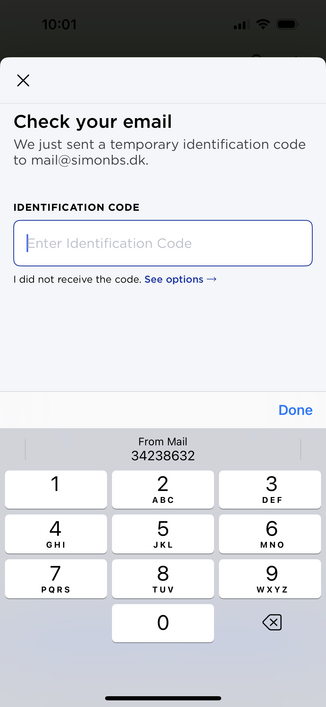
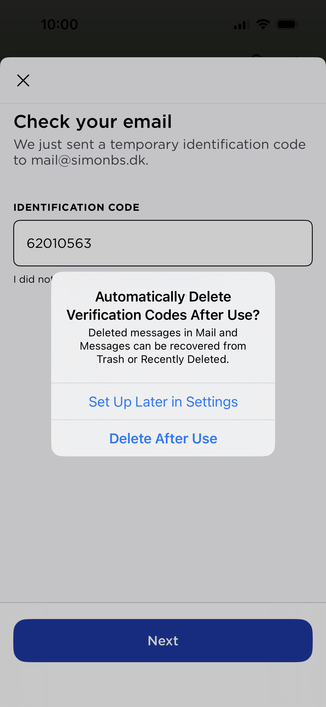
iOS 17’s improvements to verification codes are SO GOOD! 🤯

Verification codes are now read from the Mail app and mails and messages containing a code is automatically deleted after use ✨ #WWDC #WWDC23
@simonbs This is one of the features I’m looking forward to the most👍
@simonbs Do you know if this will work for other mail apps? Not a fan/user of the apple mail app
@simonbs Seeing similar in iPadOS 17. Feels very much like a solid evolutionary release of practical features based on observed user behaviors. Good Product Management this year!
@simonbs Do you know if it requires notifications to be enabled on Mail app?
@zackva I don’t have notifications enabled.
@simonbs Since they're one time codes so they have no meaning after one use, this seems to be a case of shutting the barn door after schrodinger's horse has bolted. The attack on these codes is not someone re-using them, it's someone social-engineering you into telling you them.
@resuna I don’t think they’re doing this for increased security. This is to ensure your messages and mails are cleaned up.

@simonbs This seems like a really minor component of the not-quite-spam-but-almost I have to deal with.

Possibly because if I have the opportunity to use a better MFA system like FIDO or open TOTP I do that instead.

But I suppose a company that's implemented their own proprietary MFA system instead of using one of the widely deployed and reliable open ones wouldn't understand that.

@resuna You realize this works with any verification code you receive through SMS or mail, right?

@simonbs Yes. That's the point. You shouldn't have many of those. If you get enough that this seems like a worthwhile feature, you have a security problem.

Verification codes through SMS or mail, except for the special case of verifying an email address during initial account setup, are so bad a security system that it's not clear they're not actually worse than not doing MFA at all. If you're routinely getting these that's a problem that needs to be fixed, not swept under the carpet.

@resuna But they do exist and Apple have made features to make it more pleasant to receive those verification codes. In the mean time, Apple is also pushing PassKeys hard which will ultimately get rid of high verification codes and passwords. I think it’s smart to push a more secure technology while making the transition period as pleasant as possible.

@simonbs I have been using basically passkeys for ssh authentication for decades and it's great but it requires a lot more coordination on both ends. Getting desktop or ops to re-install my .ssh directory after an upgrade is a regular chore.

And of course given their choice to make their MFA solution proprietary and require buying an Apple mobile device I am sure their passkey solution will be open and well coordinated with third parties and competitors.

That's sarcasm by the way.

@simonbs Yes it's a nice thing to do but it's not something I'd celebrate in all caps.
@resuna @simonbs You do realize that you are an outlier (in a good way) right? I’d imagine a high percentage of users still get their codes via text and e-mail. This is a great quality of life item for them.
I try to not use SMS or mail for codes and still find myself getting them semi often.
@RickWilliams @simonbs I realize that most people are not as careful about security as I am. If they were the world would be quite different (and more secure). That doesn't mean that switching away from codes would not improve both their quality of life and their security, instead of just one.
@resuna @simonbs absolutely. But getting my mom to setup 2FA is never going to happen in its current state. I think Passkeys will be the answer.
@RickWilliams @simonbs I will not be dancing with the denial-of-service fairy by setting up proprietary authentication tokens.
@RickWilliams @simonbs I am forced to use Duo to authenticate at work, and this morning I dropped my phone in the dog's waterbowl and my whole email flashed before my eyes.
@resuna which MFA solution is proprietary? I had thought all Apple MFA was just experience improvements on top of standards.
@scrwd Apple's MFA requires a "trusted device". Non-Apple devices don't qualify as "trusted device". You can't use any standard TOTP app (Google Authenticator, 1Password, Codebook, etc...) or FIDO key (Yubikey, Solo, etc...) to log on to your Apple account.
@resuna ah ok, so this is logging into an Apple account. Thanks for the clarification. Not great but less of an issue than if they had a proprietary MFA method they were expecting people to adopt for all sites.
@scrwd Apple MFA is only implemented for logging in to iCloud, so that’t the only environment it can be examined in.
@simonbs it was awesome when it was added to Messages. Best bit was that it marked the message as read too ha. Looking forward to this Mail feature. Does there have to be a special hint on the input field so it knows to look for the code in an email?
@simonbs @rmondello I’m almost tempted to put my personal gmail account in Apple Mail for this. Almost.