
Do you use Mastodon? Do you have a WordPress site? Starting today, you can use the Jetpack plugin to automatically publish your posts to your Mastodon account.

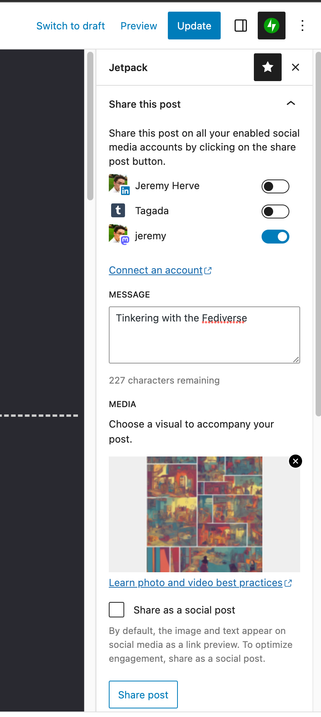
When writing new posts or editing existing posts in the WordPress editor, you have the option to automatically share that post (alongside with some text and an image) with your Fediverse followers.

Give it a try and let us know what you think! We'll continue to iterate on the feature in the next few weeks, and would be happy with any feedback you may have. :)

Note: we've developed the feature with Mastodon in mind, but we know there are dozens of microblogging tools allowing you to post to the Fediverse today. Our integration already works with some of those tools out of the box, but not all. We're definitely aiming to support other aspects of the Fediverse in the future.

And another note: maybe you'd rather have your site become its own ActivityPub actor? That's possible, too! You can install the ActivityPub plugin, and each author on your site will have their own ActivityPub account, where each one of their new posts will be pushed.
Jetpack – WP Security, Backup, Speed, & Growth

Improve your WP security with powerful one-click tools like backup, WAF, and malware scan. Get essential free tools including stats, CDN and social sh …

WordPress.org
@jeremy Awesome! Got my site setup and posting works, however it didn’t grab the image on the page. Should it? Should it grab the featured image? I also do not see the “Media” section there like in your screenshot to manually pick my own.

@freehours9 It should grab the featured image, or the image in the post if there is one.

The general output can be impacted by other plugins on your site that may make changes to Social Media metadata that's added to each one of your posts.

I also do not see the “Media” section there like in your screenshot to manually pick my own.

That section is currently only available when you use the Jetpack Social plugin either in addition or instead of the Jetpack plugin you already have on your site. It basically gives you a few more social options, like for example the option to insert the image right in your Mastodon update, vs. just in the link preview.

I hope this clarifies things a bit!

Jetpack Social

Write once, publish everywhere. Reach your target audience by sharing your content with Jetpack Social!

WordPress.org