I got a new M.1 drive to replace my SATA drive. It is the same size or nearly so, so I want to clone the old drive to the new drive. The only OS I have installed is Windows and it's an NTFS partition.

What should I use to clone the drive? Tom's Guide and PCMag both recommend "Macrium Reflect Free…
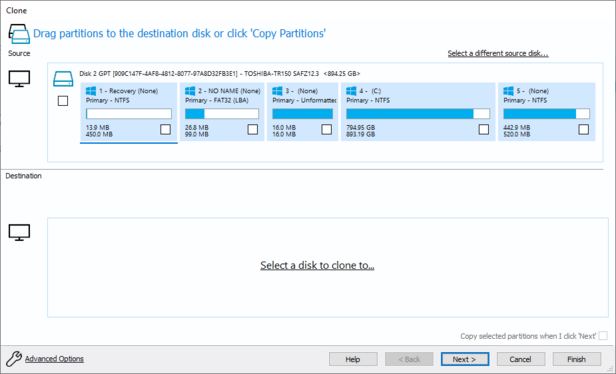
I got about equal votes for Macrium and Clonezilla and Macrium seemed more Windows-aware so I tried that first

But like wait https://pureinfotech.com/clone-windows-10-hard-drive-ssd-macrium-reflect/

Is this gonna like… clone the drive… while Windows is running?

How is that possible

Maybe I should go with clonezilla so I can run off a boot usb

Once I have two copies of the same hard drive… Windows isn't going to get confused at multiple OSes and throw a fit when I boot up afterward is it

How will it decide which is the C drive

How to clone a Windows 10 hard drive to a new SSD using Macrium Reflect - Pureinfotech

Macrium Reflect is a great tool for drive cloning whether you're replacing a HDD for an SSD or creating a full backup. Here's how to use it.

Pureinfotech • Windows 10 & Windows 11 help for humans
TIL about "Volume Shadow Copy Service", which is the first time in more years than I can remember I have learned about a thing in Microsoft Windows and gone "huh, that's really cool" https://learn.microsoft.com/en-us/windows-server/storage/file-server/volume-shadow-copy-service
Volume Shadow Copy Service (VSS)

Learn how to use Volume Shadow Copy Service to coordinate the actions that are required to create a consistent shadow copy for backup and restore operations in Windows Server.

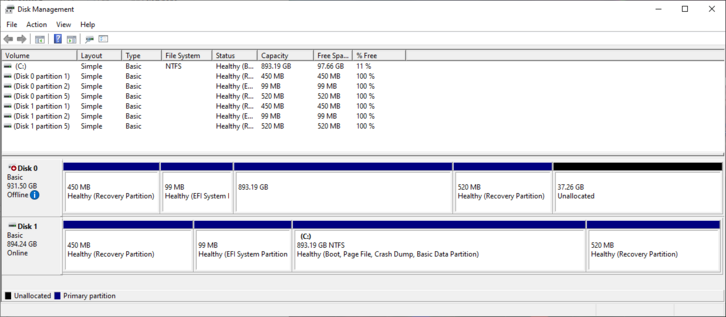
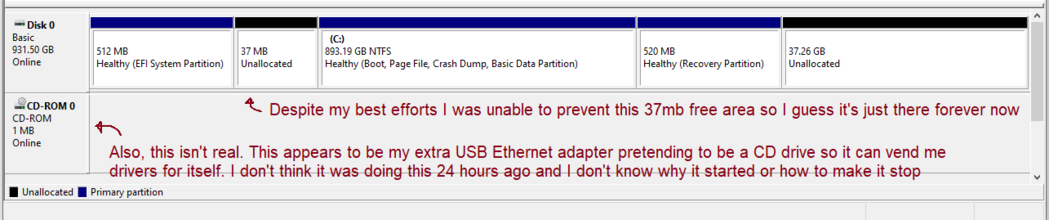
So I cloned the full drive with Clonezilla and I think I did something wrong. Partitions of the correct size are present on the new disk (Disk 0) but Windows can't boot off it (just skips it when it's in the boot order) and doesn't even recognize my NTFS partition as an NTFS partition.

(Someone previously told me I need to copy over the "partition unique GUID"s or Windows boot will get upset, but I couldn't find a way in either clonezilla or gparted to do that.)

I have successfully booted off the new hard drive
Several people in the replies told me that the way to get Windows to switch from ignoring Drive 0 and booting off Drive 1, to ignoring Drive 1 and booting off Drive 0, was to temporarily unplug Drive 1 and reboot so that Drive 0 gained the blessed "Real Hard Drive" status. I did not believe this. It was too silly. It worked. It totally worked
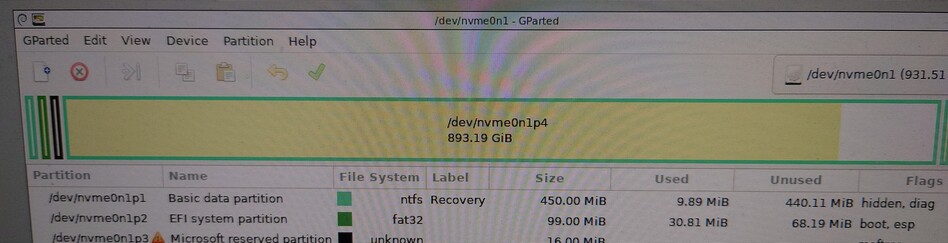
So I have a 450mb junk (old recovery) partition at the start followed by a 99mb EFI partition. Everybody says I want a bigger EFI partition. I wonder how hard it would be to move the EFI partition*backward*. Do I like… dd nvme0n1p2 to nvme0n1p1 then grow p1 back outward? Can GParted do this by itself?

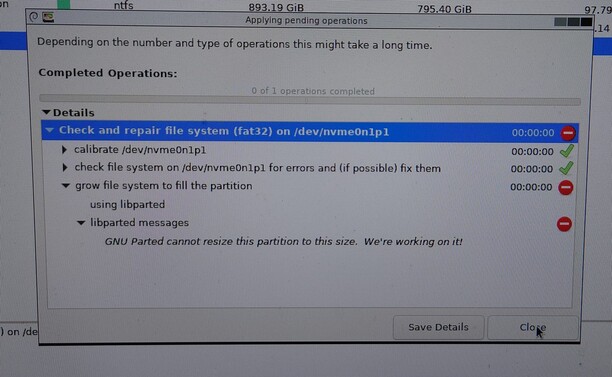
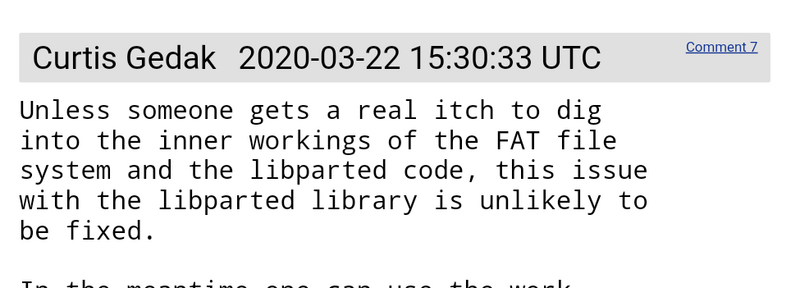
Fascinating discovery: GParted CANNOT resize FAT32 partitions if they are less than 250 MB in size to start with. It prints a cryptic message ending with "We're working on it!" (Not true, see screenshot from bug first filed in 2017)

Well, that's fine right? How often do you encounter small FAT partitions?

How about BASICALLY EVERY EFI PARTITION IN THE WORLD?

This would have been great to know about BEFORE I blew away my boot partition believing GParted would fix it after. I'm now unbootable

I did all these steps with the Linux toolchain instead of the win32 toolchain because I believed this was the toolchain for adults that is known to actually work and instead I get "FAT32 is too hard. Wouldn't you rather format your EFI partition as ext3?". Wish I'd created a Windows tools USB key before this D:

Anyway whatever I guess I'll just re-image the disk from the original, again, and my EFI partition will simply not be larger than 100 MB even though there's a fat wad of free space there

So after a bunch of struggling with trying to get gparted to make a working EFI partition, I gave up, wiped the EFI partition again, booted into the terminal on the Windows recovery partition, and ran "diskpart"/"bcdedit" from an online tutorial. After creating the EFI partition from Windows, it worked on the first try. My system now boots fine and I seem to have succeeded fully at everything I set out to do but the progression of the final steps were so confusing I at some level do not trust it
I guess the lesson here, which I should have known (as it's been repeatedly explained to me over the last 10 years), is that you can't install Windows EFI stuff into an existing EFI partition, Windows has to create the EFI partition and set everything up from scratch the fussy way it likes it and *after* Windows has created a Windows-recognized EFI partition *then* you can install your linux stuff or whatever afterward. I had the hubris to believe I could cheat the system. I could not.
@mcc Not to confirm after you've already done this, but Yes the rule is Windows First and Then Linux for this reason. Unfortunately. The rule has not been updated in the 20 years I have been doing this same set of operations. Wish it would.
@mcc When I installed Windows on my Steam Deck (after shrinking the SteamOS partition), it did not remove the SteamOS entries (I can select the OS from the BIOS boot menu).